Deliverability question / gmail interpretation of from email | Community
Skip to main content
Denise_Greenbe7
Level 3
June 4, 2019
Solved

Deliverability question / gmail interpretation of from email

  • June 4, 2019
  • 4 replies
  • 8884 views

When our emails arrive in my client's company gmail email accounts, the company "from email address" that we set in Marketo is ignored and instead gmail displays this:
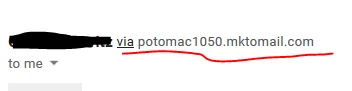
Is the part underlined in red specific to our company? Or does it just mean the real sender is Marketo - or a particular shared Marketo IP? I'm asking because I've seen that same email address reported as spam in bounce/email suspend causes. We're wondering if we should look into getting a dedicated IP address to lessen instances of being interpreted as spam. In other words, if a filter decides that potomac1050.mktomail.com is a spammer is that a response to my client's company or to a Marketo shared IP address?

This post is no longer active and is closed to new replies. Need help? Start a new post to ask your question.
Best answer by SanfordWhiteman

It's signed by the client domain (as well as by Marketo) as expected.

And the 'via' as it turns out, doesn't show up, in general consumer Gmail.

Thus far, this looks to be due to them testing with their own (GSuite-hosted) domain and Gmail being more vigilant in that special case, even though there's no undue impersonation.

4 replies

Jay_Jiang
Level 10
June 4, 2019

It's showing that because DKIM, SPF isn't set up or isn't set up properly for your client's domain

SanfordWhiteman
Level 10
June 4, 2019

SPF doesn't have any relevance to a Marketo instance without a branded envelope sender. The SPF record for your domain will never be queried if it isn't used in the SMTP envelope.

SanfordWhiteman
Level 10
June 4, 2019

I assume the email is not DKIM-signed by the client's domain, i.e. because you haven't added the pubkey to their DNS and had Marketo validate it (in Admin under Email).

As noted above, you can't use SPF to authenticate the email any further because this client does not control the envelope sender domain (that domain is under Marketo's control).

Thus the only wiggle room is on the DKIM side.

Google & other email providers, and unfortunately Marketo too, tend to dumb down the very important distinction between envelope info & email headers. This causes all manner of confusion with no upside. I wish everyone would convey the technical truth, fewer things would break that way.

Denise_Greenbe7
Level 3
June 4, 2019

Hi Sandy,

In Admin it appear the DKIM status is verified:

I see our emails say the branded domain is the same as the above but with "go." added. Is that the problem? Do I need to set up SPF/DKIM for the additional domain - go.area1security.com?

SanfordWhiteman
Level 10
June 4, 2019

Put it this way... trust but, er, verify again.   Check the Original Source of the message and you'll see if it's signed. Or send me an email (not sample) from the instance and I'll tell you.

..in is the same as the above but with "go." added. Is that the problem? Do I need to set up SPF/DKIM for the additional domain - go.area1security.com?

No, the branded domain is just used for click tracking. It's unrelated to the SMTP headers.

And again, SPF is irrelevant for a shared Marketo instance. Even if you used go.area1security.com in the From: header, the SPF record for go.area1.security would never be consulted at all.

SanfordWhiteman
Level 10
June 4, 2019

And also...

In other words, if a filter decides that potomac1050.mktomail.com is a spammer is that a response to my client's company or to a Marketo shared IP address?

Blacklists aren't just based on that hostname, since a hostname is easily changed. A blacklist will eventually spread to cover anything coming from an IP address or even from a whole IP subnet (block of contiguous IPs).  You can affect other people, or they can affect you.

Yet lots of (most of, AFAIK) Marketo's customers get by with a shared IP. The shared knowledge that you may affect other people's deliverability is a check on bad behavior. And not everyone can send from a dedicated IP, it's not only financially unfeasible but technically impossible.

Denise_Greenbe7
Level 3
June 4, 2019

Okay. So if I understand your reply correctly, seeing potomac1050.mktomail.com listed as a spammer could be due to something we did or it could be the result of other emails coming from a shared IP - there's no way to know for sure. Is that right?

SanfordWhiteman
Level 10
June 4, 2019

Yes, but it's not listed as a spammer in this instance.

Level 2
June 6, 2019

Hi Denise,

I agree with Sandy's response but just in case, if you haven't yet, check whether SPF has been configured correctly - I've seen this issue when authentication has not been set up.

Inga

SanfordWhiteman
Level 10
June 6, 2019

But SPF isn't correct when it includes machines that actually shouldn't be allowed to send mail using your domain as the envelope sender. 

Blindly including mktomail.com in SPF for shared instances is a security risk (however mild) b/c it needlessly allows people to impersonate your domain. But the far bigger risk is you break your SPF entirely by going over DNS lookup limits. In fact Denise's client's domain has used all 10 of their allowed DNS lookups because they included Marketo unnecessarily!  If they tried to include one more domain, the whole thing will break -- they will not in effect not have an SPF record.

Denise_Greenbe7
Level 3
June 6, 2019

Hey Sandy,

Re: In fact Denise's client's domain has used all 10 of their allowed DNS

lookups because they included Marketo unnecessarily!

How are you seeing this? I only see one domain in the SPF/DKIM Admin setup

area.

Thanks,

Denise

On Thu, Jun 6, 2019 at 1:27 PM Sanford Whiteman <marketingnation@marketo.com>