Delete/Remove a Dashlet in an RCE Dashboard | Community
Skip to main content
keithnyberg
Level 7
July 10, 2015
Solved

Delete/Remove a Dashlet in an RCE Dashboard

  • July 10, 2015
  • 1 reply
  • 2487 views

I just created a few dashboards in RCE to allow me to monitor overall system health. I ran into a problem however.... Once a report is added into a dashboard, there is no way to delete the report. At least I couldn't find a way. I ended up having to re-create the dashboard from scratch as I couldn't figure out the solution.

Anyone know how to delete a report from a dashboard in RCE?

This post is no longer active and is closed to new replies. Need help? Start a new post to ask your question.
Best answer by

In case you haven't  not found your answer yet...

Click the upper right hand corner of the dashlet/report to the left of the pencil icon, "file" appears. 

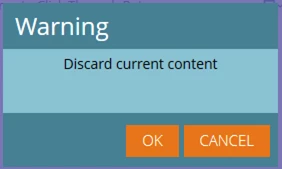
Click OK to delete the original report from the cell and select a new one from your saved RCE reports.  Once you select the report, the replacement has officially been made.

1 reply

Edward_Masson
Level 10
July 10, 2015

With the new update to Revenue Cycle Explorer, You should be able to select the report and click on 'Move to Trash'. You could not do this before the refresh design just a few months ago.

keithnyberg
Level 7
July 13, 2015

Hey Ed,

I am aware I can delete the entire dashboard. My question related to adding a report to a dashboard and then trying to delete the single report from the dashboard without deleting the entire dashboard. I can move the report from one space to the next, but cannot delete a single report in a dashboard view. Basically, I made a dashboard with 9 reports in it. I realized one of the reports was incorrect but there was no way to remove it. I ended up having to re-create the dashboard again, but lost some time with re-naming the other 8 reports in the dashboard.

Sincerely,

Keith Nyberg

Accepted solution
July 27, 2015

In case you haven't  not found your answer yet...

Click the upper right hand corner of the dashlet/report to the left of the pencil icon, "file" appears. 

Click OK to delete the original report from the cell and select a new one from your saved RCE reports.  Once you select the report, the replacement has officially been made.