Delete mkteditable element from within Marketo edit-draft page | Community
Skip to main content
May 7, 2016
Solved

Delete mkteditable element from within Marketo edit-draft page

  • May 7, 2016
  • 4 replies
  • 3994 views

Hi all

This is specific to Email templates. Sometimes designers or marketers ask to remove or hide some paragraph or image sections. I was wondering if it is possible to do this? If not what would the recommendation be to handle a template where element sections (such as paragraphs, custom bullet images, or images) need customization or removal?

Thanks
This post is no longer active and is closed to new replies. Need help? Start a new post to ask your question.
Best answer by Grégoire_Miche2

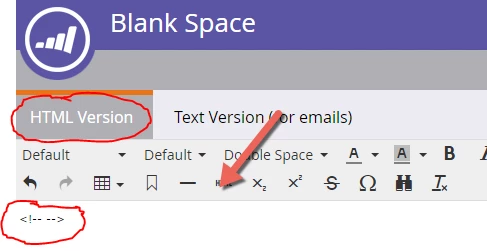
Hi, this is what I did. I click on snippet > Edit Draft > then in edit section:

Is there another way?


HTML version is not HTML mode.

click here:

-Greg

4 replies

Tim_Langlois1
Level 4
May 9, 2016

Hi Ervin,

If you have an email template that has 3 rows for example, and the person sending the email doesn't need 3 rows but 2, they can replace one of the rows with a blank snippet. (Each row would have to be an mktEditable area of the template.)

More info here: Collapsing Empty mktEditable Sections

So design your templates with the max number of areas a marketer may need, and they can "delete" them by making an editable area a blank snippet.

Grégoire_Miche2
Level 10
May 9, 2016

Hi Ervin,

No, not at the moment. You can put an html <!-- comment -->  in the editable zone to blank it, but it will still remain.

Many thing are on the roadmap re the email editor and will be announced this week at the summit.

-Greg

May 9, 2016

You can use comments to hide them

May 10, 2016

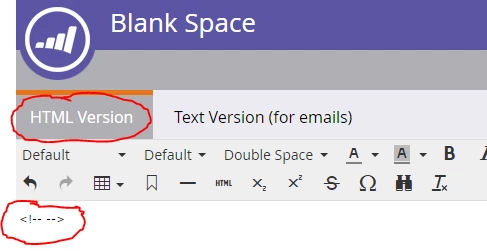
Thanks for the replies. I have created a new snippet with a blank comment <!-- --> and this is what it looks like (even after clicking preview draft):

Why is there no blank/removed space?

Grégoire_Miche2
Level 10
May 10, 2016

Hi Ervin,

You should type this in HTML mode.

-Gre

May 10, 2016

Hi, this is what I did. I click on snippet > Edit Draft > then in edit section:

Is there another way?