Declare a winner manually | Community
Skip to main content
September 10, 2014
Solved

Declare a winner manually

  • September 10, 2014
  • 5 replies
  • 6094 views
We've set up an email program with a/b testing declaring the winner manually. Once the test runs are you then able to schedule the winner email on any given time and date to the rest of the audience? Thanks
This post is no longer active and is closed to new replies. Need help? Start a new post to ask your question.
Best answer by
When the test period has completed you will be sent a report.
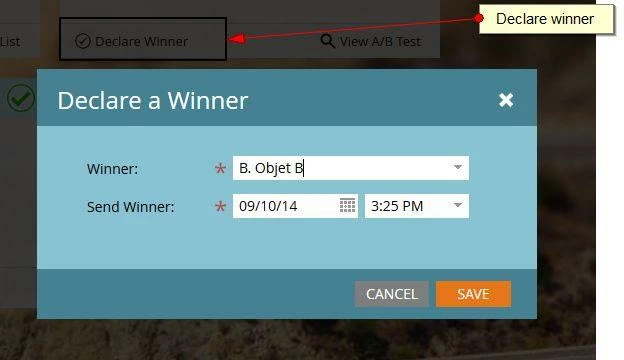
The in the email program control panel you should see a Declare winner button, when you click this you can scedule the time/date to send the winner


5 replies

Level 10
September 10, 2014
Hi Nick,

Yes, as the A/B test also configures the final send date or the report send date. When we choose to select the winner manualy, we get an option to choose the report date and not the Finishing Mailing Date/Time. Refer this article for more.

Hope this helps!
Accepted solution
September 10, 2014
When the test period has completed you will be sent a report.
The in the email program control panel you should see a Declare winner button, when you click this you can scedule the time/date to send the winner


September 10, 2014
Awesome, thanks guys.
August 2, 2015

I am not seeing this. I click the link in the report and I get the dashboard. where do i go from there? I cannot seem to find where to manually declare a winner. thank you.

Level 1
March 1, 2016

Yes, I have the same problem as you had last year, Jennifer. Were you able to find out what happened? Thank you

March 10, 2016

I was struggling with this too, and then realized that if I changed the View in the upper left-hand corner of the screen from View:Dashboard to View:Control Panel, I was able to find the button and declare a winner.

Josh_Jones1
Level 2
February 4, 2019

Hi,

Once I actually declare the winner then does it ask me separately if i want to send to the winner? I don't want to send to anyone else the test was a full list (50/50) split already. I just feel like i am getting all of the data.