Level 5
May 19, 2017
Question

Date stamp for form submissions

  • May 19, 2017
  • 2 replies
  • 6422 views

I have a form that I need to capture the submission date.

I have this as a hidden field but the the date is not pulling into my smart list that includes additional information that I need to capture.  I also need to be able to capture the date that the form was submitted.  What am I doing wrong?
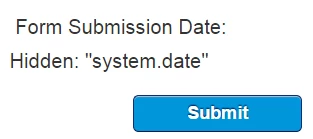
Thank you.

This post is no longer active and is closed to new replies. Need help? Start a new post to ask your question.

2 replies

Josh_Hill13
Level 10
May 19, 2017

Is that a field? Looks like you just typed "system.date". You need a hidden field like Form Submission Date and code to populate it.

You could also push this in a trigger flow.

Level 5
May 19, 2017

Hi Josh,

This is a field within the form (Form submission date) based on the system date.

Should it be something different?  I have a form that I have created a smart list for that will reflect those that we deployed to and that submitted the form (I need to be able to identify the date they submitted the form (e.g., Form Submission Date).

Thoughts?

Dan_Stevens_
Level 10
May 19, 2017

did you try populating with the actual token: {{system.dateTime}}?  Is your custom field "Submission Date" defined as the correct type?

Webenza_MT
Level 2
June 25, 2019

In order to capture the date and time your marketo form was filled, you should do below-

1) Create a container/bucket to capture this data

2) Either ask your audience to fill the data (which is ridiculous ) or command your system to fill (which smart marketers do )

Details on above-

1) Bucket/container is the custom field which you will have to create by going into admin panel. Under admin panel, go to field management and then create Custom Field. Define what type of data do you want to capture, which is date & time to be obvious. Give the name to this field. API name is assigned automatically.

2) Once you can created the field, you have to command system to fill the date and time in this field. Now go to the program where you have defined certain steps to be taken post form fill. Create one more step in the Flow section of your smart campaign to change the Data value of this field after the form is filled. In attributes, select your field name and under date mention thi system token- {{system.dateTime}}.

Now fill the form and run your report so check if the date and time is getting captured or not.

If you are able. Give a thumbsup.

Thanks,

Gautam Malik