
Data Management Strategies – Smart Campaigns for Managing Chronic Bounces
Automatically identifying email addresses which bounce repeatedly and setting these records as Marketing Suspended is TRUE in your database will help protect your sender reputation.
Smart Campaign
Set Marketing Suspended to True - Hard Bounces
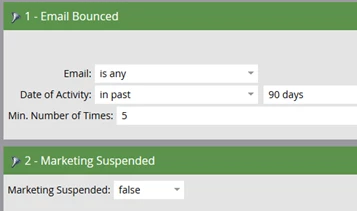
In this example, I am setting the Min. Number of Bounces to 5 in the past 90 days. If you send emails more often you might consider reducing the timeframe to the past 30 or 60 days.
Smart List
Flow
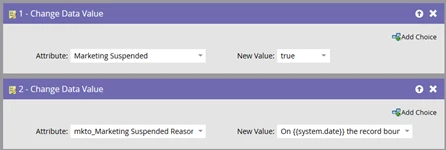
Marketing Suspended Reason (Custom Marketo field): On {{system.date}}, the record bounced for 5th time in the past 90 days.
Schedule
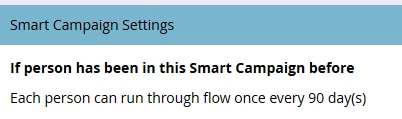
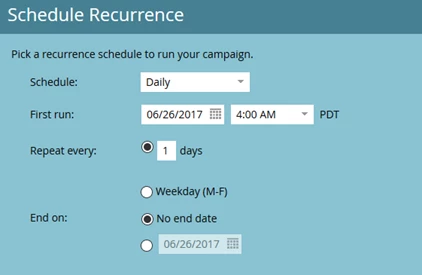
Smart Campaign
Set Marketing Suspended to True - Soft Bounces
Using a separate smart campaign will allow you to set different Min. Number of Times and activity time frame. It also makes it easier to determine how many records flow through each campaign.
Smart List
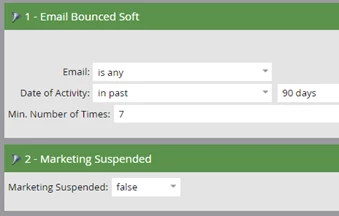
Flow
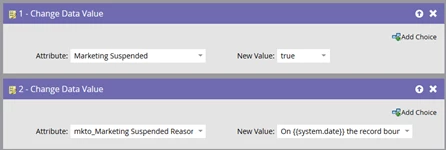
Marketing Suspended Reason (Custom Marketo field): On {{system.date}}, the record bounced for 7th time in the past 90 days.
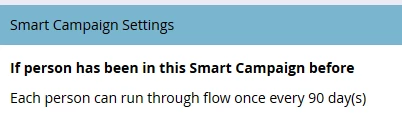
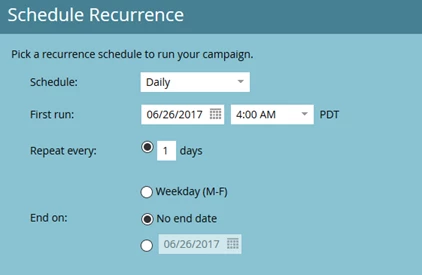
Schedule
Resources for managing bounces.