Data Management Strategies – Managing Chronic Non-responders (never open or click) Part I | Community
Skip to main content
Brian_Law_MKTO
Level 5
June 9, 2017

Data Management Strategies – Managing Chronic Non-responders (never open or click) Part I

  • June 9, 2017
  • 6 replies
  • 5896 views

Whether you are a major enterprise or a small start-up, managing chronic non-responders, records who never open or click your emails, will help protect your sender reputation by reducing the chance for a spam compliant.

The first step is to identify the records who haven’t opened or clicked any emails during the past year or whatever timeframe you prefer.

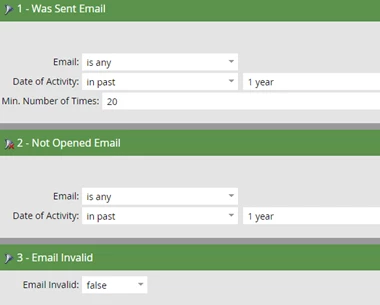
Smart List - Not Opened or Clicked Any Email in Past Year

In this example I am setting the Min. Number of Emails sent to a record to 20.
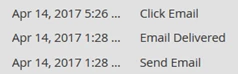
FYI - It is possible to click an email without opening it.

Activity log example:

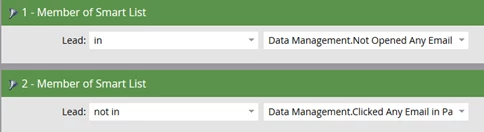
Here is an alternative way to get the same results.

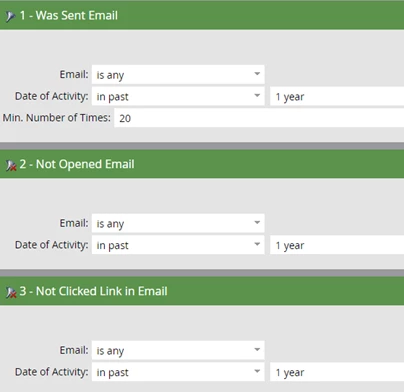
Smart List #1 - Not Opened Any Email in Past Year

In this example I am setting the Min. Number of Emails sent to a record to 20.

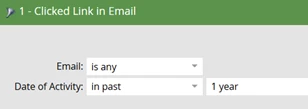
Smart List #2 - Clicked Any Email in Past Year
Smart List #3 - Not Opened or Clicked Any Email in Past Year
In my next article I will demonstrate how to set the records to Marketing Suspended to prevent accidentally sending them a promotional email while you determine a strategy to get them to re-engage.

Here is Part II of this article.

By the way, here is a similar article about identifying your chronic non-responders and the importance of managing them written by Kristen Carmean.

This post is no longer active and is closed to new replies. Need help? Start a new post to ask your question.

6 replies

June 9, 2017

Hi @Brian Law​,

This is awesome! Just one question, what do you know about emails considered as Opened when you just scroll them down in your mobile device. Is that a myth or a fact? Have  you been able to test this?

SanfordWhiteman
Level 10
June 9, 2017

Karina, any action that loads images counts as an Open.

Brian_Law_MKTO
Level 5
June 9, 2017

Sanford is correct, once the tracking pixel image is downloaded Marketo counts the email as Open.

Alex_Venus
Level 2
March 20, 2018

Hey Brian, thanks for these insights. Maybe I missed it, but how can someone click an email without opening it? (as seen in your activity log screenshot)

Dan_Stevens_
Level 10
March 20, 2018

Alex - if the user's email client has images disabled, the Marketo tracking pixel will not render - and therefore will not register an open.  But the click activity will still be tracked.  Once Marketo registers a click, it will also consider the email to be "opened" for reporting purposes.  It just won't show up in the activity log.

Logan_Paulich
Level 1
March 20, 2018

Thanks for the insight, Brian. Would you then be using this as an exclusion list for future sends or would you remove them completely from your data base?