
Data Management Best Practices – Populate State with Inferred State Information
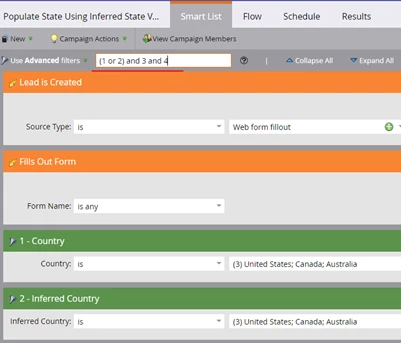
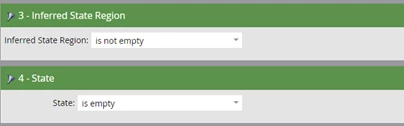
Here is an example of a data management campaign to populate an empty State field with the Inferred State value. In this case I only wanted to populate the State field for certain countries. Simply remove Country and Inferred Country if you want to populate the State field for all countries. Notice I set the Source Type to Web form fillout since I wanted the Lead is Create trigger to only fire when the record is created via a web form.
Smart Campaign
Populate State with Inferred State Value
Smart List
Flow

{{lead.Inferred State Region}}
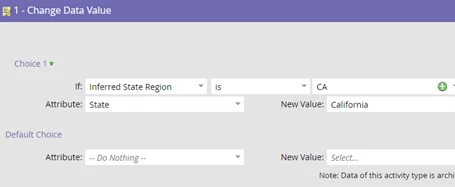
If necessary you can use the ‘Add Choice’ logic in the Change Data Value flow step to change the abbreviation to the full name of the state. Remember to create two different campaigns and put the most popular states at the top as noted in this article for better system performance.
Notes:
- Run the campaign as a daily batch campaign if you don't need low latency.
- Information about using Inferred State.
- Information about using Inferred Country.