Customize Email Autopreview | Community
Skip to main content
June 25, 2014
Solved

Customize Email Autopreview

  • June 25, 2014
  • 2 replies
  • 1229 views
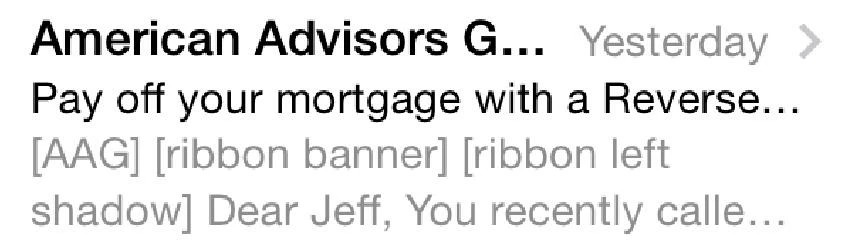
I was sent the below screenshot of how our email looks in the inbox Autopreview on mobile. It looks like descriptions of the header images are coming up first, but I'd rather have it skip over the image descriptions and simply display the body text. Does anyone know how I can do this?


This post is no longer active and is closed to new replies. Need help? Start a new post to ask your question.
Best answer by Justin_Cooperm2
This is called a "pre-header."

See this description for more details. Essentially, you can insert "hidden" text into the HTML as the first text found in the mail. This will display it as you are expecting as the pre-header of the message.

Good luck!

Justin

2 replies

Justin_Cooperm2
Justin_Cooperm2Accepted solution
Level 10
June 26, 2014
This is called a "pre-header."

See this description for more details. Essentially, you can insert "hidden" text into the HTML as the first text found in the mail. This will display it as you are expecting as the pre-header of the message.

Good luck!

Justin
June 26, 2014
This is great - thank you so much, Justin!