February 21, 2013
Question

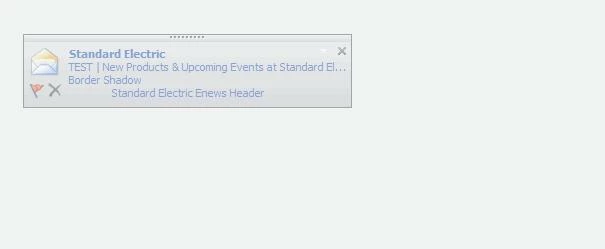
Custom code for e-mail template displays in outlook e-mail notification rather than message content

  • February 21, 2013
  • 2 replies
  • 752 views
When I send myself an e-mail from Marketo using a custom template that I've created, the code shows up as the 'message body' in the pop up e-mail notification through outlook. How can I change this so that a snippet of the text shows up rather than the code?

This post is no longer active and is closed to new replies. Need help? Start a new post to ask your question.

2 replies

February 21, 2013
Hi Michele,

I had the same problem. If you include an image at the top of your email, you could try typing it in the image title box and see if that works? Obviously not ideal but could work as a quick fix.
February 21, 2013
Hannah,
The 'Standard Electric Enews Header' text that's shown in the screenshot above is the image detail, so I know that i can change that accordingly, but I can't figure out why the 'Border Shadow' text (which is around the entire template - I used Marketo's curved paper template as my base and went from there to create my own e-news template) displays above it. I can see where it is in the code of the template, but It's not in there as text or a description, it's part of the code, so I'm hesitant to delete or change that.