CTA button on masthead image
Hi guys,
I really need to get a CTA button on our masthead image but i cant seem to get the html code right. It keeps popping below it in another table or on the right side.
This is actually for one of our email template where we need 2 CTA buttons. One on top and at the bottom.
This is the screenshot of how i am hoping to get to: Red line box is the placement i need the same orange CTA button to be at on the image.
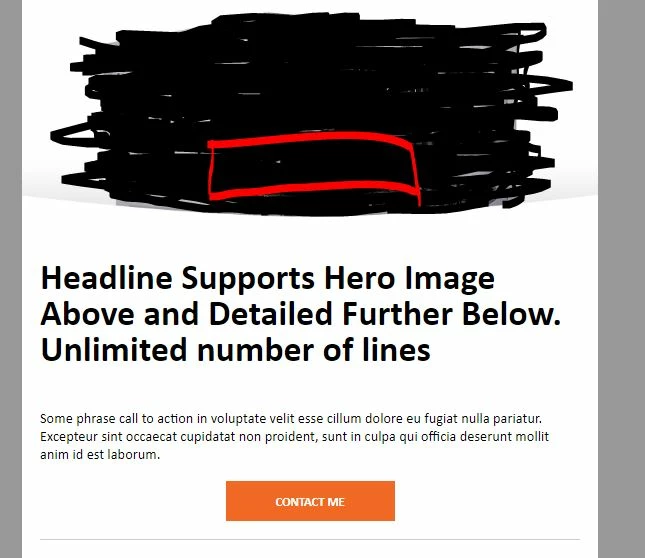
This is the code for the masthead;
<!-- MASTHEAD -->
<tr>
<td align="center" valign="top" bgcolor="#666666">
<div class="mktoImg" id="mastheadImg" mktoName="Masthead Image" mktoImgSrc="https:/soloarticle_sample.jpg" mktoImgLink="https:/" mktoImgWidth="640" mktoImgHeight="240">
<a style="border: none; outline: none; margin: 0; padding: 0; display: block;"><img style="margin:0; padding:0; border:none; display:block;" border="0" alt=""></a>
</div>
</td>
</tr>
<!-- /MASTHEAD -->
I initially put this inside the above:
<div class="mktoText" id="CTA-Text1" mktoname="Call To Action Text1" target="_blank" style="color: #ffffff; font-size:14px;font-family:Calibri,Helvetica,Arial,sans-serif; font-weight: bold; text-decoration: none;width:100%; display:inline-block; border-bottom: none; text-transform: uppercase; cursor: pointer;">
<p><a href="#" target="_blank" style="text-decoration: none; color: #ffffff;">Contact Me</a></p>
</div>
As you can see, I am really not good with html.
Thanks in advance!