css and snippets | Community
Skip to main content
March 14, 2013
Solved

css and snippets

  • March 14, 2013
  • 11 replies
  • 3392 views
Can CSS be used inside of snippets? I have been trying to do this for a table snippet (expanded footer link table segmented by industry) and the styles are gone the next time I open the html editor.

Thanks,
Liz
This post is no longer active and is closed to new replies. Need help? Start a new post to ask your question.
Best answer by
Liz,
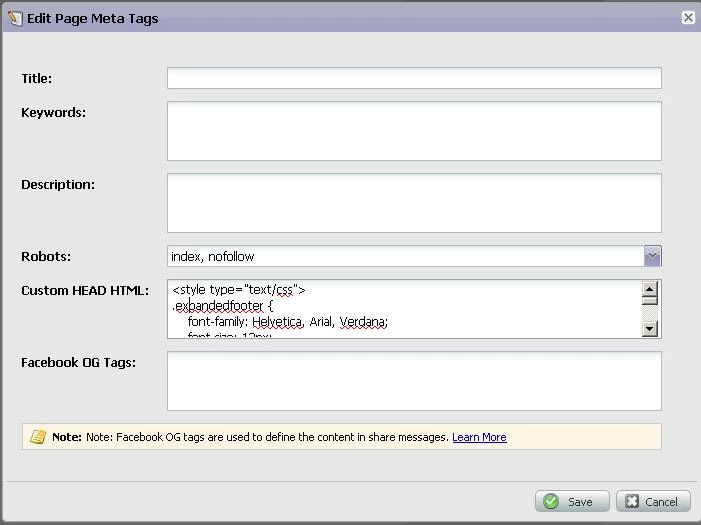
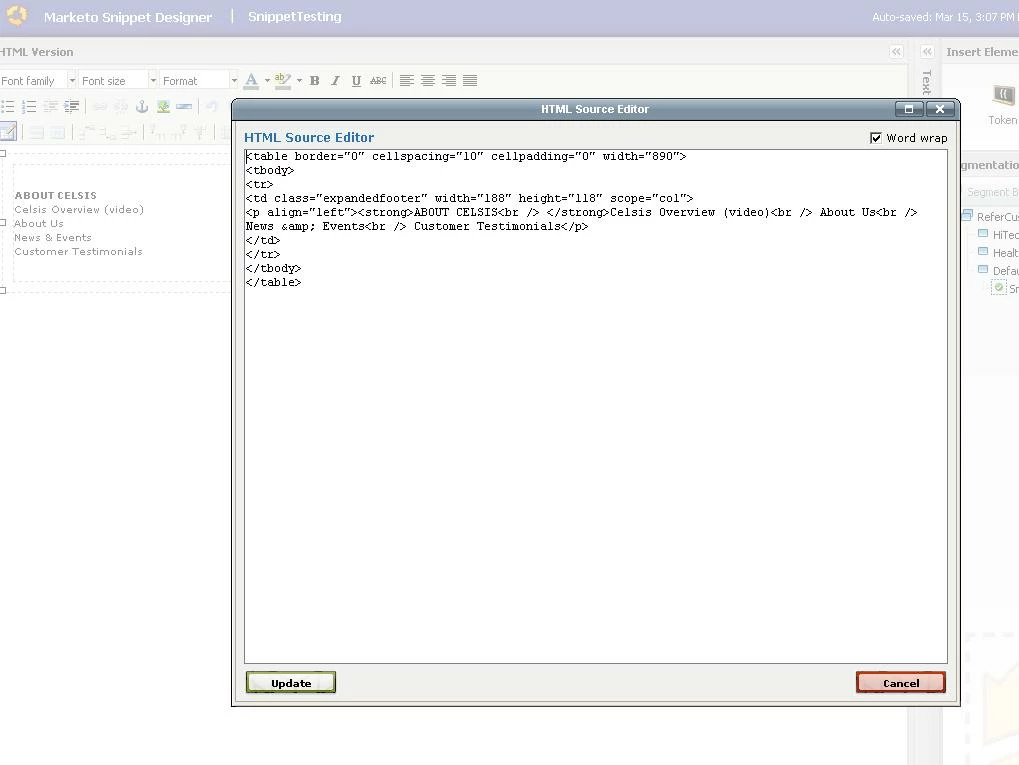
Just realized that the snippet is stripping out styles.  Here's how you can get the same result -

Add your style block in the custom HTML HEAD section of the "Edit Page meta tags" dialog  as shown below -


Create snippet without style as shown below -


Place the snippet on the Landing Page (LP) and you will see the styles.  Here's my example LP with your style http://na-qe.marketo.com/lp/socialoct/raj_regression_LPWithSnippetStyle.html

11 replies

March 15, 2013
Hey Liz - are you posting the CSS into the HTML section? I'd think this would work..

<style type="text/css">
table{border:1px solid #000;}
</style>

Like that...
March 15, 2013
Hey-thank you. I'll give that a try!
March 15, 2013
Hi-

I pasted the code below into the html are a of the snippet, but the styles are not applying. However, if I go to a landing page and paste this same code into the html, it works. Any idea why this is happening? Admittedly, I'm not a programmer! Thank you :)


<!DOCTYPE html PUBLIC "-//W3C//DTD XHTML 1.0 Transitional//EN" "http://www.w3.org/TR/xhtml1/DTD/xhtml1-transitional.dtd">
<html xmlns="http://www.w3.org/1999/xhtml">

<style type="text/css">
<!--

.expandedfooter {
    font-family: Helvetica, Arial, Verdana;
    font-size: 12px;
    font-style: normal;
    line-height: 15pt;
    font-weight: normal;
    font-variant: normal;
    text-transform: none;
    color: #666666;
    background-color: #FFFFFF;
    letter-spacing: normal;
    text-align: left;
    vertical-align: text-top;
    word-spacing: normal;
    white-space: normal;
    list-style-position: inside;
    border-right-style: solid;
    border-right-width: thin;
    border-right-color: #CCCCCC;
    }
-->
</style>


<body>
<table width="890" border="0" cellspacing="10" cellpadding="0">
  <tr>
    <td width="188" height="118" class="expandedfooter" scope="col"><p align="left" "><strong>ABOUT CELSIS<br />
    </strong>Celsis Overview (video)<br />
      About Us<br />
      News &amp; Events<br />
      Customer Testimonials</p>
    </td>
    <td width="188" class="expandedfooter" scope="col"><p align="left" ><strong>ABOUT THE SAVINGS<br />
    </strong>Industry Week Article<br />
      Fiscally Fit White Paper<br />
      FIA Sheet<br />
      Sustainability Committment</p>
    </td>
    <td width="188" class="expandedfooter" scope="col"><p align="left" ><strong>INDUSTRY SOLUTIONS<br />
    </strong>Home &amp; Beauty Solutions<br />
      Food &amp; Beverage Solutions<br />
      Pharmaceutical Solutions<br />
      Celsis Products</p>
    </td>
    <td width="190" class="expandedfooter" scope="col"><p align="left" ><strong>RESOURCES<br />
    </strong>News &amp; Events<br />
      Contact Celsis<br />
      Webinar<br />
      Ask a Question</p>
    </td>
  </tr>
</table>
</body>
</html>
March 15, 2013
Liz,
The <!-- --> enclosing your .expandedfooter class definition makes it a comment block.  Just remove it and you should see the styles.  The resulting HTML would look like this -

<!DOCTYPE html PUBLIC "-//W3C//DTD XHTML 1.0 Transitional//EN" "http://www.w3.org/TR/xhtml1/DTD/xhtml1-transitional.dtd">
<html xmlns="http://www.w3.org/1999/xhtml">

<style type="text/css">

.expandedfooter {
    font-family: Helvetica, Arial, Verdana;
    font-size: 12px;
    font-style: normal;
    line-height: 15pt;
    font-weight: normal;
    font-variant: normal;
    text-transform: none;
    color: #666666;
    background-color: #FFFFFF;
    letter-spacing: normal;
    text-align: left;
    vertical-align: text-top;
    word-spacing: normal;
    white-space: normal;
    list-style-position: inside;
    border-right-style: solid;
    border-right-width: thin;
    border-right-color: #CCCCCC;
    }

</style>


<body>
<table width="890" border="0" cellspacing="10" cellpadding="0">
  <tr>
    <td width="188" height="118" class="expandedfooter" scope="col"><p align="left" "><strong>ABOUT CELSIS<br />
    </strong>Celsis Overview (video)<br />
      About Us<br />
      News &amp; Events<br />
      Customer Testimonials</p>
    </td>
    <td width="188" class="expandedfooter" scope="col"><p align="left" ><strong>ABOUT THE SAVINGS<br />
    </strong>Industry Week Article<br />
      Fiscally Fit White Paper<br />
      FIA Sheet<br />
      Sustainability Committment</p>
    </td>
    <td width="188" class="expandedfooter" scope="col"><p align="left" ><strong>INDUSTRY SOLUTIONS<br />
    </strong>Home &amp; Beauty Solutions<br />
      Food &amp; Beverage Solutions<br />
      Pharmaceutical Solutions<br />
      Celsis Products</p>
    </td>
    <td width="190" class="expandedfooter" scope="col"><p align="left" ><strong>RESOURCES<br />
    </strong>News &amp; Events<br />
      Contact Celsis<br />
      Webinar<br />
      Ask a Question</p>
    </td>
  </tr>
</table>
</body>
</html>
March 15, 2013
Thank you. I was hoping that would solve it, but here's what happened. I copied and pasted your (Raj) modified code in the html area of the snippet, and then exited the html. The front end didn't appear to follow the style sheet. So, I went back into the html, and the code was changed to what I have pasted below. It puts the <!-- --> back in, and deletes the <style type="text/css">.

Any ideas why this is happening? Thanks very much :)

<!-- .expandedfooter {     font-family: Helvetica, Arial, Verdana;     font-size: 12px;     font-style: normal;     line-height: 15pt;     font-weight: normal;     font-variant: normal;     text-transform: none;     color: #666666;     background-color: #FFFFFF;     letter-spacing: normal;     text-align: left;     vertical-align: text-top;     word-spacing: normal;     white-space: normal;     list-style-position: inside;     border-right-style: solid;     border-right-width: thin;     border-right-color: #CCCCCC;     } -->
<table border="0" cellspacing="10" cellpadding="0" width="890">
<tbody>
<tr>
<td class="expandedfooter" width="188" height="118" scope="col">
<p align="left"><strong>ABOUT CELSIS<br /> </strong>Celsis Overview (video)<br /> About Us<br /> News &amp; Events<br /> Customer Testimonials</p>
</td>
<td class="expandedfooter" width="188" scope="col">
<p align="left"><strong>ABOUT THE SAVINGS<br /> </strong>Industry Week Article<br /> Fiscally Fit White Paper<br /> FIA Sheet<br /> Sustainability Committment</p>
</td>
<td class="expandedfooter" width="188" scope="col">
<p align="left"><strong>INDUSTRY SOLUTIONS<br /> </strong>Home &amp; Beauty Solutions<br /> Food &amp; Beverage Solutions<br /> Pharmaceutical Solutions<br /> Celsis Products</p>
</td>
<td class="expandedfooter" width="190" scope="col">
<p align="left"><strong>RESOURCES<br /> </strong>News &amp; Events<br /> Contact Celsis<br /> Webinar<br /> Ask a Question</p>
</td>
</tr>
</tbody>
</table>
Accepted solution
March 15, 2013
Liz,
Just realized that the snippet is stripping out styles.  Here's how you can get the same result -

Add your style block in the custom HTML HEAD section of the "Edit Page meta tags" dialog  as shown below -


Create snippet without style as shown below -


Place the snippet on the Landing Page (LP) and you will see the styles.  Here's my example LP with your style http://na-qe.marketo.com/lp/socialoct/raj_regression_LPWithSnippetStyle.html
March 15, 2013
Yes! This is great! THANK YOU!

One final question...where do you edit meta tags within the snippet? I know where to do that in landing pages, but am not seeing the option inside of the snippet.

Thanks again!

Liz
March 15, 2013
Oh...wait. It just clicked. You mean to create the snippet, and put the style into the meta tag on the landing page. Got it.Thanks so much for your help!
March 15, 2013
The meta tags are part of the Landing Page editor.  
June 6, 2013
I want to use a mouseover effect in a snippet. to high light something. But it keeps stripping it out ;-(
Suggestions?