Question
Cropped Hero Image in Outlook
I am hoping you can help me out. I have an email that is giving me a few problems with an email rendering in Outlook. Below is a forwarded screenshot from one user's email and it appears fine.

I've also copied in a pic from my boss' Outlook - her hero image (a blue/green rack of servers) is cut-off as the width is cropped. it may be the code, but I've test sampled this thing on many different computer and hers is the only error I've found. (See below).
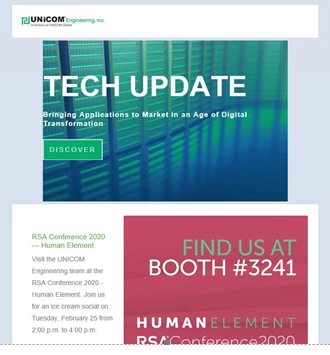
I'm also attaching the hero section of email code. Anyway I can get help to figure this out? I manipulated a template from Marketo to get a look we liked. There may be extra code that is not necessary. Any help is appreciated and thank you in advance!
<table id="hero" style="-webkit-text-size-adjust: 100%; -ms-text-size-adjust: 100%; mso-table-lspace: 0pt; mso-table-rspace: 0pt; border-spacing: 0; border-collapse: collapse;" align="center" border="0" cellpadding="0" cellspacing="0" width="100%" class="mktoModule m_hero" mktoname="Hero">
<tbody>
<tr>
<td class="background" style="-webkit-text-size-adjust: 100%;mso-table-lspace: 0pt;mso-table-rspace: 0pt;word-break: break-word;-webkit-hyphens: none;-moz-hyphens: none;hyphens: none;font-family: Arial, Helvetica, sans-serif;-ms-text-size-adjust: 100%;vertical-align: middle;height: 390px;background-repeat: no-repeat;background-position: center
center;background:${heroBackgroundImage};background-color:${heroBackgroundColor};padding-top: 0;padding-right: 0;padding-bottom: 0;padding-left: 0;background-image:${heroBackgroundImage};border-collapse: collapse;" height="390" background="http://go.unicomengineering.com/rs/221-VVO-216/images/NewsletterHeroImage_640x390.jpg" bgcolor="${heroBackgroundColor}" valign="top" width="640">
<center>
<!--[if gte mso 9]>
<v:rect xmlns:v="urn:schemas-microsoft-com:vml" fill="true" stroke="false" style="width:640px;height:353px">
<v:fill type="frame" src="${heroBackgroundImage}" color="${heroBackgroundColor}" />
<v:textbox style="mso-fit-shape-to-text:true" inset="0,0,0,0">
<![endif]-->
<table class="table600" style="-webkit-text-size-adjust: 100%; -ms-text-size-adjust: 100%; mso-table-lspace: 0pt; mso-table-rspace: 0pt; border-spacing: 0; border-collapse: collapse; margin-top: 0; margin-right: auto; margin-bottom: 0; margin-left: auto;" align="center" border="0" cellpadding="0" cellspacing="0" width="600">
<tbody>
<tr>
<td class="" style="-webkit-text-size-adjust: 100%; -ms-text-size-adjust: 100%; mso-table-lspace: 0pt; mso-table-rspace: 0pt; word-break: break-word; -webkit-hyphens: none; -moz-hyphens: none; hyphens: none; font-family:Arial, Helvetica, sans-serif; border-collapse: collapse;" height="86"> </td>
</tr>
<tr>
<td class="primary-font title" style="hyphens: none;-webkit-text-size-adjust: 100%;mso-table-lspace: 0pt;mso-table-rspace: 0pt;word-break: break-word;-webkit-hyphens: none;-moz-hyphens: none;-ms-text-size-adjust: 100%;font-family:Arial, Helvetica, sans-serif;;font-size: 60px;line-height: 90%;color: #ffffff;font-weight: bold;text-align: left;border-collapse: collapse;">
<div class="mktoText" mktoname="Title" id="title">
TECH UPDATE
</div> </td>
</tr>
<tr>
<td style="-webkit-text-size-adjust: 100%; -ms-text-size-adjust: 100%; mso-table-lspace: 0pt; mso-table-rspace: 0pt; word-break: break-word; -webkit-hyphens: none; -moz-hyphens: none; hyphens: none; font-family: Arial, Helvetica, sans-serif; border-collapse: collapse;" height="10"> </td>
</tr>
<tr>
<td class="primary-font subtitle" style="hyphens: none;-webkit-text-size-adjust: 100%;mso-table-lspace: 0pt;mso-table-rspace: 0pt;word-break: break-word;-webkit-hyphens: none;-moz-hyphens: none;-ms-text-size-adjust: 100%;font-family: Arial, Helvetica, sans-serif;;text-align: left;color: #ffffff;font-weight: bold;font-size: 15px;letter-spacing: 1px;border-collapse: collapse;">
<div class="mktoText" mktoname="Subtitle" id="subtitle">
<p>Bringing Applications to Market in an Age of Digital Transformation</p>
</div> </td>
</tr>
<tr>
<td style="-webkit-text-size-adjust: 100%; -ms-text-size-adjust: 100%; mso-table-lspace: 0pt; mso-table-rspace: 0pt; word-break: break-word; -webkit-hyphens: none; -moz-hyphens: none; hyphens: none; font-family: Arial, Helvetica, sans-serif; border-collapse: collapse;" height="30"> </td>
</tr>
<tr>
<td class="cta" style="-webkit-text-size-adjust: 100%; -ms-text-size-adjust: 100%; mso-table-lspace: 0pt; mso-table-rspace: 0pt; word-break: break-word; -webkit-hyphens: none; -moz-hyphens: none; hyphens: none; font-family: Arial, Helvetica, sans-serif; border-collapse: collapse;">
<center>
<table style="-webkit-text-size-adjust: 100%; -ms-text-size-adjust: 100%; mso-table-lspace: 0pt; mso-table-rspace: 0pt; border-spacing: 0; border-collapse: collapse;" align="left" border="0" cellpadding="0" cellspacing="0">
<tbody>
<tr>
<td style="-webkit-text-size-adjust: 100%; -ms-text-size-adjust: 100%; mso-table-lspace: 0pt; mso-table-rspace: 0pt; word-break: break-word; -webkit-hyphens: none; -moz-hyphens: none; hyphens: none; font-family: Arial, Helvetica, sans-serif; border-collapse: collapse;" align="center" bgcolor="${heroButtonBackgroundColor}"> <a href="${heroLink}" target="_blank" class="primary-font button" style="-webkit-text-size-adjust: 100%;-ms-text-size-adjust: 100%;display: inline-block;font-size: 14px;font-family:Arial, Helvetica, sans-serif;color: white;padding-top: 12px;padding-right: 18px;padding-bottom: 12px;padding-left: 18px;border-top-width:${heroBorderSize};border-right-width:${heroBorderSize};letter-spacing: 3px;border-left-width:${heroBorderSize};border-top-style:
solid;border-right-style: solid;border-bottom-style: solid;border-left-style: solid;border-bottom-width:${heroBorderSize};text-decoration: none;border-top-color:${heroBorderColor};border-right-color:${heroBorderColor};border-bottom-color:${heroBorderColor};border-left-color:${heroBorderColor};background-color:${heroButtonBackgroundColor}">${heroLinkText}</a> </td>
</tr>
</tbody>
</table>
</center> </td>
</tr>
<tr>
<td style="-webkit-text-size-adjust: 100%; -ms-text-size-adjust: 100%; mso-table-lspace: 0pt; mso-table-rspace: 0pt; word-break: break-word; -webkit-hyphens: none; -moz-hyphens: none; hyphens: none; font-family: Arial, Helvetica, sans-serif; border-collapse: collapse;" height="86"> </td>
</tr>
</tbody>
</table>
<!--[if gte mso 9]>
</v:textbox>
</v:rect>
<![endif]-->
</center></td>
</tr>
</tbody>
</table>