June 15, 2015
Question

Creating token for email title updating

  • June 15, 2015
  • 2 replies
  • 3040 views

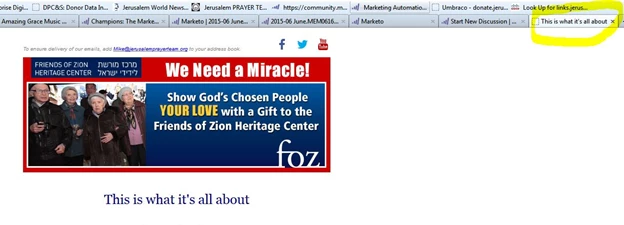
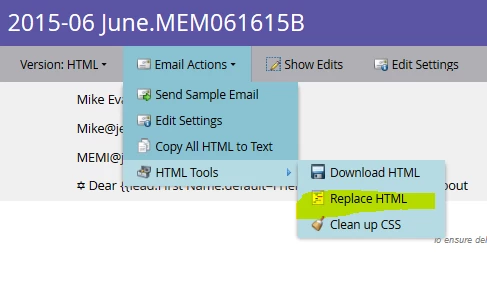
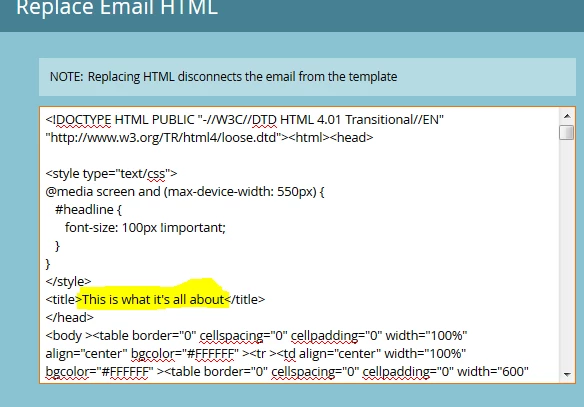
Hello, is it possible to create a token that would be used to update the title that appears when an email is viewed in the web browser (see below)? Right now I am manually updating this by going to Email Actions > HTML Tools > Replace HTML and then updating the title as shown below (3rd image down). This is problematic because doing this disconnects the email from its original template. Any help is much appreciated!
This post is no longer active and is closed to new replies. Need help? Start a new post to ask your question.

2 replies

Community Advisor
June 15, 2015

Definitely do-able in My Activities, however if you house your emails in Design Studio it won't be as simple.

There are only 2 steps. First update your email template in the Design Studio -- change what you've highlighted to be something along the lines of {{my.EmailTitle}}. Now you have a few options where to put the actual token, you can do it at the program level that houses your email in My Activities or up the chain through any folder in the hierarchy. Simply create the token with the name "EmailTitle" in this instance, and you're done.

With these types of updates/changes to the templates it's always best practice to share what you're doing with anyone else that might use the same templates as it will impact future development (albeit for the better).

Let me know how it goes.

June 17, 2015

Hi JD,

Which type of token should I use? Email Script, Rich Text, Text?

Thanks,

Laura

Community Advisor
June 17, 2015

you just need the Text version; I choose this token most often anyway because you can see it from the overview page (whereas Rich Text requires you to click further to see/update the content) -- but in this case you're just creating flat html text, so 'text' is perfect.

June 16, 2015

Hey Laura, I moved your question where there will be more visibility.

June 17, 2015

Thank you JD and Tiger! I'm sorry for not being on here today, have been working on a big project...Will get on tomorrow!

LK