
Creating DNS CAA records for Marketo-hosted domains
That email from IT we all dread: Urgent: Remediation Required with a list of supposed Marketo config issues found during an external audit.
Typically, the issues’ll range from factually false[1] to meaningless[2] to head-shakingly unactionable[3], but there’s sometimes a valid point in there. (Especially if it’s tagged Low Priority so neither side has to get defensive.)
A legit point that came up recently is missing DNS CAA records for Marketo LP and Branding (click tracking) domains. The Marketo instances still passed the audit because it was tagged P3 (Low), but there’s good reason to try to make IT happy.
What CAA records do
CAA records list the specific Certificate Authorities allowed to issue SSL certs for a host.
For example, if your company is on AWS with Amazon-issued ACM certs, IT can publish a CAA record that says only Amazon’s CA is allowed to issue certs for example.com and all its subdomains. Any other CA must reject a cert request if they are to stay in good standing with the CA/Browser Forum.[4]
In theory, this helps discourage “Rogue IT” (an epithet sometimes unfairly hurled at Marketo). That is, non-IT users enabling SaaS apps without going through proper security channels. In reality, it doesn’t impact internal/inadvertent rogues much[5], but there are rare-but-not-impossible situations where external malicious actors might be thwarted.[6]
CAA records have their own RRType (CAA/257), unlike records like SPF[7], DKIM, and DMARC which are actually repurposed TXT records. An example allowing the commercial CA GlobalSign:
pages.example.com. 3600 IN CAA 0 issue "globalsign.com"
If you have more than a passing familiarity with DNS CNAMEs, you instantly saw the problem:
A label used in a CNAME cannot be used in any other DNS record types
To set up a Marketo LP domain or domain alias, you use a CNAME record:
pages.example.com. 3600 IN CNAME 123-ABC-456.mktoweb.comThe record above states the name (left-hand side) pages.example.com. is not canonical. It’s a mere alias for 123-ABC-456.mktoweb.com, which is the canonical name. (Please, I’m begging you, never forget this: the right-hand side is the canonical name![8])
CNAMEs are convenient (the internet wouldn’t work without them) but have a natural side effect: once you say a name is an alias, it can’t have any other DNS records besides the CNAME.
Think about aliases or nicknames in real life. Patrick goes by “Buddy.” Buddy and Patrick can’t have different addresses, ages, and so on, right? Those are ultimately characteristics of Patrick — Buddy, Bud, and B-Man merely point to Patrick’s data. The DNS CNAME restriction is much the same.
So there’s a core conflict: if pages.example.com is an alias for another hostname, pages.example.com can’t also have its own CAA record.
CAA records do understand CNAMEs (don’t get your hopes up, though)
Now, the DNS CAA standard does understand the CNAME issue... to a degree. Take this chain of CNAMEs typical of Marketo LP domains:
> dig pages.example.com
;; flags: qr rd ra; QUERY: 1, ANSWER: 7, AUTHORITY: 0, ADDITIONAL: 1

;; QUESTION SECTION:
;pages.example.com.    IN      A

;; ANSWER SECTION:
pages.example.com.       300     IN      CNAME   exampleglobal.mktoweb.com.
exampleglobal.mktoweb.com. 300   IN      CNAME   sj01.mktossl.com.
sj01.mktossl.com. 300 IN      A       104.16.93.80
sj01.mktossl.com. 300 IN      A       104.16.92.80
sj01.mktossl.com. 300 IN      A       104.16.94.80
sj01.mktossl.com. 300 IN      A       104.16.95.80
sj01.mktossl.com. 300 IN      A       104.16.96.80
In this case, if sj01.mktossl.com had a CAA record, that would be consulted when generating the cert for pages.example.com. But those *.mktossl.com hosts don’t have CAA records, either:
> dig sj01.mktossl.com CAA
;; flags: qr rd ra; QUERY: 1, ANSWER: 0, AUTHORITY: 1, ADDITIONAL: 1

;; QUESTION SECTION:
;pages.example.com.    IN      CAA

;; AUTHORITY SECTION:
mktossl.com.            30      IN      SOA     bart.ns.cloudflare.com. dns.cloudflare.com. 2408205987 10000 2400 604800 1800
For those not accustomed to dig output, that means “The CAA query didn’t throw any errors, but also didn’t have any answers. Also, here’s some high-level info about the domain.” (Long way of saying there’s no CAA record.)
So there’s our task: if IT wants pages.example.com to have CAA protection, we have to try our best despite known technical barriers. There are 3 options; the 3rd one is best but might not be feasible in your environment.
Option 1: Append to the CAA records for example.com
In addition to chasing CNAMEs — which doesn’t help here since sj01.mktossl.com doesn’t have a CAA — CAA lookup logic also checks all parent private domain(s) of a host, e.g. for pages.example.com it looks for a CAA at example.com, too.
If IT is insisting on CAA records, they’ve already covered the parent domain like so:
> dig example.com caa
;; flags: qr rd ra; QUERY: 1, ANSWER: 3, AUTHORITY: 0, ADDITIONAL: 1

;; QUESTION SECTION:
;example.com.    IN      CAA

;; ANSWER SECTION:
example.com.         300     IN      CAA     0 issue "amazonaws.com"
example.com.         300     IN      CAA     0 issue "digicert.com"
example.com.         300     IN      CAA     0 issue "globalsign.com"
So you could ask them to add the Marketo issuers as well:
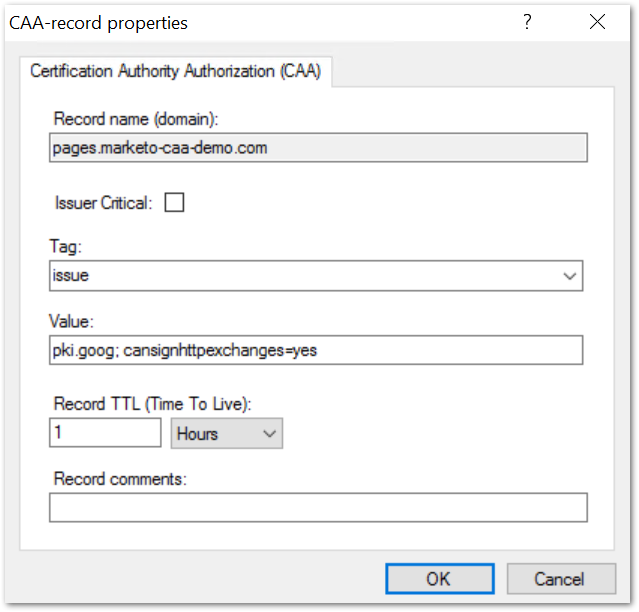
example.com. 3600 IN     CAA     0 issue "pki.goog; cansignhttpexchanges=yes"
example.com. 3600 IN     CAA     0 issue "letsencrypt.org"
Worth a try, but they’d be justified in pushing back. Problem with blindly adding new CA issuers at the top-level example.com is those issuers are inherited by any subdomain that doesn’t have its own CAA. Now all of ’em can get certs from Let’s Encrypt or Google in addition to Amazon, DigiCert, and GlobalSign. If you keep domain-wide adding CAs like that, CAA’s security promises — already somewhat overblown — become de facto meaningless.
Again, not to say you shouldn’t ask, but there’s a good reason to say no.
Option 2: Create a new subdomain with CAA record(s) and put Marketo domains one level deeper
One way to keep IT happy is to create a new subdomain like m.example.com or mkto.example.com and give that domain the required CAA records:
m.example.com. 3600 IN     CAA     0 issue "pki.goog; cansignhttpexchanges=yes"
m.example.com. 3600 IN     CAA     0 issue "letsencrypt.org"
This way the global CAAs for example.com need not be overly permissive.
Your LP domain can then be pages.m.example.com and branding domain go.m.example.com. Those get the CNAME records:
pages.m.example.com. 3600 IN    CNAME    123-ABC-456.mktoweb.com
go.m.example.com. 3600 IN    CNAME    mkto-7890.com
I’ve become surprisingly sanguine about this setup. In fact, for a client where we’re rolling out 2 new Marketo instances, I was downright enthusiastic about it! Each instance serves a different side of the business. Putting retail under r.example.com and wholesale under w.example.com allows both to use the label go, i.e. go.r.example.com and go.w.example.com.
That said, I don’t mean to downplay the change. While it has no technical impact — don’t worry, cookies are shared between sub-subdomains and the main domain! — some might bridle at the cosmetic impact. I get that, but again, it’s principally about staying in good terms with IT so they’ll be responsive to other requests.😏
Option 3: Non-standard ALIAS type records
ALIAS records are the best of both worlds, but your DNS infrastructure might not support ’em. (In the screenshots below, I’m showing perhaps my favorite app of all time, the DNS server Simple DNS Plus. Other servers/services that support ALIAS are DNSimple and PowerDNS.[9])
ALIAS isn’t an actual DNS RRType; rather, it’s a concept implemented similarly by vendors. Confusingly, it’s usually written in all-caps like a standard. ALIAS addresses the shortcomings of CNAMEs via what you might call “stealth CNAMEs” or “private CNAMEs” or “server-side CNAMEs”[10].
To the public, ALIAS records appear to be A records:
> dig pages.marketo-caa-demo.com
;; flags: qr rd ra; QUERY: 1, ANSWER: 5, AUTHORITY: 0, ADDITIONAL: 1

;; QUESTION SECTION:
;pages.marketo-caa-demo.com.    IN      A

;; ANSWER SECTION:
pages.marketo-caa-demo.com. 288 IN      A       104.16.93.80
pages.marketo-caa-demo.com. 288 IN      A       104.16.92.80
pages.marketo-caa-demo.com. 288 IN      A       104.16.94.80
pages.marketo-caa-demo.com. 288 IN      A       104.16.95.80
pages.marketo-caa-demo.com. 288 IN      A       104.16.96.80
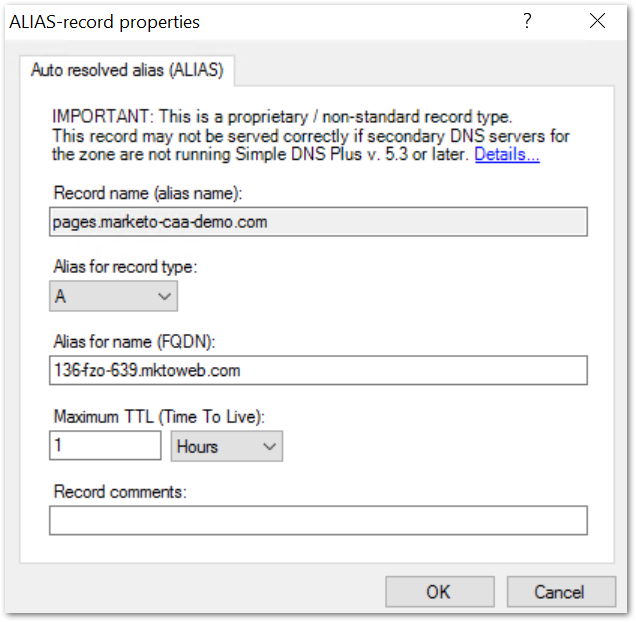
Within DNS control panels, ALIASes are set up much like CNAMEs — a hostname is pointed to its canonical name.
The difference is:
- with standard CNAME resolution, the CNAME is revealed to both the client and the resolver, i.e. the resolver chases each
CNAMEvalue, and the client can see those intermediateCNAMErecords in the response alongside final answers - with ALIAS resolution, only the authoritative nameserver for
example.comknows there was any kind of aliasing; neither the recursor nor the client has any idea there was another lookup
An important CNAME/ALIAS quirk with Marketo in particular
If you’re lucky enough to have ALIAS support, you still need to create a temporary CNAME record in order for LP/branding domains to validate in Marketo. Then after validation, delete it and replace it with an ALIAS.
In SimpleDNS Plus, you’d first create the CNAME:
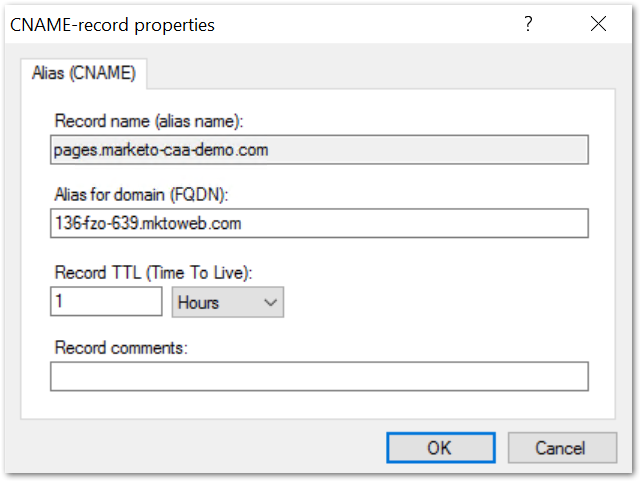
Wait for it to validate in Marketo Admin, then replace it with the ALIAS:
Now that you don’t have a CNAME conflict, create the CAA records:
Notes
[1] Like “High priority: pages.example.com doesn’t support SSL” when it clearly does, they just didn’t double-check their automated audit.
[2] Like “Medium priority: port 443 is open on click.example.com” as if that’s not intentional and required.
[3] Favorite recent one of these is “Medium priority: pages.example.com is not in the HSTS Preload list.” (Only zone apexes like example.com are allowed in HSTS Preload so it’s entirely on the IT team to implement this, not the Marketo admin.)
[4] The current baseline requirements for CAs require CAA enforcement:
4.2.2.1 CAA record processing
As part of the Certificate issuance process, the CA MUST retrieve and process CAA records in accordance with RFC 8659 for eachdNSNamein thesubjectAltNameextension that does not contain an Onion Domain Name.
Note if a CA gets hacked, just removing corresponding CAA records doesn’t invalidate already-issued certs (and since it’s up to the CA operator to enforce CAA, if they get compromised the CAA record has no meaning). But the next thing that happens after such a hack — hopefully very soon after! — is the CA root cert gets revoked in browsers so its issued certs become invalid.
[5] IT balances the threat of Rogue IT with the promise of Rogue IT, that is, that it gives them less to do.😉 If budget is approved and legal is a go, they’ll typically greenlight DNS entries for a SaaS — even a pretty niche one in my experience — if the vendor seems to know what they’re doing. So rather than a hardcore security measure, the DNS CAA entry becomes a common onboarding step.
And once the zone apex’s CAA allows certs from, say, Amazon or Let’s Encrypt, hundreds of other SaaS apps use those popular CAs. Rogues are only stopped if an app uses a CA that isn’t already allow-listed. Account-specific CAA records would prevent this, e.g. this one only authorizes Let’s Encrypt account 123456789, which belongs to a single SaaS provider:
example.com 300 IN CAA 0 issue "letsencrypt.org;validationmethods=http-01;accounturi=https://acme-v02.api.letsencrypt.org/acme/acct/123456789"But if a provider allocates/rotates Let’s Encrypt accounts a lot, it’s impractical to embed an account in the CAA record. If you survey real-world CAA records, they’re likely to allow any account at a given CA:
example.com 300 IN CAA 0 issue "letsencrypt.org"
[6] A case I find fairly compelling is a defunct/orphaned SaaS app where a branded subdomain, say socially.example.com, is still pointing to the app’s IP because no one knew to remove the DNS record. Then a hacker finds a vulnerability that lets accounts use any domain pointed to the platform. (Or maybe the IP address was released and is used by a new platform entirely.)
Without a CAA record, the hacker could use any CA that supports HTTP authentication (i.e. when you upload a file to http://socially.example.com/testfile to prove you control the domain), then serve up a phishing site at https://socially.example.com. With CAA, they’d have to use the same CA used by the now-hacked platform, a smaller attack surface.
[7] SPF used to have its own RRType (SPF/99) but rolling it out proved difficult and it’s no longer used.
[8] More correctly, the right-hand side is the possibly canonical name in the grand lookup scheme. The right-hand side may itself turn out to be an alias once you look it up! Indeed, in Marketo setups, <munchkin subdomain>.mktoweb.com isn’t canonical either: it’s an alias for the A record <subdomain>.mktossl.com and the latter is the canonical name.
[9] To my knowledge, providers like Amazon Route 53 and Google Cloud DNS enable their ALIAS-like feature only if the destination is hosted in the same cloud account. E.g., with Route 53 you can ALIAS whatever.example.com if the origin is behind one of your own CloudFront distributions. But that wouldn’t work for Marketo LP domains, which are behind Adobe’s Cloudflare proxies.
[10] The “server” in “server-side” meaning an authoritative DNS server. Standard CNAMEs are resolved by recursive DNS servers, so they’re also server-side in the broad sense.
Security tidbit: ALIAS means authoritative nameservers perform DNS lookups, albeit secretly. Normally, an authoritative NS doesn’t need outbound network access beyond zone transfers with its peers (other NSes for example.com). But if it’s gonna turn pages.example.com into a bunch of A records, that requires either a local recursor or a connection to an upstream recursor. Not a problem in modern times, but it’s looser than how paranoid sysadmins set things up in the past.