Creating a list based on parameters and date | Community
Skip to main content
Michael_McGowa1
Level 3
July 26, 2019
Solved

Creating a list based on parameters and date

  • July 26, 2019
  • 3 replies
  • 4832 views

On our site there are activities that members take to earn points and then they can use those points to enter drawings.

I would like to send a monthly email based on the following.

  1. List the activities where the status equals “Completed”.
  2. Only show the activities that were completed this month based on the column updatedAt and list them (if there is more than one) in descending order based on the date.
  3. Show the name of the completed activity and the points earned.
  4. Add up the points earned this month and show the total number of points earned.

 Trying to break this project down, I am first trying to get the list of activities a person has completed. However, I am finding that it not only gives me the information in the entire row, it ignores the “Completed” status and gives me activities a person had started as well as completed.

Here’s the code


#if (${sPAdActivity_cList.get(0).activityStatus} == "Completed" )
#set( $activityDescription = ${sPAdActivity_cList.get(0).description})
#else
#end

#set( $pointsEarned = ${sPAdActivity_cList.get(0).points})
#set( $myIndicator = "1")

<table width="600" border="0" cellspacing="0" cellpadding="0" style="border:1px solid #000">
<tr>
<td bgcolor="#005daa" valign="middle" style="font-family:Arial, Helvetica, sans-serif; font-size:13px; padding-left:5px; padding-right:5px; color:#fff; padding-top:5px; padding-bottom:5px;"><strong>Activity</strong></td>
<td bgcolor="#005daa" valign="middle" style="font-family:Arial, Helvetica, sans-serif; font-size:13px; padding-left:5px; padding-right:5px; color:#FFF; padding-top:5px; padding-bottom:5px;"><strong>Points Earned</strong></td>
</tr>
#foreach( $activityDescription in $sorter.sort($sPAdActivity_cList,["updatedAt:desc"]))
#if ($myIndicator == "1") ##This alternates row color if there is more than one row
#set( $rowColor = "#ffffff")
#set( $myIndicator = "0")
#else
#set( $rowColor = "#e6eff8")
#set( $myIndicator = "1")
#end
<tr>
<td bgcolor="$rowColor" valign="middle" style="font-family:Arial, Helvetica, sans-serif; font-size:13px; padding-left:5px; padding-right:5px; color:#000; padding-top:5px; padding-bottom:5px;">$activityDescription</td>
<td bgcolor="$rowColor" valign="middle" style="font-family:Arial, Helvetica, sans-serif; font-size:13px; padding-left:5px; padding-right:5px; color:#000; padding-top:5px; padding-bottom:5px;">$pointsEarned</td>
</tr>
#end
<tr>
<td bgcolor="#005daa" valign="middle" style="font-family:Arial, Helvetica, sans-serif; font-size:13px; padding-left:5px; padding-right:5px; padding-top:5px; padding-bottom:5px; color:#fff;"><strong>Total Points Earned</strong></td>
<td bgcolor="#005daa" valign="middle" style="font-family:Arial, Helvetica, sans-serif; font-size:13px; padding-left:5px; padding-right:5px; color:#fff; padding-top:5px; padding-bottom:5px;"><strong>$totalPoints</strong></td>
</tr>
</table>

Here is what it returns for one person I know has completed only a few offers but started a few more.
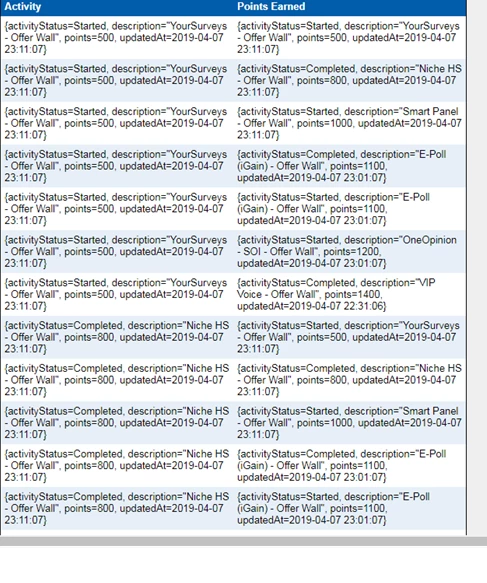
Been at this for a few weeks and not getting anywhere. Any help would be appreciated.

This post is no longer active and is closed to new replies. Need help? Start a new post to ask your question.
Best answer by SanfordWhiteman
## filter sorted list into new list
#set( $completedActivityList = [] )
#foreach( $activity in $sorter.sort($sPAdActivity_cList, ["updatedAt:desc"]) )
#if( $activity.activityStatus.equals("Completed") )
#set( $void = $completedActivityList.add($activity) )
#end
#end
#if( !$completedActivityList.isEmpty() )
#set( $alternateRowColors = ["#e6eff8", "#ffffff"] )
#set( $totalPoints = $math.getTotal( $completedActivityList, "points" ) )
## open <table>
<table width="600" border="0" cellspacing="0" cellpadding="0" style="border:1px solid #000">
<tr>
<td bgcolor="#005daa" valign="middle" style="font-family:Arial, Helvetica, sans-serif; font-size:13px; padding-left:5px; padding-right:5px; color:#fff; padding-top:5px; padding-bottom:5px;"><strong>Activity</strong></td>
<td bgcolor="#005daa" valign="middle" style="font-family:Arial, Helvetica, sans-serif; font-size:13px; padding-left:5px; padding-right:5px; color:#FFF; padding-top:5px; padding-bottom:5px;"><strong>Points Earned</strong></td>
</tr>
## iterate filtered list
#foreach( $activity in $completedActivityList )
#set( $rowColor = $alternateRowColors[$math.mod($foreach.index,2)] )
<tr>
<td bgcolor="${rowColor}" valign="middle" style="font-family:Arial, Helvetica, sans-serif; font-size:13px; padding-left:5px; padding-right:5px; color:#000; padding-top:5px; padding-bottom:5px;">${activity.description}</td>
<td bgcolor="${rowColor}" valign="middle" style="font-family:Arial, Helvetica, sans-serif; font-size:13px; padding-left:5px; padding-right:5px; color:#000; padding-top:5px; padding-bottom:5px;">${activity.points}</td>
</tr>
#end
## close </table>
<tr>
<td bgcolor="#005daa" valign="middle" style="font-family:Arial, Helvetica, sans-serif; font-size:13px; padding-left:5px; padding-right:5px; padding-top:5px; padding-bottom:5px; color:#fff;"><strong>Total Points Earned</strong></td>
<td bgcolor="#005daa" valign="middle" style="font-family:Arial, Helvetica, sans-serif; font-size:13px; padding-left:5px; padding-right:5px; color:#fff; padding-top:5px; padding-bottom:5px;"><strong>$totalPoints</strong></td>
</tr>
</table>
#end‍‍‍‍‍‍‍‍‍‍‍‍‍‍‍‍‍‍‍‍‍‍‍‍‍‍‍‍‍‍‍

Please remember/realize that anytime you refer to index [0] you're talking about the initial (zero-th) item in the list. That doesn't represent any kind of filtering, you're just focusing on that item at that moment. Doesn't change the underlying list.

3 replies

SanfordWhiteman
Level 10
July 26, 2019

At no point in there are you actually filtering on Completed.

But can you please highlight the code using the Syntax Highlighter? Then we'll continue and I'll show you how it's done.

Michael_McGowa1
Level 3
July 26, 2019
#if (${sPAdActivity_cList.get(0).activityStatus} == "Completed" )
#set( $activityDescription = ${sPAdActivity_cList.get(0).description})
#else
#end

#set( $pointsEarned = ${sPAdActivity_cList.get(0).points})
#set( $myIndicator = "1")

<table width="600" border="0" cellspacing="0" cellpadding="0" style="border:1px solid #000">
<tr>
<td bgcolor="#005daa" valign="middle" style="font-family:Arial, Helvetica, sans-serif; font-size:13px; padding-left:5px; padding-right:5px; color:#fff; padding-top:5px; padding-bottom:5px;"><strong>Activity</strong></td>
<td bgcolor="#005daa" valign="middle" style="font-family:Arial, Helvetica, sans-serif; font-size:13px; padding-left:5px; padding-right:5px; color:#FFF; padding-top:5px; padding-bottom:5px;"><strong>Points Earned</strong></td>
</tr>
#foreach( $activityDescription in $sorter.sort($sPAdActivity_cList,["updatedAt:desc"]))
#if ($myIndicator == "1") ##This alternates row color if there is more than one row
#set( $rowColor = "#ffffff")
#set( $myIndicator = "0")
#else
#set( $rowColor = "#e6eff8")
#set( $myIndicator = "1")
#end
<tr>
<td bgcolor="$rowColor" valign="middle" style="font-family:Arial, Helvetica, sans-serif; font-size:13px; padding-left:5px; padding-right:5px; color:#000; padding-top:5px; padding-bottom:5px;">$activityDescription</td>
<td bgcolor="$rowColor" valign="middle" style="font-family:Arial, Helvetica, sans-serif; font-size:13px; padding-left:5px; padding-right:5px; color:#000; padding-top:5px; padding-bottom:5px;">$pointsEarned</td>
</tr>
#end
<tr>
<td bgcolor="#005daa" valign="middle" style="font-family:Arial, Helvetica, sans-serif; font-size:13px; padding-left:5px; padding-right:5px; padding-top:5px; padding-bottom:5px; color:#fff;"><strong>Total Points Earned</strong></td>
<td bgcolor="#005daa" valign="middle" style="font-family:Arial, Helvetica, sans-serif; font-size:13px; padding-left:5px; padding-right:5px; color:#fff; padding-top:5px; padding-bottom:5px;"><strong>$totalPoints</strong></td>
</tr>
</table>

Here is the code in the syntax highlighter.

SanfordWhiteman
Level 10
July 26, 2019

Switch to Java maybe?

SanfordWhiteman
Level 10
July 26, 2019

OK, I can work with that. Will post the code when I get home in a couple of hours.

SanfordWhiteman
SanfordWhitemanAccepted solution
Level 10
July 27, 2019
## filter sorted list into new list
#set( $completedActivityList = [] )
#foreach( $activity in $sorter.sort($sPAdActivity_cList, ["updatedAt:desc"]) )
#if( $activity.activityStatus.equals("Completed") )
#set( $void = $completedActivityList.add($activity) )
#end
#end
#if( !$completedActivityList.isEmpty() )
#set( $alternateRowColors = ["#e6eff8", "#ffffff"] )
#set( $totalPoints = $math.getTotal( $completedActivityList, "points" ) )
## open <table>
<table width="600" border="0" cellspacing="0" cellpadding="0" style="border:1px solid #000">
<tr>
<td bgcolor="#005daa" valign="middle" style="font-family:Arial, Helvetica, sans-serif; font-size:13px; padding-left:5px; padding-right:5px; color:#fff; padding-top:5px; padding-bottom:5px;"><strong>Activity</strong></td>
<td bgcolor="#005daa" valign="middle" style="font-family:Arial, Helvetica, sans-serif; font-size:13px; padding-left:5px; padding-right:5px; color:#FFF; padding-top:5px; padding-bottom:5px;"><strong>Points Earned</strong></td>
</tr>
## iterate filtered list
#foreach( $activity in $completedActivityList )
#set( $rowColor = $alternateRowColors[$math.mod($foreach.index,2)] )
<tr>
<td bgcolor="${rowColor}" valign="middle" style="font-family:Arial, Helvetica, sans-serif; font-size:13px; padding-left:5px; padding-right:5px; color:#000; padding-top:5px; padding-bottom:5px;">${activity.description}</td>
<td bgcolor="${rowColor}" valign="middle" style="font-family:Arial, Helvetica, sans-serif; font-size:13px; padding-left:5px; padding-right:5px; color:#000; padding-top:5px; padding-bottom:5px;">${activity.points}</td>
</tr>
#end
## close </table>
<tr>
<td bgcolor="#005daa" valign="middle" style="font-family:Arial, Helvetica, sans-serif; font-size:13px; padding-left:5px; padding-right:5px; padding-top:5px; padding-bottom:5px; color:#fff;"><strong>Total Points Earned</strong></td>
<td bgcolor="#005daa" valign="middle" style="font-family:Arial, Helvetica, sans-serif; font-size:13px; padding-left:5px; padding-right:5px; color:#fff; padding-top:5px; padding-bottom:5px;"><strong>$totalPoints</strong></td>
</tr>
</table>
#end‍‍‍‍‍‍‍‍‍‍‍‍‍‍‍‍‍‍‍‍‍‍‍‍‍‍‍‍‍‍‍

Please remember/realize that anytime you refer to index [0] you're talking about the initial (zero-th) item in the list. That doesn't represent any kind of filtering, you're just focusing on that item at that moment. Doesn't change the underlying list.

Michael_McGowa1
Level 3
July 29, 2019

When I tested the code I am seeing this.

The field names are correct but can't figure why I am getting this result. 

Michael_McGowa1
Level 3
July 29, 2019

D'oh! That was the problem. Forgot to check those fields.

Thank you Sanford. Marking this as correct.