Hi @nishanth27
Each Email Program can only have one single A/B test. And it is not possible to nest one Email Program in another Email Program.
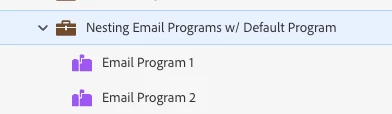
What you could do is creating a Default Program and nest 2 separate Email Programs in that Default one.
Another way of working with multiple A/B tests in a Program, is working with Smart Campaigns and the following elements:
- Creating samples and adding the records to a Static List (the filter you use in your Smart List criteria is called "Random Sample")
- A Smart Campaign to send version A to the first random sample you created (Static List n°1) and to send the B version to the second random sample you created (Static List n°2). Of course you can expand this depending on how many versions you'd like to test.
As you can see, this requires a little more manual effort.
Hope this helps you going in the right direction.
Don't hesitate to reach out in case you have more questions on this.
Happy to help.
Kind regards,
Ilona