Conditionally fill hidden form fields only if they are blank | Community
Skip to main content
Level 2
March 25, 2026
Solved

Conditionally fill hidden form fields only if they are blank

  • March 25, 2026
  • 2 replies
  • 24 views

Is there a way to add a default value to a hidden field only if the field is blank in the database? So if the person is a known record, the hidden field should get the default value only if it didn’t have a recorded value initially. If there was a recorded value initially, it should not be overwritten by the default value.
 

Best answer by Darshil_Shah1

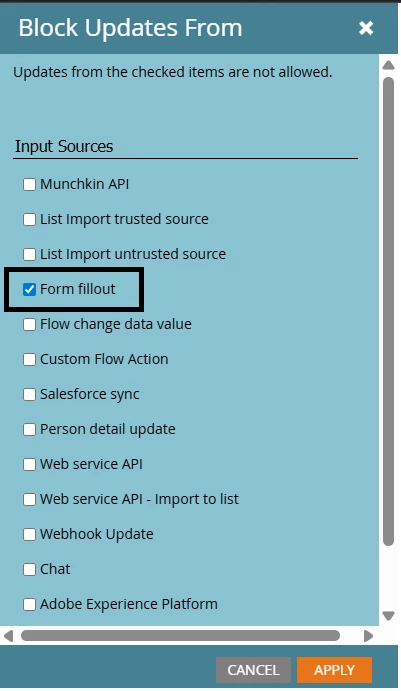
Well, if this is the requirement for all the forms using this field, then you can block field updates from being filled out (Marketo Admin > Field Management > Select Field > Field Actions > Block Updates From). The idea is to let this field be populated once and never again.

Also, if you want the update to be blocked from other sources too (other than form fill, then you can select more input sources too). You might want to allow the Change Data Value flow step to update the field, as it may be an intentional way to change the value when other methods are blocked.

2 replies

Darshil_Shah1
Community Advisor and Adobe Champion
Darshil_Shah1Community Advisor and Adobe ChampionAccepted solution
Community Advisor and Adobe Champion
March 25, 2026

Well, if this is the requirement for all the forms using this field, then you can block field updates from being filled out (Marketo Admin > Field Management > Select Field > Field Actions > Block Updates From). The idea is to let this field be populated once and never again.

Also, if you want the update to be blocked from other sources too (other than form fill, then you can select more input sources too). You might want to allow the Change Data Value flow step to update the field, as it may be an intentional way to change the value when other methods are blocked.

SanfordWhiteman
Level 10
March 25, 2026

(Obviously Darshil knows this, but others might not be as clear.)


When you use Block Field Updates, that doesn’t actually change whether the hidden input on the form is filled in or not — the browser side doesn’t directly know/care about Block Field Updates. But if Block Field Updates is enabled, then even if the <input type="hidden"> has a value, it will be ignored on the server side instead of being processed, which matches your requirement.