
Venus_Wills
Level 3
September 6, 2013
Solved

Company Name Keeps Changing

  • September 6, 2013
  • 12 replies
  • 6485 views
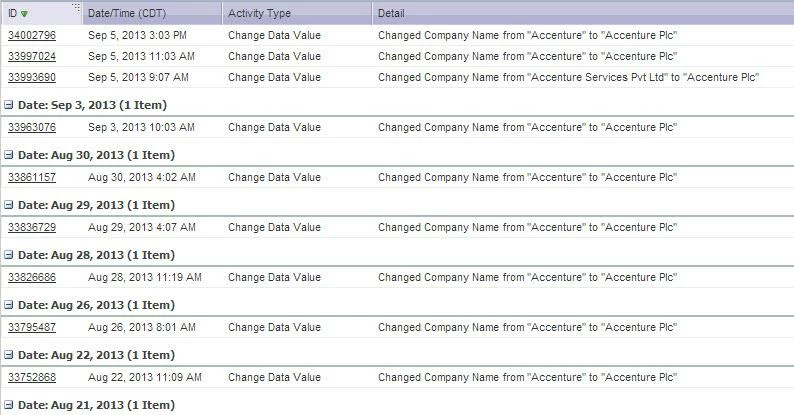
We’ve continuously had this issue where Marketo keeps changing the company name field in our database. For example, say a lead is from Accenture. The correct account name in SFDC is "Accenture Plc." That field is almost never correct in Marketo. It rotates through all the different versions of the name that has been entered into our system through forms, list uploads, etc. Sometimes it reads “Accenture” and sometimes “accenture.” In the activity log, it shows that whenever Marketo is synced with SFDC, it keeps trying to change it back to "Accenture Plc." See image below.
 
We’ve contacted customer support but was told that SFDC is source of the change. If you look at the image, it never logs when "Accenture Plc" is changed to "Accenture" but only the other way around. If SFDC and Marketo are syncing correctly, the company name should always be "Accenture Plc."


Any insight is greatly appreciated!


This post is no longer active and is closed to new replies. Need help? Start a new post to ask your question.
Best answer by Mike_Reynolds2

When a field value on the Company/Account object is changed, all lead records associated to the same Company/Account inside of Marketo will have that change made to them as well. The problem we find is that the Change Data Value activity is only logged on the individual lead record where the change was actually made. All other leads associated to the same Company/Account that got the change due to that association will not show the Data Value Change activity at all.

Since SFDC is the owner of the Account object, the next time it syncs, the value from the SFDC side will overwrite the other value. That's why you don't see the value change to the wrong value but do see the correct value coming down from SFDC.

12 replies

Mike_Reynolds2
Mike_Reynolds2Accepted solution
Level 10
September 28, 2015

When a field value on the Company/Account object is changed, all lead records associated to the same Company/Account inside of Marketo will have that change made to them as well. The problem we find is that the Change Data Value activity is only logged on the individual lead record where the change was actually made. All other leads associated to the same Company/Account that got the change due to that association will not show the Data Value Change activity at all.

Since SFDC is the owner of the Account object, the next time it syncs, the value from the SFDC side will overwrite the other value. That's why you don't see the value change to the wrong value but do see the correct value coming down from SFDC.

June 24, 2016

How can we prevent this @Mike Reynolds​? I understand what is happening but I want to prevent it FROM happening.  Would blocking all Account info from any sort of Non-SFDC Updates solve the issue?

Mike_Reynolds2
Level 10
June 24, 2016

Dan Donin​ Blocking field updates would stop existing field values from being changed. Check this doc for how: Block Updates to a Field - Marketo Docs - Product Docs

Thing to remember though is that this will stop updates to fields only. Brand new values being put in will not be blocked because they're an insert of a new value, not an update to an existing value. So if a new lead comes in with the same company info but has a different value for a field on the Company/Account object, if it's the first new insert of the value into the field, it could still have the same effect.

I'd personally love to see that behavior changed. Best recommendation I can make to that point would be to submit it as an idea in the Ideas section of the Community here.

Dan_Stevens_
Level 10
June 8, 2018

I realize this is an older thread, but here’s a great explanation from @Paul Wilson​ on why this is happening (at least on the MS Dynamics side - and suspect it’s the same for SFDC).


[Accounts Tip] Company Name Mismatch