Clicks Link in Email with Token Workarounds | Community
Skip to main content
bbhenry-arria
Level 2
March 11, 2022
Solved

Clicks Link in Email with Token Workarounds

  • March 11, 2022
  • 2 replies
  • 4436 views

Hi everyone,

My company is sending people links to download content after they submit a form. I have a token used for that link, {{my.DownloadLink}}. The link is properly inserted into the email as {{my.DownloadLink}}, the content has the mtk_tok tracking present when I click on the link in the email, and that click gets registered in the person's activity log/fires off Clicks Link programs that are not link-specific.


What's driving me crazy is that I can't seem to trigger a smart campaign using Clicks Link in Email targeting this token...

  • Link is {{my.DownloadLink}} doesn't work
  • Link contains {{my.DownloadLink}} doesn't work
  • Link contains {{my.DownloadLink}} doesn't work

Basically the only way I could get this smart campaign to fire is to use Link contains and then a part of the actual URL, like go.domain.com/rs/123-ABC-456/images/.


Is there a better way to do this, preferably in a "set-and-forget" way so all my team has to do is change the token value when cloning the campaign and everything will work as expected?

Thanks!
Best answer by SanfordWhiteman

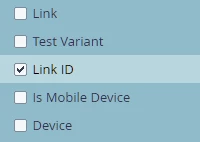
Set the id attribute on your links, then use the Link ID constraint:

This is a shockingly underused feature! All email CTAs should have a (unique) id.

2 replies

Darshil_Shah1
Community Advisor and Adobe Champion
March 11, 2022

Well, Marketo doesn't resolve the tokens when used in the smart list (filters/triggers). The trigger doesn't capture and resolve the name of the token, it only captures the actual resolved text, i.e. the actual link. There's a idea regarding the ability to use the tokens in the SL here - if you wanna vote. 🙂

There's a probable workaround to use a # value appended to the end of the URL token and use the # value in the trigger with contains operator.

e.g., {{my.linkToSomepage}}#linkToSomepage

SanfordWhiteman
Level 10
March 11, 2022

Adding the hash is definitely not recommended as that will break Munchkin tracking because the URL is incorrectly parsed. (Click tracking doesn't use Munchkin so it will still work, leading you to think the whole process worked.)

SanfordWhiteman
SanfordWhitemanAccepted solution
Level 10
March 11, 2022

Set the id attribute on your links, then use the Link ID constraint:

This is a shockingly underused feature! All email CTAs should have a (unique) id.

Darshil_Shah1
Community Advisor and Adobe Champion
March 11, 2022

Ohh gotcha! good to know, thank you @sanfordwhiteman !