
Question
"Clicks link" choice within flow step does not work
I have a landing page containing two different links. Within the smart campaign, there is a "Change program status" flow step containing two choices - and based on the link that is clicked, the appropriate program status should change. When I find the attribute "Click link", I see this:
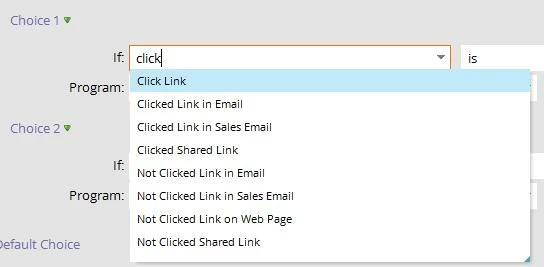
But when I select it, it changes to "clicked link on Web Page". What happened to the "Click Link"?
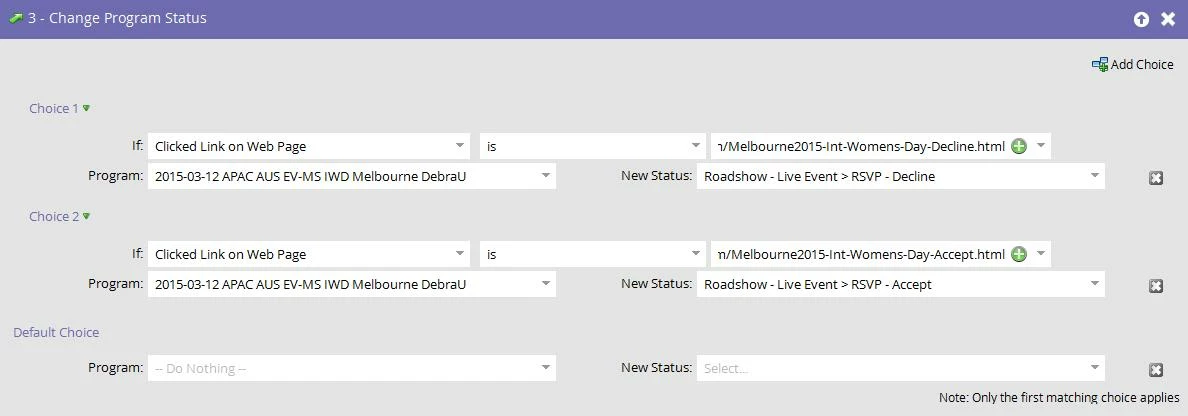
Furthermore, when testing, the lead will always qualify for the first choice - regardless of what link the user clicks on. Which leads me to believe this choice is not looking for a specific link (as desired/expected), and instead is looking for a web page. That's not what I want here. Marketo provides no documentation at this level so I'm unclear on where to go from here. And I can't use a trigger in the smart list since I already have it configured as "if user clicks on any of the two links" proceed to the flow.
Is this not working properly or does Marketo not offer a "Choice" within a flow step to determine a specific link that has been clicked?
But when I select it, it changes to "clicked link on Web Page". What happened to the "Click Link"?
Furthermore, when testing, the lead will always qualify for the first choice - regardless of what link the user clicks on. Which leads me to believe this choice is not looking for a specific link (as desired/expected), and instead is looking for a web page. That's not what I want here. Marketo provides no documentation at this level so I'm unclear on where to go from here. And I can't use a trigger in the smart list since I already have it configured as "if user clicks on any of the two links" proceed to the flow.
Is this not working properly or does Marketo not offer a "Choice" within a flow step to determine a specific link that has been clicked?