Click to Pop Up a Form - Code isn't Working | Community
Skip to main content
Level 7
December 12, 2016
Solved

Click to Pop Up a Form - Code isn't Working

  • December 12, 2016
  • 2 replies
  • 5784 views

Hello,

I'd like to set up a form so that it pops up after clicking on a link, but I'm having trouble with the following code.
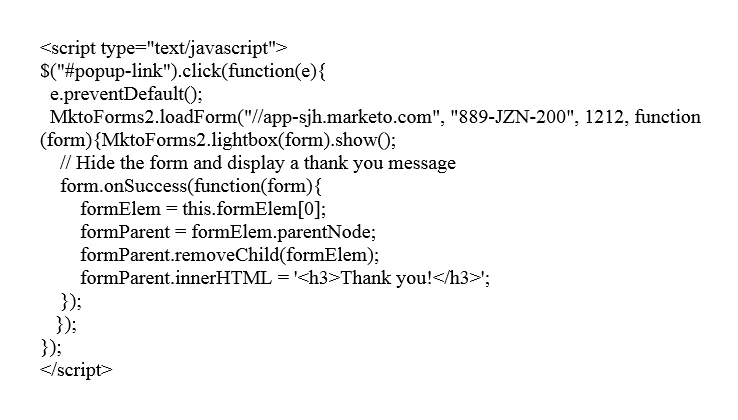
I added this snippet of code (above) to my landing page.

Then I added an HTML element containing the following form embed code:

Then I added a link to the landing page containing the following HTML:

<div><a href="" id="popup-link">Click here</a></div>

I approved the landing page and tested, and thought that the form would pop up once I clicked on that link, but nothing happens when I click on the link.

Please let me know if I am setting this up the wrong way.

Thanks in advance,

Tom

This post is no longer active and is closed to new replies. Need help? Start a new post to ask your question.
Best answer by SanfordWhiteman

Console error:

You have, to your credit (since I hate jQuery passionately) not included jQ in the page but the code you're using has a jQ dependency.

You don't need the jQuery shortcuts at all:

document.querySelector('#popup-link').addEventListener('click', function(e){

  e.preventDefault();

  MktoForms2.loadForm("//app-abk.marketo.com", "450-PSA-364", 479, function (form){

    MktoForms2.lightbox(form).show();

    form.onSuccess(function(form){

        var formElem = form.getFormElem()[0],

          formParent = formElem.parentNode;

        formParent.removeChild(formElem);

        formParent.innerHTML = '<h3>Thank you!</h3>'; 

    });

   });

});

Note the original code doesn't use var, which is not good.

2 replies

Level 5
December 12, 2016

Hi Tom,

For this to work you need to replace your Munchkin Account ID and the Form ID:

Currently it says ("//app-sjh.marketo.com", "889-JZN-200", 1212, you need to replace this part with the string for your specific form.

Right click on your form, click Embed Code and then copy paste the string from there. It should be unique to your instance (Munchkin ID) and the form you are referring to (1212 - Should be your own ID).

Also make sure to include ("//app-sjh.marketo.com", from your own instance as that varies depending on the instance.

/Erik

Level 7
December 12, 2016

Hi Erik,

Yes, actually I did replace the Munchkin Account ID as well as the Form ID. I just copied and pasted the example that was listed on the document you found online, to see if there was anything potentially missing in that example.

Tom Kerlin
SanfordWhiteman
Level 10
December 12, 2016

Please post a URL so we don't have to troubleshoot screenshots... I'm sure it's not that nothing is happening, but that there's an error in your browser console.

Level 5
December 12, 2016

I did a Google search and it's from this post Advanced Marketo Form Techniques so just needs a switch of the IDs as long as the other steps were followed.

SanfordWhiteman
Level 10
December 12, 2016

Thanks for the legwork, but I stand by my comment.

(The error would be "Form ID 1212 not found".)