Chrome error causing embedded Marketo form to not display
We have had a Chrome problem for a while and are trying to get to the bottom of it. Most people do not have issues, but for some employees (and not all the time) there is an issue with embedded Marketo forms not displaying. We are concerned this is happening with others as well so are trying to dig in further. It is only Chrome that has the problem. The page is: https://ontic.co/demo-request/ although other pages with Marketo forms also have the same issue (when someone is having this problem). Here’s the console errors when this is happening.
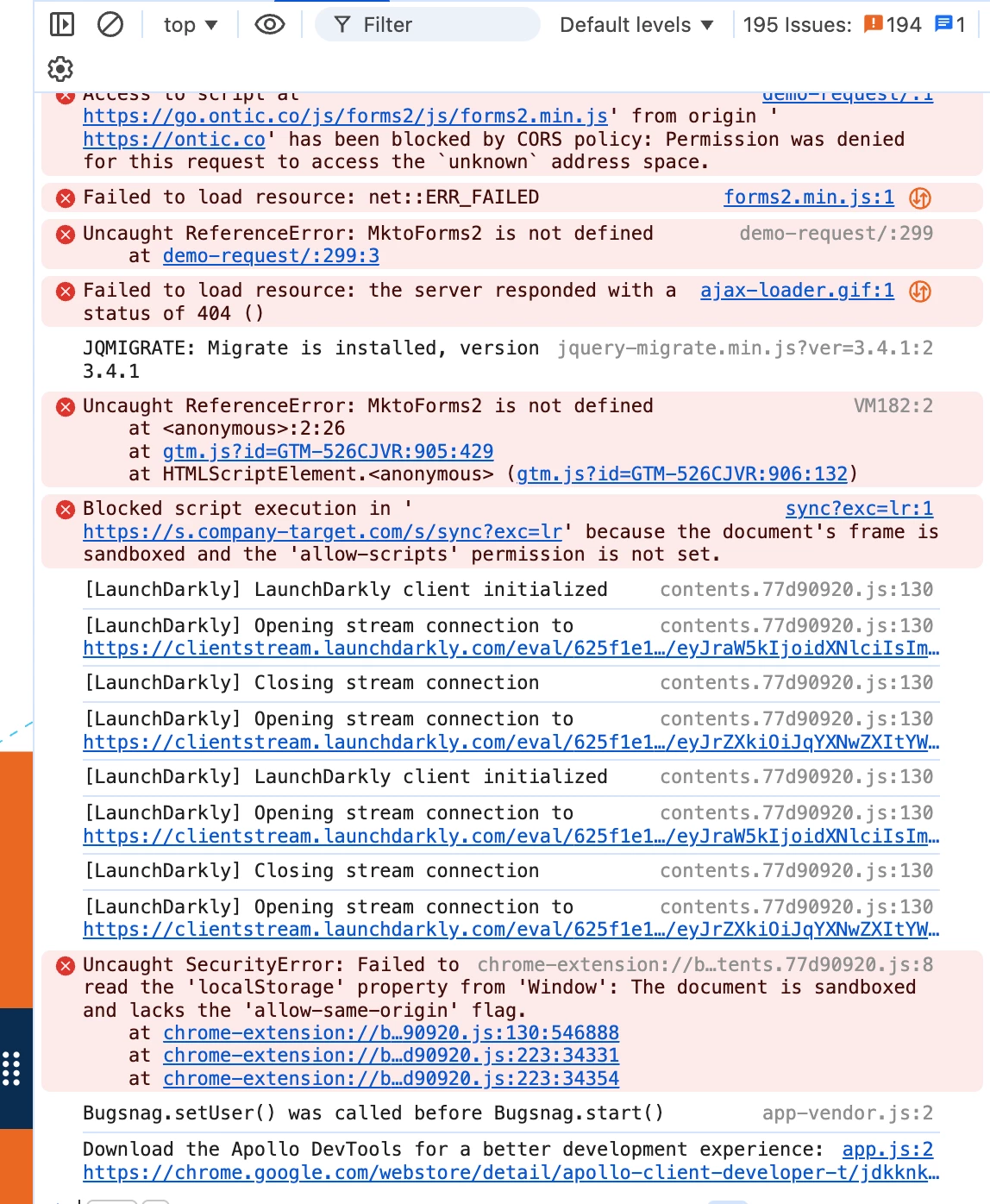
From a Gemini search, one of the suggestions is that we need to:
update the Access-Control-Allow-Private-Network: true header added to the preflight (OPTIONS) response for our instance in the CNAME. Because go.ontic.co is managed by Marketo's infrastructure, you often have to reach out to their technical support. They recently updated their infrastructure to handle this for many customers, but older instances or specific CNAME setups sometimes get missed.
This instance is from 2021 so it is older, but not that old. Does this make sense? I haven’t been able to figure out how to see if the Access-Control-Allow-Private-Network is set to true.
If this is correct, happy to ask Marketo Support to fix. Just want to see if there are any other ideas on what is happening.