
Choice Condition Glossary | Community
Skip to main content
Alex_Foster
Level 1
October 16, 2019
Question

Choice Condition Glossary

  • October 16, 2019
  • 5 replies
  • 4097 views

Hi Community, 

Is there a choice condition glossary available to determine the meaning of the choice conditions? Some of these are awkwardly worded and I am struggling to discern the meaning of a few. 

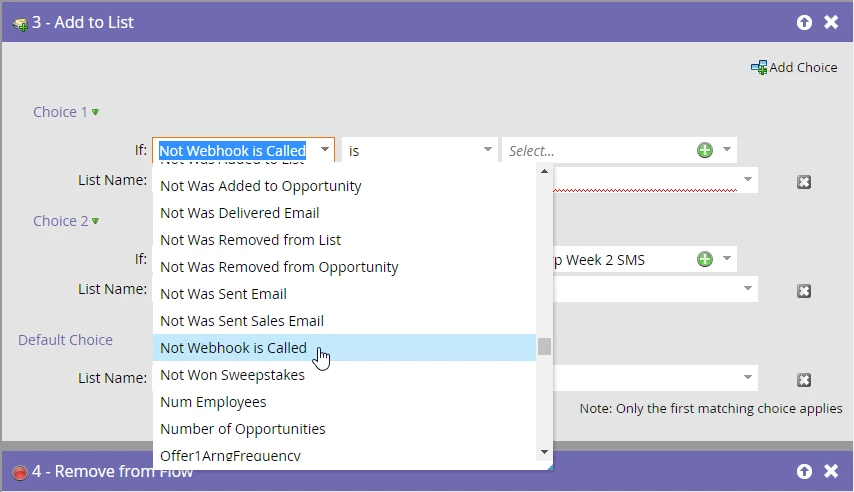
If something like that doesn't exist, could someone please let me know what "Not Webhook is Called" means? I assumed it meant if the selected Webhook wasn't called, do X (in my case, add the person to a list). However it hasn't done that (it just skipped the flow step), and I can't figure out what it actually does. 
Many thanks, 

This post is no longer active and is closed to new replies. Need help? Start a new post to ask your question.

5 replies

Josh_Pickles
Level 5
October 16, 2019

Hi Alex,

Not statements in the rules generally refer to people who have not taken an action, so in this instance, everybody on your database who runs through this who has not had this webhook called will be added to the list.

SanfordWhiteman
Level 10
October 16, 2019

Continuing Josh's response and adding my own take, in general the activity-related choices create more confusion than they're worth, as they can (and usually do) refer to activities that have nothing to do with the current campaign.

Jay_Jiang
Level 10
October 16, 2019

One word of caution, there are limitations to using choices in the flow step versus using the same filters/triggers in smart lists.

An example and something else to be weary of: 'Not webhook is called' is not the same as 'webhook is called' with constraint Error Type = HTTP Error 400: Bad URL request. <= you can't add constraints in your flow step choices

Lastly, choices are filters and if you're trying run activities through choices when you only want to match the most recent instance of that activity, you can't, because it will return true as long as any historical activities match the criteria.

Alex_Foster
Level 1
October 16, 2019

Hi guys, 

Thanks for the quick response. 

I assumed that the choice condition referred to the previous flow step, however as Jay pointed out, I'm guessing Marketo checked to see if the Webhook had ever been sent to that account (I had previously sent this SMS to them as they were test accounts). 

I filtered our database into lists before sending comms and this seems to have solved the problem. 

Btw, is there actually a glossary for filters/triggers, like they have for icons, or do you need to just figure them out over time? 

Thanks again, 

SanfordWhiteman
Level 10
October 16, 2019
I assumed that the choice condition referred to the previous flow step, however as Jay pointed out, I'm guessing Marketo checked to see if the Webhook had ever been sent to that account (I had previously sent this SMS to them as they were test accounts).

Not "had ever been" exactly, but had been called in the past 25 months.

Chris_Willis1
Adobe Champion
Adobe Champion
October 17, 2019

When all else fails, use "Member of Smart List" as your choice filter.  Creating smart lists allow you to extend the functionality of the "choice" options and customize your criteria in a smart list you create.  

Chris Willis - Fractional GTM Operations Consultant