Changing Status in SFDC | Community
Skip to main content
Emma_Malecker
Level 2
March 2, 2018
Solved

Changing Status in SFDC

  • March 2, 2018
  • 2 replies
  • 2591 views

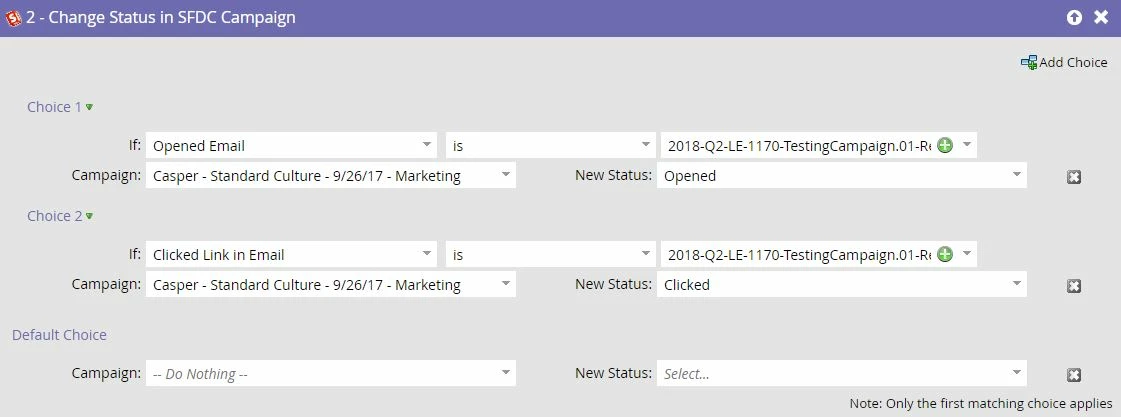
We put on live events and we pull the information from the designated SFDC. We normally have two campaigns, one for marketing and one for the actual roster. I have figured out how to change it from sent to opened to clicked but we want to make sure once they are marked registered we don't want that status to be changed. Is there a way to not change the status if the person is marked registered?

Here is a screenshot of what I have figured out so far. Obviously the default choice would be sent.

Any suggestions would be appreciated!

Thanks!
This post is no longer active and is closed to new replies. Need help? Start a new post to ask your question.
Best answer by Gerard_van_den_

for Webinars, which is a similar case, I use the Program Status to keep track of who was invited, who registered, who attended etc. The big advantage of Program Statuses (defined by the Tags in the Admin section) is that People can only move forward through statuses and not backwards. Once the Program Status is set correctly based on the lead's activity, you can use a Smart Campaign that triggers when the Program Status has actually changed, and set the SFDC campaign status accordingly to the Program Status reached at that moment. Maybe that might be a solution for you too?

2 replies

Grégoire_Miche2
Level 10
March 2, 2018

Hi Emma,

The only secure way to lock these is through validation rules in Salesforce.

You could also create some smart campaign in Marketo that undo any unwanted change, but that will be less efficient, although easier to implement.

-Greg

Gerard_van_den_
Gerard_van_den_Accepted solution
Level 3
March 5, 2018

for Webinars, which is a similar case, I use the Program Status to keep track of who was invited, who registered, who attended etc. The big advantage of Program Statuses (defined by the Tags in the Admin section) is that People can only move forward through statuses and not backwards. Once the Program Status is set correctly based on the lead's activity, you can use a Smart Campaign that triggers when the Program Status has actually changed, and set the SFDC campaign status accordingly to the Program Status reached at that moment. Maybe that might be a solution for you too?

Emma_Malecker
Level 2
March 5, 2018

Thank you!