Changing engagement program stream | Community
Skip to main content
Pierre_Lintzer
Level 2
February 13, 2018
Solved

Changing engagement program stream

  • February 13, 2018
  • 7 replies
  • 7426 views

Hi,

I'm having difficulty transitioning leads from one stream to another in an engagement program.

I have 2 streams, one "Awareness" and one "Investigate and Compare". I want the leads to transition to the second one once the content in the first one is exhausted.

Here is a screen shot of my setup:
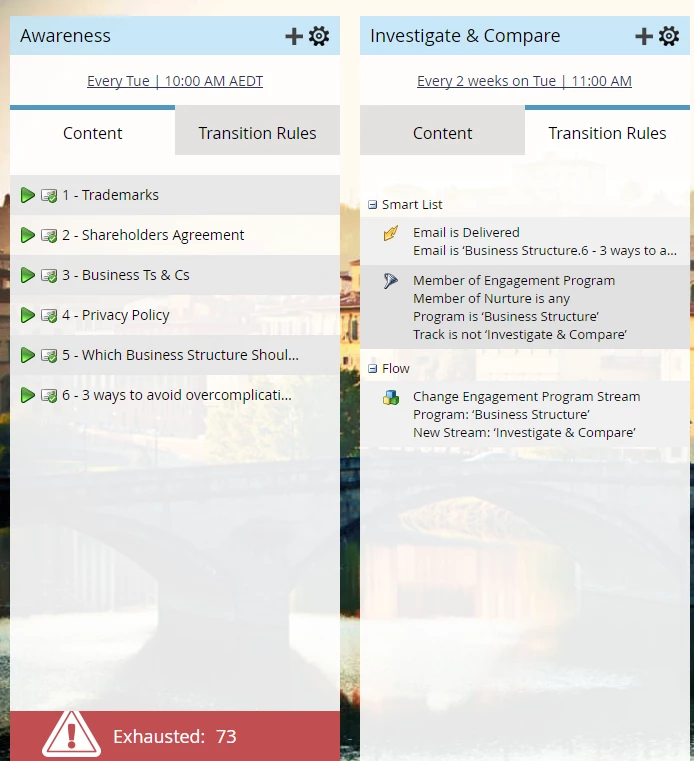
The 73 exhausted leads did not transition to the 2nd stream.
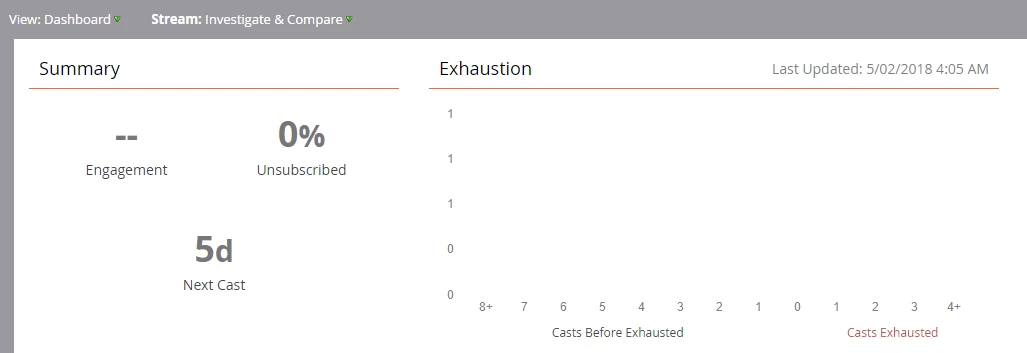
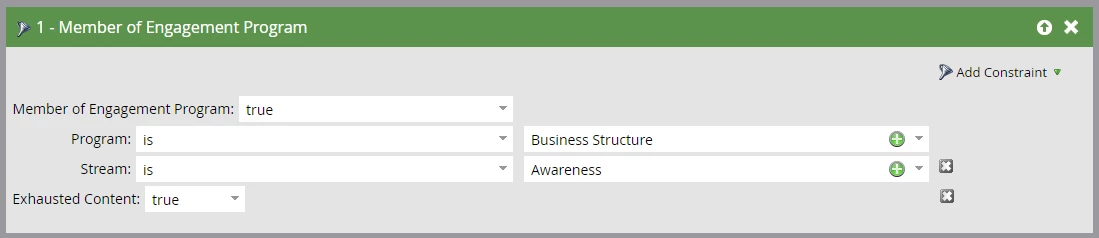
Now even more confusing, I set up a smart campaign to "manually" move leads to the other stream, with the below settings:

Smart List:
Flow:

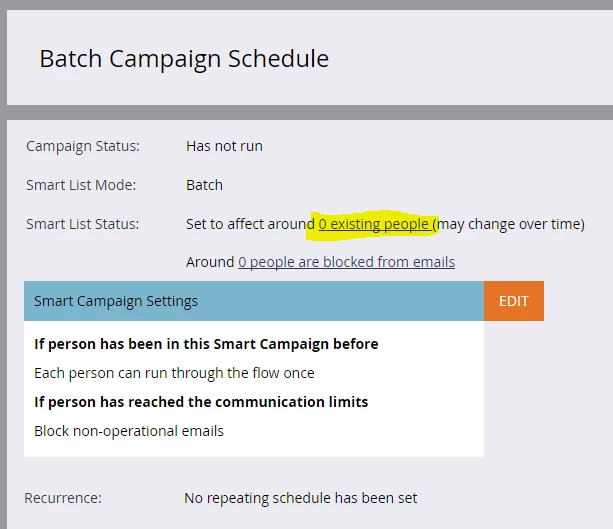
and in the Schedule tab, I see that 0 people will be affected by the smart campaign, when I am expecting to see 73:
Anyone has any idea what I could be missing?

Thanks

This post is no longer active and is closed to new replies. Need help? Start a new post to ask your question.
Best answer by Grégoire_Miche2

Dan is right, do not use transition rules. Use batch smart campaigns instead. They are far easier to debug. The filtered SC you have created is correct.

The fact that your SC not yielding any member means that the leads have necessarily be moved out of the stream or are no longer exhausted.

Create a smart list with all leads that have been sent the email 6-3, and examine their activity logs, this is the only way to know what happened and stop speculating

-Greg

7 replies

keithnyberg
Level 7
February 14, 2018

nothing sticks out immediately. if you create a smart list with the same filter you defined above do 73 people show? can you also confirm you don't see anyone in the Investigate and Compare stream when the "People" view is selected as opposed to "Content"?

Pierre_Lintzer
Level 2
February 14, 2018

Hi Keith, thanks for taking the time to answer.

Creating the smart list doesn't help, but if I get rid of the "Exhausted Content" constraint, I can see every lead in the stream, so I suspect the problem comes from this field. I have raised a support ticket.

Also confirming no one is in the other stream under the people view.

Dan_Stevens_
Level 10
February 14, 2018

This isn't a solution, per se, but once you figure out this issue, it's recommended to use smart campaigns to move your leads between streams (rather than transition rules).  More flexible and just easier to use.

February 14, 2018

It could be because in your transition rules smart list, you're using a filter to indicate exhausted content, not a trigger.

Pierre_Lintzer
Level 2
February 14, 2018

Thanks Courtney. I'm actually using a trigger (email is delivered) in the transition rule smart list.

Exequiel_Carriz
Level 2
February 15, 2018

I would change that trigger for a filter with something along "Was sent [Last Email Name]"

Adolfo_Correa
Level 2
February 22, 2018

Sound like an option. Could you explain the logic behind it? Why would it work vs a "delivered" trigger? Have you tried it?

David_Jackman1
Level 2
February 22, 2018

Unless I'm missing a reason for having both a transition rule and smart campaign that moves the exhausted people along, you may want to try removing the "Email is delivered" trigger in transition rule, and then delete and then re-set up your smart campaign to refresh.

I imagine Marketo is likely seeing two separate conditions for moving a person from Stream 1 to Stream 2 and therefore, not taking any action there. Though having been delivered the last email in the stream seems close enough to being exhausted from our point of view, technically these are not the same as there could be conditions that would differentiate them (ex: new content being dropped into the stream--into the last email position--before the person received what was supposed to be the last one, etc).

Hope that helps!

Grégoire_Miche2
Grégoire_Miche2Accepted solution
Level 10
February 23, 2018

Dan is right, do not use transition rules. Use batch smart campaigns instead. They are far easier to debug. The filtered SC you have created is correct.

The fact that your SC not yielding any member means that the leads have necessarily be moved out of the stream or are no longer exhausted.

Create a smart list with all leads that have been sent the email 6-3, and examine their activity logs, this is the only way to know what happened and stop speculating

-Greg

Trish_Voskovitc
Level 5
May 23, 2018

Hi Gregoire,

As there is no trigger for was sent email (and using name of last email in stream) - only a regular filter -  is the suggestion we create batch smart campaign and then set it up to run every day or week or whatever is appropriate to catch newly exhausted content?

I was hoping there was a way to trigger on content exhausted so happens in real time versus setting up a batch schedule.

Trish.

Trish_Voskovitc
Level 5
May 17, 2018

Hi Pierre,

As there is no trigger for was sent email (and using name of last email in stream) - only a regular filter is the suggestion we create batch smart campaign and then set it up to run every day or week or whatever is appropriate to catch newly exhausted content?

I was hoping there was a way to trigger on content exhausted so happens in real time versus setting up a batch schedule.

Trish.