Changing a background color to an image in a guided landing page | Community
Skip to main content
January 15, 2016
Solved

Changing a background color to an image in a guided landing page

  • January 15, 2016
  • 1 reply
  • 2785 views

Hi,

I'm trying to change the marketo hero background color to an image and want to be able to change the image on the template.

Is this possible?

Can the mktoImg class be defined as a variable then used in the CSS?

I'm trying to declare it:

<meta class="mktoImg" id="hero-bg" mktoName="Hero BG Img" default="#">

But I don't think I'm doing it right:
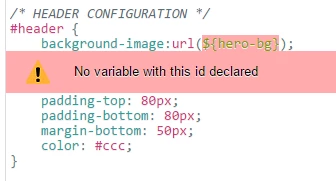
If there's a way to do it, could someone provide a tutorial?

cheers,

Marilyn

This post is no longer active and is closed to new replies. Need help? Start a new post to ask your question.
Best answer by Grégoire_Miche2

Hi Marylin,

The "MktoImg" only serves to create an editable image element in your LP. YOu cannot use it as a variable.

To do what you want to do, you need to declare a String variable in the header. Something in the line of :

<meta class="mktoString" id="hero-bg" mktoName="Background Image URL" default="Set here a default image" allowHtml="false">

-Greg

1 reply

Grégoire_Miche2
Grégoire_Miche2Accepted solution
Level 10
January 15, 2016

Hi Marylin,

The "MktoImg" only serves to create an editable image element in your LP. YOu cannot use it as a variable.

To do what you want to do, you need to declare a String variable in the header. Something in the line of :

<meta class="mktoString" id="hero-bg" mktoName="Background Image URL" default="Set here a default image" allowHtml="false">

-Greg