
Changes to Marketo Salesforce Sync – Questions and Discussion | Community
Skip to main content
Mike_Reynolds2
Level 10
August 5, 2016
Question

Changes to Marketo Salesforce Sync – Questions and Discussion

  • August 5, 2016
  • 43 replies
  • 21472 views

Updates to the Marketo Salesforce Sync Configuration

This discussion thread has been set up to ensure you get answers to your questions regarding the upcoming configuration changes between Marketo and Salesforce. It is being monitored by the Marketo team so please post any questions you have and we’ll be happy to get you answers!

Quick Overview

Due to changes to the SFDC integration architecture, action is required soon to continue syncing a small number of fields to your Salesforce instance. There are 16 fields affected, but most customers are only using a couple of these fields in their Salesforce instance – Lead Score and Acquisition Program. The configuration update will shut off the sync of data to the MLM package and these fields, so the data in those fields in SFDC will become stale and won’t update.

You can keep syncing this data to SFDC but it requires creating new custom fields. When the fields are re-created, a drip process will be triggered to backfill existing data from Marketo into the new fields in SFDC. If you aren’t using these fields, or aren’t using SFDC at all, this doesn’t apply to you and there’s nothing for you to do.

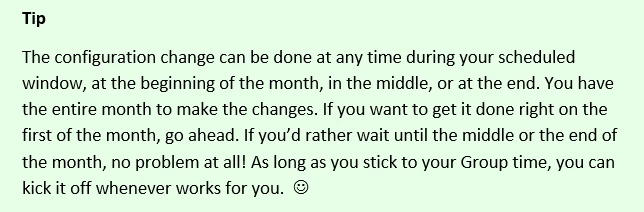
When to Make the Changes

The configuration changes are being scheduled over time into month-long groups. Please see the Release Schedule for specifics.
Important Note About Schedule Requests
Fields Affected

Lead Score

Acquisition Program

Acquisition Program Id

Acquisition Date

Original Search Phrase

Original Source Info

Original Source Type

Original Referrer

Original Search Engine

Inferred Company

Inferred Metropolitan Area

Inferred Phone Area Code

Inferred State Region

Inferred City

Inferred Postal Code

Inferred Country

Where to go for More Information

Changes to Marketo Salesforce Sync – Frequently Asked Questions

Changes to Marketo Salesforce Sync - Overview

Changes to Marketo Salesforce Sync – Release Schedule

Changes to Marketo Salesforce Sync – Under The Hood

Adding Marketo Fields to Salesforce

Changes to Marketo Salesforce Sync – Preventative Troubleshooting

New Related Discussion Threads

Is the Marketo lead management app still available? Initial set up required for Marketo to salesforce integration?

Weird bug with "Score" field type?

All score fields have stopped to sync from SFDC to Marketo 

This post is no longer active and is closed to new replies. Need help? Start a new post to ask your question.

43 replies

October 26, 2016

Hello Mike,

According to our account string we have been scheduled for November.

I have created the two Lead score fields for the Lead/Contact object. I have made sure that both of them have got in the API name the prefix "mkto71_" so they both look like this "mkto71_Lead_Score__c".

* I have done this in sandbox.

1. Do i need to update the field level-security to none visible for the old fields now? or do i have to wait until next week to do that?

2. When should i be mapping both fields?

Thanks for your help.

Jessica

Mike_Reynolds2
Level 10
October 26, 2016

Hi Jessica Moros

As soon as the new fields have been recreated, the old ones are essentially obsolete pretty much immediately. You can change field level security or you can uninstall the MLM Package which would delete the fields entirely.

The only thing I'd clarify is what you're referring to with mapping both fields. As soon as the new fields are recreated with the correct API names, the mapping is done automatically on the back end on the very next sync cycle. Just let me know what you mean there, but otherwise you should be good.

Thanks,
Mike

October 26, 2016

Thanks Mike.

so the sync will happen outside our sync time? if yes, then whats the

difference of doing it now and doing it in November.

2. I was talking about the mapping of the fields in Salesforce for when

converting a lead to a contact.

On Thu, Oct 27, 2016 at 10:50 AM, Mike Reynolds <marketingnation@marketo.com

Timothy_Gilbert
Level 2
November 1, 2016

Mike, If we rename the existing fields with the updated names, would this work instead of creating new fields?

Thanks,

Tim

Mike_Reynolds2
Level 10
November 1, 2016

Hi @Tim Gilbert​

Unfortunately no, the fields do need to be recreated as new fields. The big configuration change happening is actually on the SFDC side -- these fields in particular are having the communication to them cut off. So even if they're given new names, technically within SFDC, they're still the same fields and SFDC will be cutting them off. So, recreating them as new fields is needed to get around that.

- Mike

Timothy_Gilbert
Level 2
November 1, 2016

Got it, thanks Mike.

November 4, 2016

I created the new fields on Nov 1 and the majority (about 15k of our 20k leads ) have been backfilled, but I still haven't seen a "process complete" notification in our notification center. After the first day about 10k had been filled, and on the second day another 5k came through, but the remaining 5k seem stuck: there were no newly-modified by Marketo lead records (except for the ones that were created) today, for example.

Any idea what's going on or how I should proceed?

Mike_Reynolds2
Level 10
November 7, 2016

Hi Jake Harris

Could be a combination of things, so the short version would be to Contact Marketo Support so we can look at it directly and be 100% sure everything looks good on the back end.

We've heard some scattered reports here and there that even after the backfill has gone through, the instance notifications haven't come up. Still trying to sort out what's causing that but they're a not overly common. Could be that it completed and just didn't send the notification.

Not sure what you mean by them being "stuck", which is why it'd be good to Contact Marketo Support so we can check it out directly. There are a few possibilities, but none that would explain it with 100% certainty without looking directly at it.

-Mike

November 17, 2016

Hi Mike,

Just wanted to share my experience thus far on trying to get this resolved through Marketo Support. I opened my case 6 days ago, and I'm not any closer to getting it resolved. The tech support rep has been unable to communicate anything clearly in writing, so I asked for a meeting. The rep told me they were completely unavailable all of monday and tuesday (which was very frustrating, and frankly hard to believe) and offered to meet at 3:30pm yesterday. They failed to show up to this meeting (I updated the case at 3:35pm to remind me of the meeting, too), so another day has passed without any resolution. I clicked the Escalate Case button, and somebody in Australia replied to say "sorry" and that they were assigned the case back to the same tech that isn't responding to my case. I still haven't heard from the tech assigned to my ticket since Friday.

I have over 5k leads that have not been backfilled, and I created this case 6 days ago. I'm really disappointed in this customer service experience, and in the backfill process in general.

Mike_Reynolds2
Level 10
November 10, 2016

If anyone is interested, Jenn DiMaria over at  RevEngine will be holding a webinar on these configuration changes on Thursday, November 17th, from 1 - 1:45pm Eastern time. I'll be there along with a couple other key contributors to this project from Marketo to answer as many questions as we can. If you'd like to join in, please check out their webinar registration page right here.

Cheers!

Mike

November 27, 2016

Just a quick update that hopefully helps anyone else that ran into my same question. If you're trying to run comparisons between the old mkto2__ fields and the new mkto71_ fields on the Lead object, make sure that you exclude IsConverted leads in your comparison - the converted leads will not get backfilled by the Marketo backfill process. Also, I never got an alert that my backfill completed, so you may not either. And don't wait if you run into issues, the Marketo tech support assistance is extremely slow, so if you're having problems, don't delay in getting a ticket started. They took 11 days to resolve my question, and insisted that they were "within their SLAs."

Mike_Reynolds2
Level 10
November 28, 2016

Jake,

As long as the new fields exist on both the Lead and Contact objects, the data will backfill into the newly recreated fields. So the field values are there, even on leads that have been converted. There isn't anything that would prevent the records that had previously been leads and were then converted to contacts from getting the values backfilled as part of this configuration change.

That said, there are external factors to consider. If you have visibility rules set up in such a way that the Marketo sync user can't access your Contacts, or if there are any kind of field settings or workflow rules for example that apply to the Contacts after they've been converted, that could affect this. Those would be customized variations in your SFDC setup that you'd need to check into, but we've got documentation that covers this right here: Changes to Marketo Salesforce Sync – Preventative Troubleshooting​. I can see that on the case you had escalated that there was something different going on with these leads that stopped them from syncing entirely between Marketo and Salesforce for all sync, but I wasn't on the call you had with your Support Engineer, so I don't know what specifically that was. Once that block was removed, it seems the leads all got resynced, which brought the backfilled values into the new fields.

Hope that helps!

Thanks,

Mike

Event_User
Level 1
December 3, 2016

I want to make sure I understand the suggestion to deal with the field mapping issue where we don't know which contact field to map the lead field to because the labels are exactly the same.  Shown by this image posted earlier

The suggestion seemed to be like this:

1. Create all the new Lead fields you want to sync over with slightly different labels than the past fields.  Example "Acquisition Program" is "Acquisition-Program"

2. Create all the new Contact fields you want to sync over with slightly different labels than the past fields

3. Map them.

4. If you want the labels to match the original labels, then rename all the Lead and Contact field names you just made.

5. Delete MLM inside SFDC to remove the old fields

Is this the suggestion?  If so, what will be the label in Marketo when all finished?  As an alternative to renaming everything, can you delete MLM from SFDC after step 2 above and therefore not have the confusion about which field to map to?

Thanks,

Mike

Mikes_Jones
Level 7
December 7, 2016

Anyone have a follow up to this?

Mike_Reynolds2
Level 10
December 8, 2016

Hi @Malik Zafar​

Sorry if I missed it, but I'm not seeing a previous comment or question from you here. This discussion has gotten quite lengthy but I've been trying to catch as many questions as I can along the way.

Can you point me to it or ask it here again?

Thanks,

Mike

December 15, 2016

Hi,

I just realised that my group open window was scheduled for November and I haven't made the changes/created the fields.

Can I do it now? or do I need to contact support to open another window for me?

Thanks.

Irene

Mike_Reynolds2
Level 10
December 15, 2016

Hi Irene Garcia

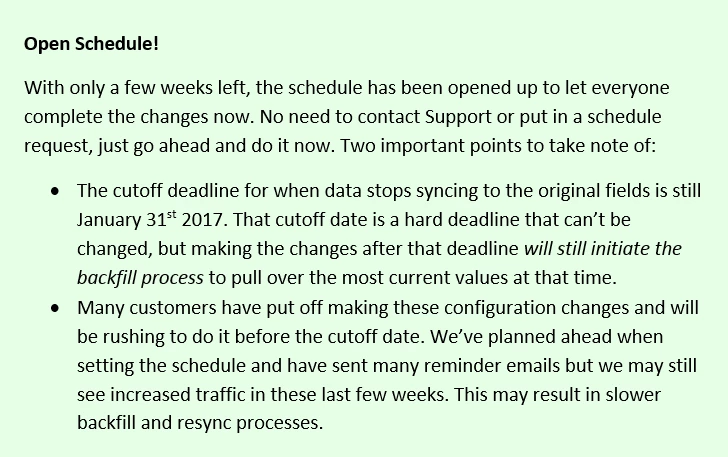
Don't worry, go ahead and make the changes now. We're in the home stretch and have opened up to let everyone go ahead during these last 6 weeks.

Thanks,

Mike

December 15, 2016

That's great

Thanks Mike!

December 15, 2016

Hi Mike again,

I've read and read about the prefix (mkto71_) in the API names and I'm still a bit confused.

The documentation to add fields to salesforce only show the details for 3 fields, and the Field/API name doesn't match with the ones I have in Salesforce. My fields prefix is mkto2__

Field Label

Field Name

Data Type

Field Attributes
Lead Scoremkto71_Lead_ScoreNumberLength 10
Decimal Places 0
Acquisition Datemkto71_Acquisition_DateDate/Time
Acquisition Programmkto71_Acquisition_ProgramTextLength 255

What happen with the other 13 fields, do I have to use mkto71_ for all of them? Is there any completed table with the 16 fields details (API name, data type, attributes...?

Thank you.
Irene

Mike_Reynolds2
Level 10
December 15, 2016

Irene Garcia

The Adding Custom Marketo Fields to Salesforce doc actually shows all of the 16 fields, but it's broken up into two tables. The first one with the three fields you found are listed first up top just because they're the most commonly used and most needed ones. The rest are about halfway down in the doc in a second table. And yes, all of the new fields do use the mkto71__ prefix (it's part of what the sync cycle is watching for to know when the fields have been created and the backfill should be started). Let me know if you have any other questions at all!

--Mike

December 15, 2016

Ok, sorry, I should have read the whole thing before asking.

Thanks for the help as usual

Regards,

Irene

December 15, 2016

Hi Mike:

I saw this alert about the changes a while ago, and since we do not have MLM or MSI installed, I figured this didn't apply to us.

Can you confirm that we do not need to do anything with regard to this change?

Thank you much,

Ginger Tulley

Mike_Reynolds2
Level 10
December 16, 2016

Hi Ginger Tulley

If you're not using MLM or MSI, then there's nothing to worry about at all!

-Mike

December 21, 2016

Mike,

This is a belated thanks for your quick confirmation that we don't have to worry about this.

Yay.

Ginger

December 16, 2016

Hi Mike (again),

How long does the backfill take? I have about 20.000 records in Marketo and I've created the 32 fields. Is it a matter of minutes? hours? days?

Thanks.

Irene

Mike_Reynolds2
Level 10
December 16, 2016

Irene Garcia

The backfill process runs at approximately 10k records per hour. So that's probably only a couple of hours to complete there.

Hope that helps!

Mike

December 16, 2016

Thanks Mike,

I received the notification that the backfill is completed but none of my leads have anything in the new fields. The contacts are ok though.

I guess I should contact support about this...

Thanks.