
Changes to Marketo Salesforce Sync – Questions and Discussion | Community
Skip to main content
Mike_Reynolds2
Level 10
August 5, 2016
Question

Changes to Marketo Salesforce Sync – Questions and Discussion

  • August 5, 2016
  • 43 replies
  • 21407 views

Updates to the Marketo Salesforce Sync Configuration

This discussion thread has been set up to ensure you get answers to your questions regarding the upcoming configuration changes between Marketo and Salesforce. It is being monitored by the Marketo team so please post any questions you have and we’ll be happy to get you answers!

Quick Overview

Due to changes to the SFDC integration architecture, action is required soon to continue syncing a small number of fields to your Salesforce instance. There are 16 fields affected, but most customers are only using a couple of these fields in their Salesforce instance – Lead Score and Acquisition Program. The configuration update will shut off the sync of data to the MLM package and these fields, so the data in those fields in SFDC will become stale and won’t update.

You can keep syncing this data to SFDC but it requires creating new custom fields. When the fields are re-created, a drip process will be triggered to backfill existing data from Marketo into the new fields in SFDC. If you aren’t using these fields, or aren’t using SFDC at all, this doesn’t apply to you and there’s nothing for you to do.

When to Make the Changes

The configuration changes are being scheduled over time into month-long groups. Please see the Release Schedule for specifics.
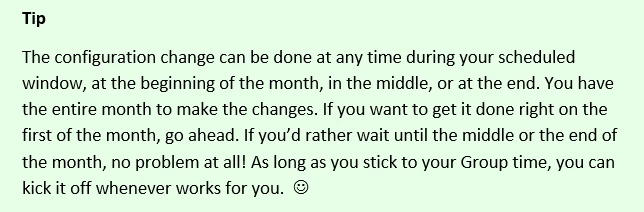
Important Note About Schedule Requests
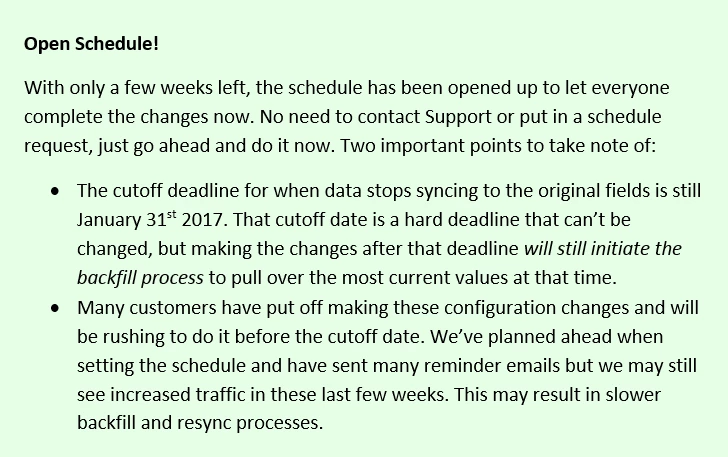
Fields Affected

Lead Score

Acquisition Program

Acquisition Program Id

Acquisition Date

Original Search Phrase

Original Source Info

Original Source Type

Original Referrer

Original Search Engine

Inferred Company

Inferred Metropolitan Area

Inferred Phone Area Code

Inferred State Region

Inferred City

Inferred Postal Code

Inferred Country

Where to go for More Information

Changes to Marketo Salesforce Sync – Frequently Asked Questions

Changes to Marketo Salesforce Sync - Overview

Changes to Marketo Salesforce Sync – Release Schedule

Changes to Marketo Salesforce Sync – Under The Hood

Adding Marketo Fields to Salesforce

Changes to Marketo Salesforce Sync – Preventative Troubleshooting

New Related Discussion Threads

Is the Marketo lead management app still available? Initial set up required for Marketo to salesforce integration?

Weird bug with "Score" field type?

All score fields have stopped to sync from SFDC to Marketo 

This post is no longer active and is closed to new replies. Need help? Start a new post to ask your question.

43 replies

Mike_Reynolds2
Level 10
August 9, 2016

If anyone has questions about the upcoming changes to the Marketo Salesforce sync, please feel free to post them here.

Kenzie_Caldwell
Level 2
August 10, 2016

Hi Mike!

Once the new fields have been created in Salesforce, do we need to submit a support ticket during our backfill window to ensure the backfill happens or will support just check to make sure the fields have been created and enable the backfill?

Thanks!

Kenzie

Mike_Reynolds2
Level 10
August 10, 2016

Hi @Kenzie Caldwell​!

The backfill will kick off automatically as soon as the fields are recreated, so no need to contact support to get that going. The next sync cycle will see the new fields with the correct corresponding API names (check out Adding Marketo Fields to Salesforce ) and will start the backfill from there.

When the backfill process is done, you'll get an instance notification to let you know it's done. Check out the info here for more details on that part: https://nation.marketo.com/docs/DOC-3836#jive_content_id_Backfilling_Data If you want to check the progress along the way, Support will be able to check the status on the back end and let you know how far along it is. Contact Marketo Support

August 10, 2016

We have had some Marketo Insights degradation since yesterday... and everything slowly came back in a rolling fashion over the course of today. Was this related???

Mike_Reynolds2
Level 10
August 10, 2016

Email insights has been backfilling data since it was released in the quarterly release. Check out the doc here for the details on that: Supplement: Email Insights Launch Process - Marketo Docs - Product Docs

It's possible that it may have just finished and that's the difference you're seeing. Hard to say without troubleshooting the instance directly though. There are a few different possibilities when it comes to performance issues. If it's still an issue, please feel free to open a case with Support and we'll gladly investigate it for you Contact Marketo Support

The email insights process wouldn't be related to this configuration change at all though. It's a separate process and doesn't start until after you recreate the new fields. The data backfill for Email Insights goes through a separate data pipeline than the one used for the backfill process here. And both go through data pipelines separate from the usual SFDC sync.

Annika_Leihkauf
Level 1
August 11, 2016

Hello Mike!

We don't just use one Lead Score field in Marketo, but have product-specific ones. Do they all need recreation in SFDC?

Thanks,

Anni

Mike_Reynolds2
Level 10
August 11, 2016

Hi Anni,

Custom lead scores that you've created will still work the same way. The only ones affected here will be the fields created by the MLM package when it was installed. You can see those listed here: https://nation.marketo.com/docs/DOC-3836#jive_content_id_Fields_Affected  If you're using these fields, they're the ones affected. If they're different custom fields, there's nothing to do.

Also, not sure how you have your Sales Insight set up, but if you've customized your Stars and Flames to be based off of the other custom fields, the Stars and Flames will still work in Sales Insight without any changes needed. You can check out the details on that part right here: https://nation.marketo.com/docs/DOC-3836#jive_content_id_Stars_and_Flames_Still_Function_the_Same_Way

August 11, 2016

Once our new fields are created in Salesforce and the backfill of data has occurred, is it safe to assume that the old MLM fields can be deleted?

hena_wells
Level 4
August 11, 2016

Kristina Campos​, yes, that is correct.

Just keep in mind that that the act of deleting the "old MLM fields" is done by uninstalling the MLM package in sf.com (which in turn deletes all the fields that were created by the package). Sf.com documentation on Uninstalling a Package .

Aj

August 14, 2016

Hi,

Creating those new custom fields and mapping them is no problem. However,

  1. 1. should I do it based on the scheduling (we’re group C – Sep1)? What happens if I do it before?
  2. 2. Since we’ll create the new custom fields, what to do with the old ones? They have the same field name, so this can be confusing.
  3. 3. To be 100% I get this correctly – after I create the new custom fields – I can uninstall the MLM package? If so, will this solve the issue of the question #2?
  4. 4. What will happen if I will rename the API name of the original fields? Meaning, instead of “mkto2__Acquisition_Program__c” to “mkto71_Acquisition_Program_Id__c” assuming I will not uninstall the MLM package.
  5. 5. All of those fields are in the Lead object only, right?

Thanks,

Guy

Mike_Reynolds2
Level 10
August 14, 2016

Hi Guy Alfia

Good questions. I'll go through each in turn, but I wanted to start by saying that it will be important to stick to the deployment schedule.

1. The release schedule has been created with the size of the lead databases of our customer base in mind. It's been split alphabetically by Account String into different numbers of customers and the determining factor for how the splits were made was total database size. For example, Group 2 is only the three letters A, B and C while Group 3 has the nine letters of D through L. However, based on the lead database sizes of the customers within those groups, Group 2 and Group 3 have approximately the same number of leads in them. The schedule has been divided this way to avoid causing traffic jams in data flowing back and forth with SFDC.

Marketo continuously makes significant strides forward in our software offerings as well our hardware serving that software, such as with Project Orion that was detailed in this year's Summit. Check out the webinar located here for a description of Orion (starts at 28min in). Even with the best software and hardware out there, data can only be pushed through an API call so fast. (Whether you use a garden hose or a fire hose, it still takes time to empty a whole water tower.) The servers have set lines of communication with SFDC and all of the customers share those lines. We've created new pipelines to be devoted just to the backfill process so that it doesn't compete with the regular SFDC sync cycle, and if everyone sticks to the schedule, we know those communication lines will keep up with the traffic. But if customers don't stick to the schedule, it throws it off. (What happens if someone parks a second water tower next to yours and asks to share your one fire hose?) That's why we ask everyone to stick to the schedule. We know this schedule may not work for everyone, so you're welcome Contact Marketo Support to request a schedule change.​ We'll be happy to accommodate as best we can.

2. The old fields being replaced can be deleted by uninstalling the MLM package. The details of cleaning up SFDC can be found here and here are SFDC's instructions for Uninstalling a Package​. One thing to note is that if you have any reports or workflows in SFDC that reference these fields, SFDC won't let you uninstall it until those dependencies have been removed. Once data stops flowing to the old fields, they'll be obsolete, so there's no real need to keep them.

3. The old fields and the MLM package can be removed as soon as the the fields have been created. Just be sure to update your workflows and SFDC reports if you have any to connect to the new fields like noted above. All of the details can be found in our Changes to Marketo Salesforce Sync – Under The Hood documentation.

4. The fields do need to be recreated as new fields. The configuration change will shut off communication to the existing fields and new fields must be created in SFDC to replace them. Changing field names on the existing fields won't work unfortunately. You can find the info on keeping field data in SFDC in the documentation for Adding Marketo Fields to Salesforce here.

5. The fields currently exist in SFDC on the Lead and Contact objects already, and it's strongly recommended that you recreate them on both the Lead and Contact objects. It isn't required. You can do it on just the Lead object, but as it says in our FAQ doc, it's best to create them on both the Lead and Contact as well.

I hope this helps! Let me know if you have any other questions.

August 17, 2016

Thanks so much Mike!

August 15, 2016

Hi Mike,

Once we re-create the 16 fields do we need to refresh the schema?

Cheers

Kassandra

Mike_Reynolds2
Level 10
August 15, 2016

Hi Kassandra Burgess

That's a really good question. The answer is no - no need to refresh the schema at all. Part of the configuration change from the Marketo side was to create an "event listener" that monitors the sync cycle for the recreated fields. So, when you recreate the new fields, on the very next sync cycle, the sync picks up the fact that the new fields have been created and automatically maps them to the correct corresponding Marketo fields. This in turn kicks off the backfill process, but once the fields have been created, the rest from there is automatic.

Thanks,

Mike

August 15, 2016

Wanted to check the response to a previous question above.

What happens if we create the new fields before our backfill window starts?    Will these show  up in Marketo as separate, new fields?

Thanks,

Pam Hudadoff

hena_wells
Level 4
August 15, 2016

Hi Pam,

If you start before your window, it will work too and we will start backfilling immediately. No new fields will be created in MKTO.  We batched folks up to manage the overall load. However, we are mostly seeing requests to push out the date vs pull it in.

So if you want to do it earlier, its fine. If possible, could you let support know?

Aj

August 15, 2016

Arjun,

   Thanks for confirming what will occur.   I was actually planning on just transitioning the Lead Score field at this time and all of the other fields later.   But given how you are handling the transition (and the impact in SFDC), I am just going to hold off and do all together in our transition window.  (That is if I got to the SFDC team that is creating the field in time.)

Appreciate your response,

-Pam

August 16, 2016

Hi,

I take it I need to uninstall the App first before creating the new salesforce fields as they need to have exactly the same API names and this would cause a duplicate error if I tried to create them whilst they still exist?

Thanks

Nick

Mike_Reynolds2
Level 10
August 16, 2016

UPDATED: Editing my reply here - I had a copy/paste mistake in the table. Please be sure to check the doc for exact details: Adding Marketo Fields to Salesforce

Hi Nick ,

Actually you'll want to create the new fields first. The new fields will have specific API names to use and the details can be found in the doc here: Adding Marketo Fields to Salesforce

The API names do need to be precise, so please check the doc for the specifics.

Grégoire_Miche2
Level 10
August 16, 2016

Hi @Mike Reynolds​,

The Acquisition program Id is listed twice in the table. Is this an error or is there a rationale behind it?

-Greg

Grégoire_Miche2
Level 10
August 16, 2016

Hi @Mike Reynolds,

What will be the version number of the MSI package once it has been upgraded ?

-Greg

Mike_Reynolds2
Level 10
August 16, 2016

Hi Greg,

The version number won't change from what it currently shows. It isn't automatically upgrading the MSI package, it's patching the dependency for the existing installation to remove the dependency on the MLM package. So if you manually upgrade the MSI package, you'll get an entirely new version number, but the patch that went out doesn't actually upgrade the package, it just corrects that back end dependency, so the version is actually the same.

I think it may have added a ".1" at the end of the version number, but I'm not positive on that point. @Arjun Nair​ should know more about that particular detail.

Thanks,

Mike

Grégoire_Miche2
Level 10
August 16, 2016

Hi Mike,

It would be nice if we could have a clear way to know in SFDC whether the MSI package has been patched or not. And on a compliance / It procedure stand point, it would also be preferable

-Greg

Chris_Kuhlman
Level 1
August 16, 2016

So if I understand everything correctly, I need to:

  1. Create the 16 new fields
  2. Install MSI
  3. Uninstall MLM

Will the new MSI package write to these new fields I just created for the future?  So any reports I have pointing to those old fields can be updated to these new ones?

Is the MSI package capable of doing the backfilling or should I let the new fields sit with the old MLM package until its all synced up?

Just out of curiosity, if I were to download and do a clean install of MSI on a new server, what field would it sync Lead Score to? (I mean isn't the new package going to create a custom field for that value anyway?  If the fields are different, how will my MSI know to write to mkto71_Lead_Score and not whatever field may be created by MSI during the install?)

hena_wells
Level 4
August 16, 2016

Hi @Chris Kuhlman,

A few things:

- The fields that come with the MSI packaged has not changed. And MSI does not write to any field in sf.com. The fields it creates (like the interesting Moments fields) are populated by the sync and this part remains exactly the same.

- The MSI package used to reference the lead score field created by the MLM package. In some versions mousing over the stars in MSI would show the lead score by referencing this field. This reference has been removed from all versions.

- You don't actually need to reinstall MSI. We removed the reference mention above remotely.

Hope this helps

Aj

Chris_Kuhlman
Level 1
August 18, 2016

Hi Arjun and thank you for your reply.  Sorry to bother but I have a few follow up questions.

The fields that come with the MSI packaged has not changed. And MSI does not write to any field in sf.com. The fields it creates (like the interesting Moments fields) are populated by the sync and this part remains exactly the same.

So the fields that the MSI app uses on both the SFDC side and the marketo side are exactly the same as the MLM package? If they use the exact same fields, why the backfilling? What are the 16 new fields I'm creating for then? I'm sorry to bother with so many questions but I must not be understanding something right.

The MSI package used to reference the lead score field created by the MLM package. In some versions mousing over the stars in MSI would show the lead score by referencing this field. This reference has been removed from all versions.

But I can still keep the hover functionality if I create the mkto71_Lead_Score field right? the the new MSI installed package will recognize this field?

You don't actually need to reinstall MSI. We removed the reference mention above remotely.

So I don't need to install the MSI package then? I can just leave the (deprecated) MLM package running? I thought I was supposed to install MSI then remove MLM. Can you please link to this new updated documentation where the reference has been removed?

Thanks for the great product and taking time to respond to my questions. I sincerely appreciate it.