
Change the language of the "select" drop down in form. | Community
Skip to main content
Gerard_Donnell4
Level 9
November 24, 2015
Solved

Change the language of the "select" drop down in form.

  • November 24, 2015
  • 3 replies
  • 2899 views

Hi,

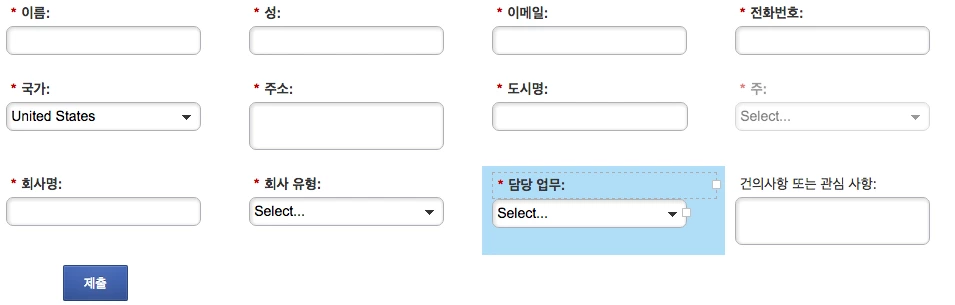
Could someone please show me how to change the language of the word select that is fixed to the top of drop down lists.  I have a Korean form created but the word "Select" is still in English.  See Screen Shot

Thanks for your help.

Gerard
This post is no longer active and is closed to new replies. Need help? Start a new post to ask your question.
Best answer by Josh_Hill13

When editing the Form, click on the Field in question.

Go to the Values section and edit the Select text there to be whatever you want.

3 replies

Priyank_Joshi3
Level 5
November 24, 2015

Hi Gerard,

You need to change your default display value for your form 2.0 select type field with the word you want in Korean.

Thanks

Priyank

Level 10
November 24, 2015

In the drop down value, add this as the first value: 고르다 | [Section] I picked this from one of our forms with Korean values.

Josh_Hill13
Josh_Hill13Accepted solution
Level 10
November 24, 2015

When editing the Form, click on the Field in question.

Go to the Values section and edit the Select text there to be whatever you want.

Gerard_Donnell4
Level 9
November 24, 2015

Thanks for the help guys. It worked a treat.