
Change order of Engagement Stream Messages | Community
Skip to main content
Trevor_Parsell
Level 5
January 26, 2018
Question

Change order of Engagement Stream Messages

  • January 26, 2018
  • 1 reply
  • 4577 views

Hello,

We have an engagement program set up with two streams. If someone clicks a certain message in stream one, we would like them to start with a corresponding email in stream two (Instead of starting with the first email at the top of stream two).

How can we set this up so that when someone clicks email #1 in Stream 1, they start Stream 2 with email #2 and then receive the remaining stream 2 messages in any order?

EX

Stream 1

Email 1 - If clicks, move to stream 2 and start with email #2, then receive the remaining stream 2 messages in any order

Email 4 - If clicks, move to stream 2 and start with email #2, then receive the remaining stream 2 messages in any order

Email 5 - If clicks, move to stream 2 and start with email #3, then receive the remaining stream 2 messages in any order
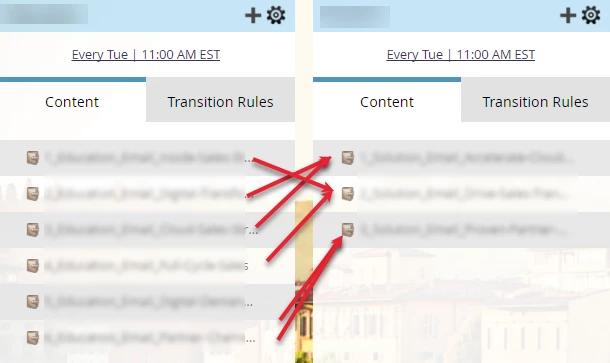
Email 6 - If clicks, move to stream 2 and start with email #3, then receive the remaining stream 2 messages in any order

Thanks!

This post is no longer active and is closed to new replies. Need help? Start a new post to ask your question.

1 reply

Community Advisor
January 26, 2018

Can you just put the three different orders in their own streams and move from steam 1 to stream 2-4 depending on their action?

Trevor_Parsell
Level 5
January 26, 2018

Hey JD,

Yes, that is how we originally set it up, and could work. I was wondering if there is a better way to do it using only two streams, since we may eventually be adding a lot more to each stream.

Thanks!

Community Advisor
January 26, 2018

I don't believe there is -- the best way to get them to 'skip' would be to utilize a program status, but that would prevent them from receiving those other emails at all. If the only thing changing is the order of the first three emails I would create a stream for those 3, then have them transition into a final stream that has the other content you plan on adding.