Change color Marketo boolean switches in Editor
While creating boolean switches for a Marketo email 2.0 template we noticed that the content didn't show in the modules inside the email editor. The reason being is that Marketo shows the module previews with their boolean value set to "false" even if the default is set to "true".
Wanting to have the content show we needed to make the booleans set to "false" with the values for that inverted from the true value.
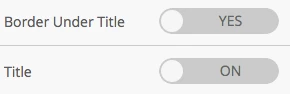
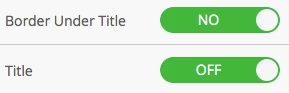
That makes the "active" switches look grey instead of green.
Long story short, is it possible to make the button switch green for "false" and grey for "true"? I put the style in my email template but Marketo UI doesn't read the css at all!
Here are the classes for the boolean switches with their colors inverted and !important added, to no effect:
.x4-reset .x4-toggle-label-off{background-color:#00b73a!important;color:#fff!important;}.x4-reset .x4-toggle-label-on {background-color: #cbcbcb!important;color: #626864!important;}I also tried being very specific using the id's for the boolean switch and it was still completely ignored.
Does anyone know if it's possible to change the boolean switches colors?