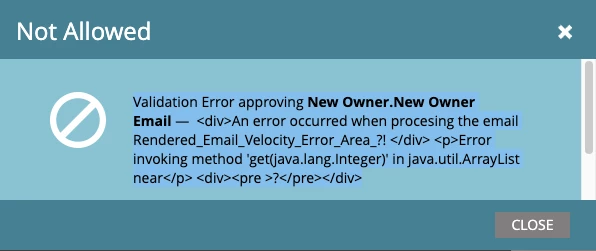
Thanks for thie @jo_pitts1 - this seemed to have work, but when I try to approve and close it gives me this error and only does that when I included the this related token in the email. Any ideas?
|
Validation Error approving New Owner.New Owner Email — <div>An error occurred when procesing the email Rendered_Email_Velocity_Error_Area_?! </div> <p>Error invoking method 'get(java.lang.Integer)' in java.util.ArrayList near</p> <div><pre >?</pre></div>
|
Again. I really appreciated your help!
@ameys89771464 ,
you probably need to wrap the whole thing in something like
#if( ! $display.alt($AssetList ,"").isEmpty() )
Which gives you
#if( ! $display.alt($AssetList ,"").isEmpty() )
  #set( $interestingItems = [] )
  #foreach( $item in $AssetList )
    #if( $item.Type__c.equals("Registration") )
      #set( $void = $interestingItems.add($item) )
    #end
  #end

  #set( $sortedInterestingItems = $sorter.sort($interestingItems ,"PurchaseDate:desc") )
  #set( $mostRecentInterestingItem = $sortedInterestingItems[0] )

  Type: ${mostRecentInterestingItem.Type__c}
  Serial Number: ${mostRecentInterestingItem.SerialNumber}
  Purchase Date: ${mostRecentInterestingItem.PurchaseDate}
  End Usage Date: ${mostRecentInterestingItem.UsageEndDate}
#end
Also, you may want to bullet proof this further but ensuring there is at least ONE item in the interestingItems array. You can do this using .size(). So, that gives you
#if( ! $display.alt($AssetList ,"").isEmpty() )
  #set( $interestingItems = [] )
  #foreach( $item in $AssetList )
    #if( $item.Type__c.equals("Registration") )
      #set( $void = $interestingItems.add($item) )
    #end
  #end

  #if ( $interestingItems.size() > 0 )
    #set( $sortedInterestingItems = $sorter.sort($interestingItems ,"PurchaseDate:desc") )
    #set( $mostRecentInterestingItem = $sortedInterestingItems[0] )
    Type: ${mostRecentInterestingItem.Type__c}
    Serial Number: ${mostRecentInterestingItem.SerialNumber}
    Purchase Date: ${mostRecentInterestingItem.PurchaseDate}
    End Usage Date: ${mostRecentInterestingItem.UsageEndDate}
  #end
#end
Something Important!
As a general rule of thumb, don't presume Velocity code that works in preview will work in the real world (i.e. sending emails). Make sure and test it and test it again, and then test some more with live data, bad data, lead records with no COs etc etc. This has been drummed into me (and many others) by @sanfordwhiteman .
Cheers
Jo