Cant get trigger to work - changed program status | Community
Skip to main content
November 16, 2015
Question

Cant get trigger to work - changed program status

  • November 16, 2015
  • 3 replies
  • 2090 views

Hi All,

I have been trying to solve this for a day, and have resorted to reaching out.

I'm trying to set the trigger in a smart campaign to fire and then send an email based upon status change.

The channel stages are:

1. Invited

2. Completed

There is one test prospect with the status 'invited' but for some reason he is not being pulled into the smart campaign.

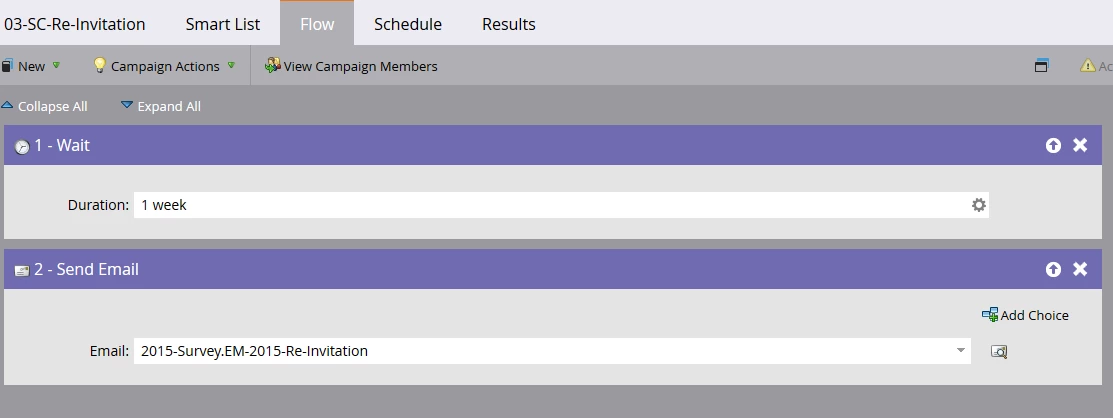
Here are some screen shots.
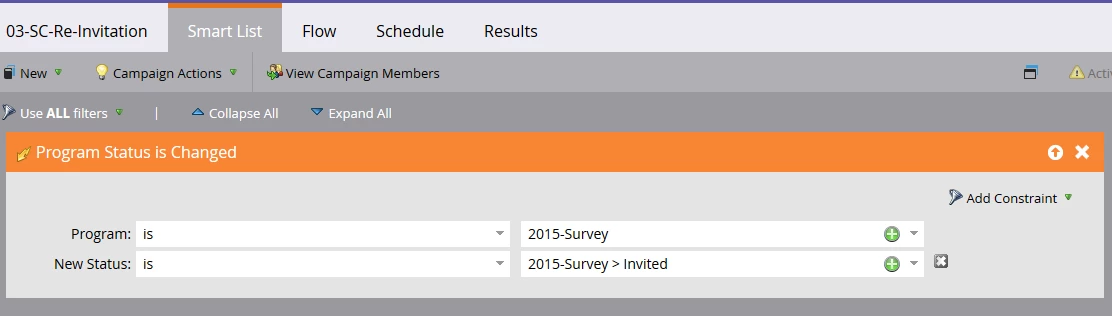
I'm sure I'm missing something simple

Thanks

Matt

This post is no longer active and is closed to new replies. Need help? Start a new post to ask your question.

3 replies

Stijn_Heijthuij
Level 6
November 16, 2015

Hi Matt,

A trigger only occurs WHEN the change happens. If you're trying to fire this on someone who already has the status you'll need to turn it into a Batch campaign by removing the trigger, adding a filter and running it once or scheduling it to run regularly.

Once you activate this trigger it will listen to all leads that have their status changed and will trigger off that occurence.

November 17, 2015

This ↑

You can create another smart list under your program to change your test lead's status to anything but "Invited".  Then modify that same smart list with an updated flow to change back to "Invited".  This should trigger your list and have him/her waiting the week for the re-invite.

Stijn_Heijthuij
Level 6
November 17, 2015

Hi Josh,

Progression status are progressive, you can go up, but never down. Unless there's a status that has the same priority level as 'invited' this won't work. You'll need to change someone's status to 'Not in Program' after which you can then add them to the program again.

November 16, 2015

You could also try changing removing the lead from the program and then adding it back with the Invited status. That should trigger the smart campaign like Stijn said.

November 17, 2015

Also, on the schedule tab make sure to set the campaign so that members can run through more than once.  By default it is set to only once.  This is important for testing purposes

November 18, 2015

Thank you for all your input. I was able to get it to work using the following flow.

Thanks again