Can't figure out why form will not submit | Community
Skip to main content
November 19, 2013
Question

Can't figure out why form will not submit
  • November 19, 2013
  • 3 replies
  • 973 views


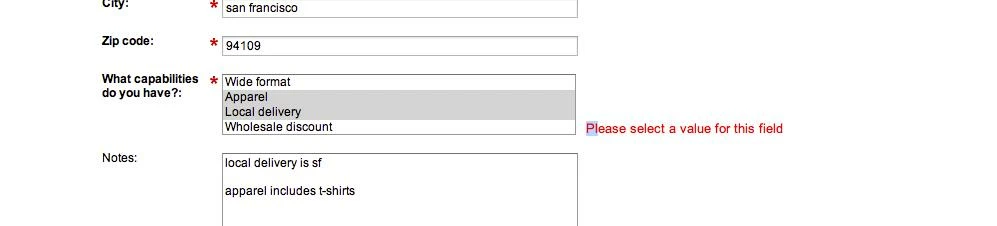
When selecting multiple values and tried to submit, i got error above...

after getting that error multiple times, i now cannot submit form period and have tried from multiple computers and browsers and with icognito browsing - please help. 

Is this a bug?
This post is no longer active and is closed to new replies. Need help? Start a new post to ask your question.

3 replies

November 19, 2013
I've also had this issue happen to me and other potential customers - specificially for picklist fields, either muti-select or single select.
November 19, 2013
Thanks Jackie! Anyone know what causes this?
November 20, 2013
Hi Chelsea,

Hmmm...interesting one.  Did you submit it EXACTLY as you have above?  

You see this sometimes with picklist fields because the first value that comes in a picklist is considered the default and thus will not allow you to submit unless you choose something else.  This is why when you put a picklist field in the form you usually want to put a "-Please Select-" or something before hand as the first value and then put a "," after.  This holds the same with multi select picklist.  

Now if you submitted the two values underneath that, the only thing I can think is...is this field really a multi-select picklist in SFDC?  You can't change a single select into a multi, it wouldn't recognise you subimtting two values.

Hope one of those works for you ;)