
Campaign Status Updating | Community
Skip to main content
Heather_DeGrave
Level 2
October 7, 2025
Solved

Campaign Status Updating

  • October 7, 2025
  • 3 replies
  • 891 views

My campaigns are not updating the status icon when they do run until I click back onto it. It changes to show the clock when it is scheduled, but will not change to the green checkmark to note it was run until I click back on it after it was run.

This also means that those campaigns, that are already run but showing the clock still, appear in campaign inspector.


Does this happen for anyone else, or is it just me?
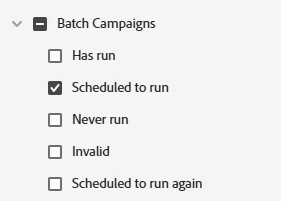
Best answer by Michael_Florin-2

It's not only a visual effect btw. It also means that this filter doesn't work correctly as it includes Smart Campaigns that actually have run.


3 replies

SanfordWhiteman
Level 10
October 7, 2025
That's typical.
Amarjit_Hayer
Level 2
October 30, 2025

When you say that's typical, do you mean this is how it has always been or will be?  I have only starting noticing this recently, and worry that the campaign didn't run as was intended, but the green check appears after clicking on it.  

Amarjit
SanfordWhiteman
Level 10
October 30, 2025

This is how it's always been and there's no imminent plan to change it afaik.

maneek_tayal2
Level 2
October 8, 2025

Yes, we face the same every time with batch campaigns or email programs.

Miray
Community Advisor and Adobe Champion
October 14, 2025

This happen sometimes to us as well, once I clicked the smart campaign it updated to be completed , sometimes refreshing browser also works

Michael_Florin-2
Michael_Florin-2Accepted solution
Level 10
October 8, 2025

It's not only a visual effect btw. It also means that this filter doesn't work correctly as it includes Smart Campaigns that actually have run.