Campaign Inspector equivalent for Forms? | Community
Skip to main content
September 30, 2014
Solved

Campaign Inspector equivalent for Forms?

  • September 30, 2014
  • 5 replies
  • 1667 views
Hi all,

Does anyone know if there is an equivalent of Campaign Inspector specifically for searching MKTO forms, as opposed to smart campaigns? We're trying to narrow down which of our assets contain specific embedded SFDC campaign IDs.

Thanks for any help!
Kendall Reicherter
This post is no longer active and is closed to new replies. Need help? Start a new post to ask your question.
Best answer by Valerie_Armstro
Hey Kendall,

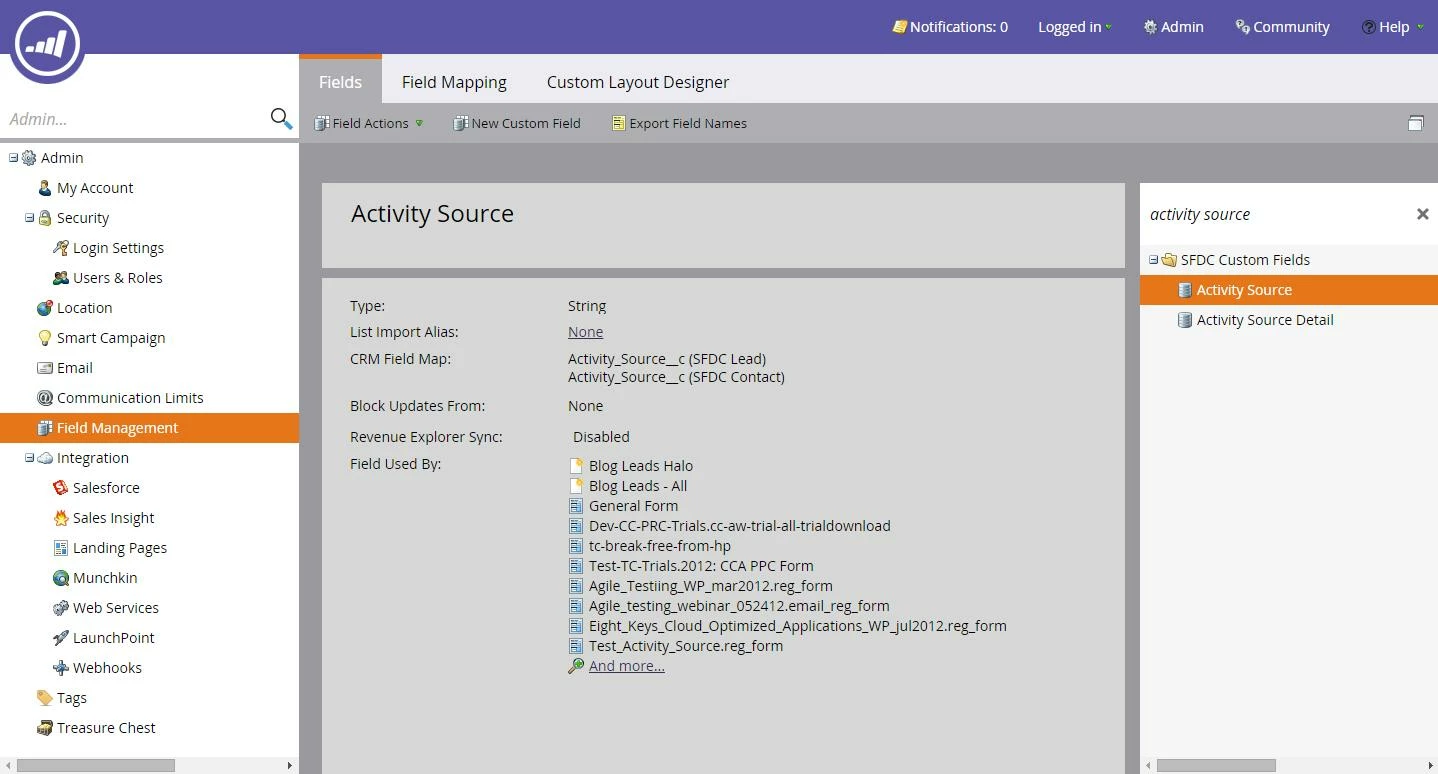
If you go to Admin > Field Management and search for the hidden field that you are using to capture SFDC Campaign IDs, you should be able to see a list of all assets that are currently using that field.

At my company, we use Activity Source and as you can see from the screenshot, the forms that use that field are shown.  You'll have to click on each asset to locate where they are (lots of back and forth, not ideal) or copy the whole expanded list and paste into Excel to audit.  It would be great to export this list instead of having to copy it.

5 replies

Valerie_Armstro
Level 9
September 30, 2014
If you use the same field each time to populate the SFDC campaign IDs, it may be worth trying to do this through Field Management in the Admin panel. 
September 30, 2014
You can get a list of Forms by going to the "Forms" element in the tree and selecting it. That might help, but I like Val's approach to find this field.
September 30, 2014
Val, would you mind elaborating on what you mean? We do always use the same hidden field for SFDC ID in forms, but I'm unclear on how Field Management could help us narrow down the locations of a specific ID in various assets.

Thanks so much!
Valerie_Armstro
Valerie_ArmstroAccepted solution
Level 9
September 30, 2014
Hey Kendall,

If you go to Admin > Field Management and search for the hidden field that you are using to capture SFDC Campaign IDs, you should be able to see a list of all assets that are currently using that field.

At my company, we use Activity Source and as you can see from the screenshot, the forms that use that field are shown.  You'll have to click on each asset to locate where they are (lots of back and forth, not ideal) or copy the whole expanded list and paste into Excel to audit.  It would be great to export this list instead of having to copy it.

September 30, 2014
I see - thank you Val, that's very helpful! Not ideal, I agree, but definitely a step in the right direction. :)

Kendall