Campaign folder Email tab results | Community
Skip to main content
Level 2
July 30, 2024
Solved

Campaign folder Email tab results

  • July 30, 2024
  • 2 replies
  • 2325 views

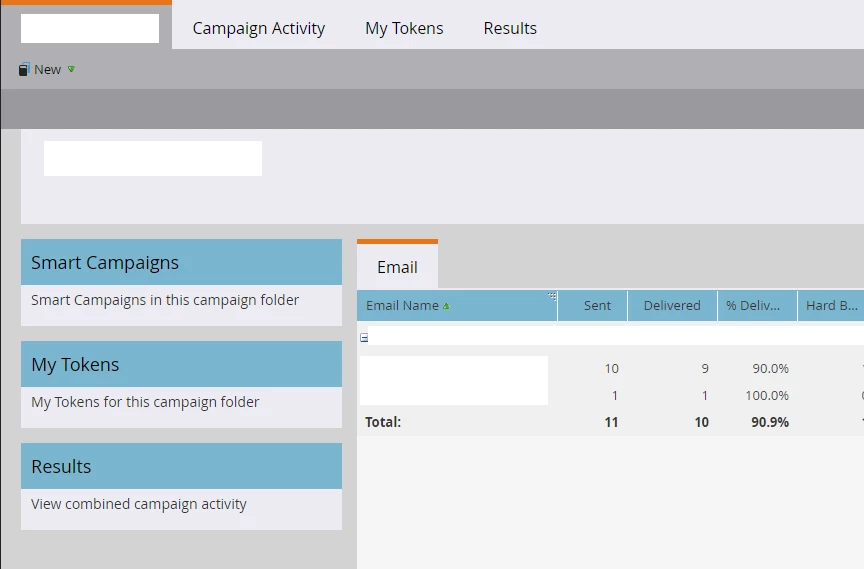
I wonder if there are any conditions to see the results in the email tab of the campaign folder.
As far as I can surmise, the email results sent by the e-mail program or the nurturing program do not seem to be counted.


I am not good at English, but I am writing in English to get many ideas. Please understand even if the sentence is awkward.

This post is no longer active and is closed to new replies. Need help? Start a new post to ask your question.
Best answer by Disha_Goyal6

@jiwonhe, This is correct.
Email results sent by the Email Program or Nurturing Program are not counted in the results under the Email tab of a Campaign folder as Email tab in the Campaign folder specifically tracks and displays results for emails sent through the Smart Campaigns within that folder.
Emails sent through different programs, such as the Email Program or Engagement (Nurturing) Program, have their own reporting and analytics. To view the results for emails sent through these programs, you will need to check the reporting sections within the respective programs themselves.

2 replies

Disha_Goyal6
Community Advisor
Disha_Goyal6Community AdvisorAccepted solution
Community Advisor
July 30, 2024

@jiwonhe, This is correct.
Email results sent by the Email Program or Nurturing Program are not counted in the results under the Email tab of a Campaign folder as Email tab in the Campaign folder specifically tracks and displays results for emails sent through the Smart Campaigns within that folder.
Emails sent through different programs, such as the Email Program or Engagement (Nurturing) Program, have their own reporting and analytics. To view the results for emails sent through these programs, you will need to check the reporting sections within the respective programs themselves.

jiwonheAuthor
Level 2
August 5, 2024

Your reply was helpful. Thank you.

Priyank_Joshi3
Level 5
July 30, 2024

Hi @jiwonhe In case you are trying to pull all the email performance report from any specific folder, here are the steps;


Step 1: Create Email Performance Report

Step 2: Goto it's Setup tab

Step 3: Now select the folder under which you have placed all your emails for global reporting. 


With this approach you should be able to see email performance for all the sent email with one go. 


Quick tip: If you would like to track any individual email asset's performance, just select that individual asset from Setup tab. 


Hope that helps!  

jiwonheAuthor
Level 2
August 5, 2024

I'll refer to your help. Thank you.