Calendar invite changed by itself.. ! | Community
Skip to main content
June 26, 2013
Question

Calendar invite changed by itself.. !

  • June 26, 2013
  • 13 replies
  • 2478 views
A calendar invite I had set up has changed the date and time all by itself. 

Anyone else??

Also, can Marketo please hurry up and stop being so vague about timezones? Precision is important.
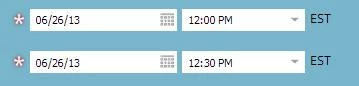


Is that EST in America.. ? Or Australia? Because the times match Australia, but the correct timezone is AEST. 
This post is no longer active and is closed to new replies. Need help? Start a new post to ask your question.

13 replies

June 26, 2013
Its worth testing but Marketo is fairly America centric in its customers, so EST is most likely in America
Kimi_Heskett1
Level 9
June 26, 2013
Mine did too! Thank goodness we ran a last minute test again and noticed!
Kimi_Heskett1
Level 9
June 26, 2013
It's done it for ALL of our ics token files. Darn! I'm going through and manually updating them all now since we have invites going out. 
June 26, 2013
Are you saying that you had set it to a timezone and then we switched the timezone after the fact?  If this is the case, I will look into this.  

@Nicholas - The timezone displayed is the timezone for the user.  So if you have set your timezone to be different than the subscription timezone, that is what will display.  So you should look to see what you have set. 
June 26, 2013
Weirdly I noticed the same thing when I was working on some recently-created calendar invites. The date was correct but the time had randomly changed. System bug?
June 26, 2013
Thanks Cheryl - I had to update my locale to Australian English. However the timezone still displays as 'EST", which is not a real timezone in Australia. It corresponds to AEST though. 

Interesting to see others had similar problems with the .ics details changing. 
July 8, 2013

I just noticed this same thing is happening to our calendar files. The date holds, but the start and end times keep changing on their own. I'll set the start time to 8:00am and the end time to 11:00am, click save...and then when clicking back into it the start time has changed to 12:00pm and the end time has changed to 3:00pm.

Our Marketo instance is set to eastern standard as is the event's date/time.

July 17, 2013
Yep...we had pretty low attendance at a webinar yesterday. Fortunately one of the people that had wanted to attend mentioned that the calendar file was off.

I reviewed them all and they had been changed, all of them. I know I wouldn't have set all my webinar calendar files to 7-8pm when they were actually either at 1pm or 2pm.

Major, prospect-facing problem!
July 17, 2013

@Scott have you checked the calendar files for any of your upcoming events? The day after posting my comment I logged back in on a different computer and reset the times times on our upcoming event .ics files to what they should have been (and originally were).

Checked them again a few times over the next couple of days and they appear to be holding/saving correctly. Hopefully this was a temporary glitch and yours are back to normal too. Definitely something to keep a close eye on though.

July 17, 2013
I did review all of mine...had to change them all back to what they should be :-(