
Calendar File token as a Variable Element | Community
Skip to main content
Brittany_Striew
Level 2
February 25, 2020
Solved

Calendar File token as a Variable Element

  • February 25, 2020
  • 2 replies
  • 4396 views

Hi everyone - 


We recently worked to set ourselves up with a brand new email template to use going forward. We wanted to make as many pieces of the template featuring variable elements as we possibly could. 


For our monthly webinars hosted in GoToWebinar, we generate our confirmation email from the Marketo side. When trying to add buttons for Add to Calendar that have both a standard .ics calendar file and a Google calendar file, we're running into an issue using the Calendar File token type. When trying to call to token {{my.Calendar}}, when the email hits the inbox, the Outlook calendar button links to <a href='target="_blank" rel="noopener">http://go.corcentric.com/rs/787-PWO-482/436/Achieving+AP+Success+-+The+Metrics+that+Matter+in+2020+with+Corcentric.ics'>Add to Calendar</a>.


As a first attempt, I linked directly to the URL generated by the {{my.Calendar}} token, but the tokenized details in the Description are lost. Typically, our calendar files include all of your details and your PURL generated by GoToWebinar by calling to the tokens. 
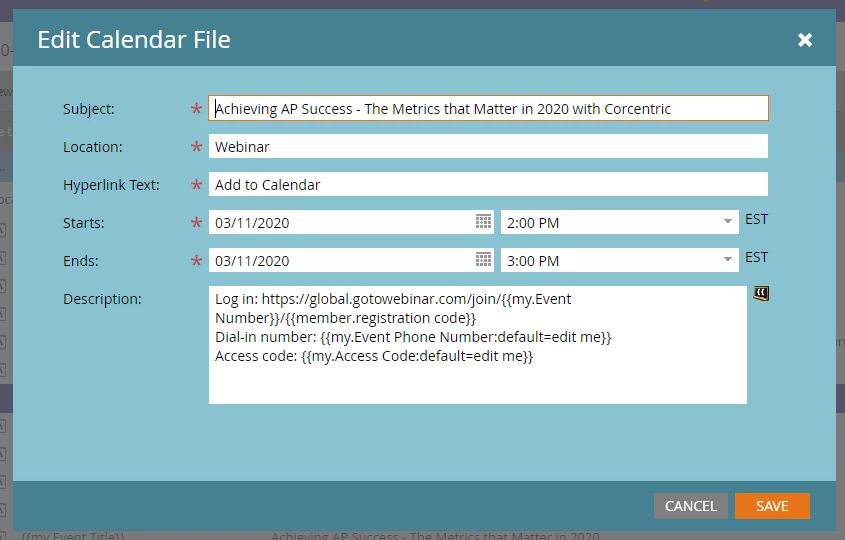


Anyone have any suggestions or guidance on how to work around this? 


Thanks in advance! 

This post is no longer active and is closed to new replies. Need help? Start a new post to ask your question.
Best answer by Michael_Florin-2

Just wanted to mention that you also could use the GTW hosted ics file and create a link to that file dynamically in your email. Discussed here: 
https://nation.marketo.com/t5/Product-Discussions/GoToWebinar-Tokens-member-registration-code-and-member-webinar/m-p/207420#M151880

2 replies

SanfordWhiteman
Level 10
February 25, 2020

This is very strange misbehavior by the ICS (Calendar) {{my.token}}. The whole idea of a Calendar {{my.token}} is that it contains a link to a remote ICS file: are you saying that it instead is linking to an LP?


Are you sure you don't have a confusion between tokens of the same name?

Brittany_Striew
Level 2
February 26, 2020

Hey Sanford - unfortunately no token confusion. It appears that the way the template was built, by adding the {{my.Calendar}} token in the variable spot of the template, it applies <a> tags that are not needed and messes with the linking. I included some screenshots below of the builder and the token. 


Upon receipt of the email, you can see where it seems to go wrong and that link tag is applied. 


SanfordWhiteman
Level 10
February 26, 2020

Are you adding a fully-formed <a> link inside another <a>?  That isn't allowed in HTML.

Michael_Florin-2
Michael_Florin-2Accepted solution
Level 10
February 28, 2020

Just wanted to mention that you also could use the GTW hosted ics file and create a link to that file dynamically in your email. Discussed here: 
https://nation.marketo.com/t5/Product-Discussions/GoToWebinar-Tokens-member-registration-code-and-member-webinar/m-p/207420#M151880

Brittany_Striew
Level 2
March 2, 2020

Thank you Michael! A combination of your advice and @sanfordwhiteman 's advice got me to a solution! 


I used the GTW hosted ics file and instead of calling to our token {{my.Event Number}}, the unique ID for the webinar, I swapped it with the exact code and voila, we have a winner! Smooth opening of the Outlook calendar file 👍


Thank you both for your help!