Solved
Calculate Age to trigger sync
Hi,
Was hoping someone could help with the my scenario. I have a smart list that contains leads with birthdates. The consultant that set up our integration created a filter within it to say that all leads that have a birthdate in the past 23605 days should reside in that list. Basically, once a lead reaches 64 and 9 months, they get removed from that list want to and integrated into Salesforce.
The problem is that this logic is a bit backwards. The Salesforce sync was set up to say if leads are NOT in that list to sync with salesforce. This worked for the initial campaign, however, as we add additional campaigns, we are finding that all of the leads from those campaigns end up syncing with Salesforce, unless we update the filters in the initial sync. At this point, there are so many filters in the sync that the sync is no longer working.
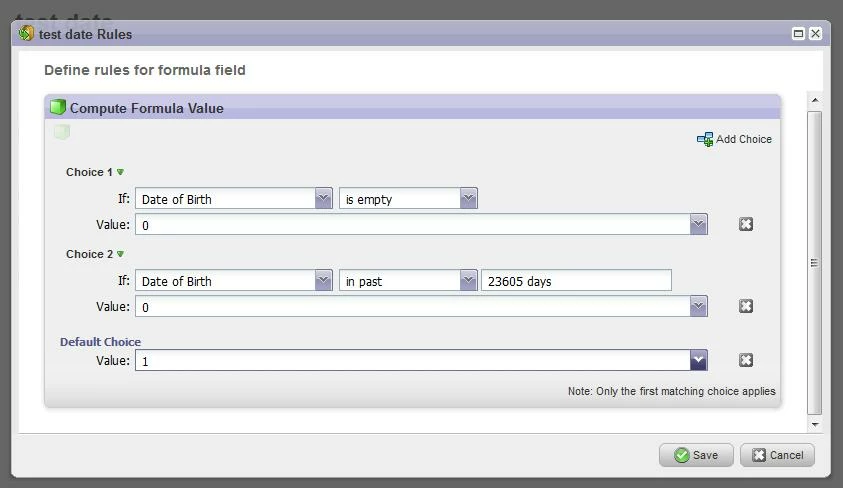
A better approach would be to create the smart list to only pull in leads that are 64 and 9 months and then update the sync to say if the leads ARE IN that smart list to sync with salesforce. That way we don't need to include a new exclusion filter for every campaign. The issue I've run across is that there is no available filter logic to do this. IE. Birthdate NOT in past 23605 days. Is there a custom formula I can create? Any suggestions?
Thanks!
Was hoping someone could help with the my scenario. I have a smart list that contains leads with birthdates. The consultant that set up our integration created a filter within it to say that all leads that have a birthdate in the past 23605 days should reside in that list. Basically, once a lead reaches 64 and 9 months, they get removed from that list want to and integrated into Salesforce.
The problem is that this logic is a bit backwards. The Salesforce sync was set up to say if leads are NOT in that list to sync with salesforce. This worked for the initial campaign, however, as we add additional campaigns, we are finding that all of the leads from those campaigns end up syncing with Salesforce, unless we update the filters in the initial sync. At this point, there are so many filters in the sync that the sync is no longer working.
A better approach would be to create the smart list to only pull in leads that are 64 and 9 months and then update the sync to say if the leads ARE IN that smart list to sync with salesforce. That way we don't need to include a new exclusion filter for every campaign. The issue I've run across is that there is no available filter logic to do this. IE. Birthdate NOT in past 23605 days. Is there a custom formula I can create? Any suggestions?
Thanks!