Bullets aren't rendering correctly in email (formatting) | Community
Skip to main content
Level 3
September 21, 2017
Question

Bullets aren't rendering correctly in email (formatting)

  • September 21, 2017
  • 2 replies
  • 9088 views

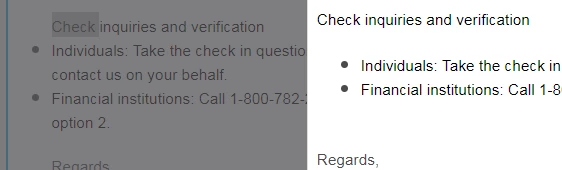
Hi all - I'm baffled. My bullets aren't rendering correctly in my email. It's fine when I'm in the editor, but then when looking at the email, still in draft, the bullets aren't indented as desired.

CODE

<span style="font-size: 14px; color: #000000; font-family: arial, helvetica, sans-serif;">Check inquiries and verification</span> <br />

<ul>

<li><span style="color: #000000; font-family: arial, helvetica, sans-serif; font-size: 14px;">Individuals: Take the check in question...</span><br /></li>

<li><span style="color: #000000; font-family: arial, helvetica, sans-serif; font-size: 14px;">Financial institutions: Call 1-800....</span></li>

</ul>

ATTACHMENTS
TIA!

This post is no longer active and is closed to new replies. Need help? Start a new post to ask your question.

2 replies

Akshay_Pant
Level 4
September 21, 2017

Hi Erica Dipyatic​,

The <ul> <li> takes by default padding and margin which creates the rendering issues on email clients. So, Please use the attached code:

Regards,

Akshay Pant

EricaDo4Author
Level 3
September 21, 2017

Thank you, @Akshay Pant​

Perkuto_Access
Level 1
December 21, 2017

Hi Erica,

I made a lot of test with bullets. If you want a use the real bullet <ul><li></li></ul> I would say not to try to change the spacing to the left of the bullets. Keep the natural behavior of the bullets. The problem is mostly in Outlook, and you will have rendering issues that are too inconsistent. Some version of Outlook will just not render bullets at all, some version will render them badly and other correctly.

But you can style the color of the bullet and the HTML shape, don't use images.

Simply use that inline CSS

<ul>

<li style="color:#30a4dc; font-size:18px;"><span style="font-size: 15px; color:#585858;">Aliquam iaculis, orci at sollicitudin posuere</span></li>

</ul>

A table option is also a good option and I think a lot of people already gives you examples. Just consider if it's for the email editor 1.0 or 2.0

For email 2.0, you can create a row module so you can add as many bullets you need. You can use images as bullets. It's flexible and fully customizable.

For email 1.0 it's not possible to use modules, so if you need to remove or add more bullets, you will need some basic knowledge in HTML, it may be a wrong idea if your team has many members and the HTML knowledge is not the same through all of them.

Hope it helps you,

Regards,

Eric

See our template here: Responsive Marketo Email 2.0 Templates | Perkuto