Blank/Empty "MailTo" Link Possible In A CTA Button? | Community
Skip to main content
michellechopin
Community Advisor
Community Advisor
June 4, 2025
Solved

Blank/Empty "MailTo" Link Possible In A CTA Button?

  • June 4, 2025
  • 2 replies
  • 2405 views

Hello Community friends!


It's been a while since I asked a question and while it's not Friday, it's close enough 😋 Looking for some advice/knowledge from my esteemed peers.


One of the current emails I'm working on requires a blank "mailto:" link in a CTA button that's edited from the module information on the right side/pane. When I add mailto:?subject=your%20subject&body=your%20body into the settings (I'm also playing with some additional content for subject and body content) and test the link (either in preview or in a sample email), it opens up a new, blank window; no email editor pops up (I'm using Google Workspace if that helps troubleshoot).


It looks like, from other posts I've read, that it might not be possible in a CTA module vs a text area (I'm sure I've used them in more than just text links but perhaps I'm misremembering) , so I was wondering:

  • Is that the correct assumption?
  • If so, can I use a token to make this work?
  • If so, would a velocity token work best here?
  • If so, can someone guide me on how to write that? 😋 (It's a skill I've yet to master beyond really basic use of them)

Appreciate any and all guidance before I go back to my stakeholders to tell them that we need another option for this email 😆

Michelle
Best answer by NiharikaGoyal

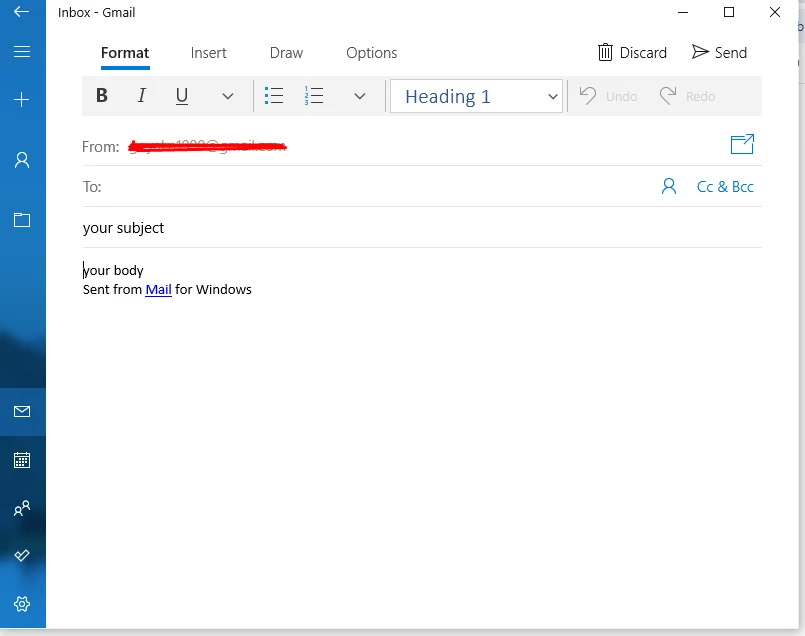
Hi @michellechopin I tested the mailto: link you shared by adding it to my test email. After sending a test and clicking the link, I was able to see the following window:

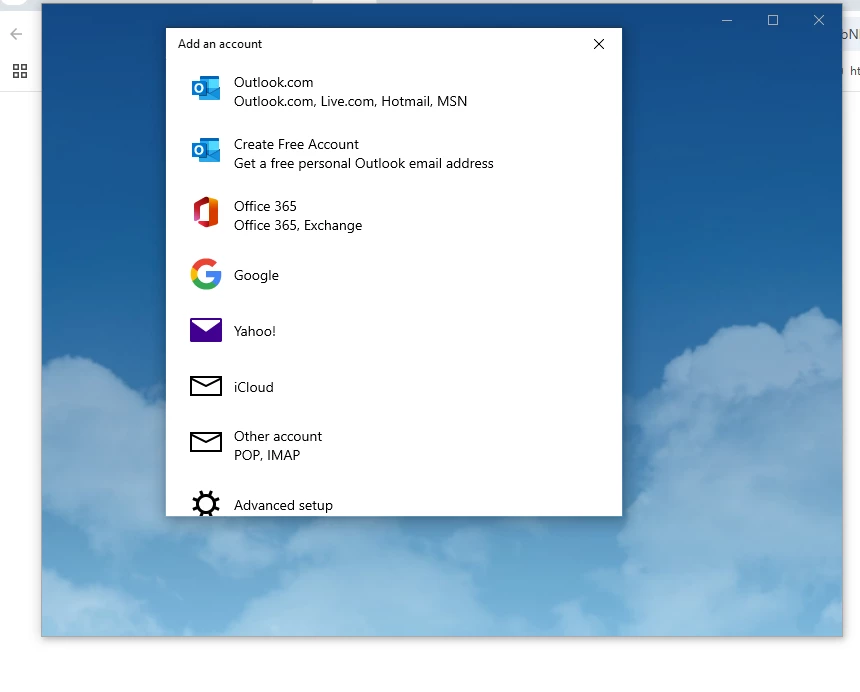
After setting my default email, I clicked the link again and the following window appeared.


May be that would be the case no default e-mail client is configured, then it opens a blank tab or nothing at all.

Hope that would helpful.

Thanks!!


2 replies

NiharikaGoyal
NiharikaGoyalAccepted solution
Level 3
June 5, 2025

Hi @michellechopin I tested the mailto: link you shared by adding it to my test email. After sending a test and clicking the link, I was able to see the following window:

After setting my default email, I clicked the link again and the following window appeared.


May be that would be the case no default e-mail client is configured, then it opens a blank tab or nothing at all.

Hope that would helpful.

Thanks!!


SanfordWhiteman
Level 10
June 5, 2025

First order of business with a mailto: link is to disable tracking.


No reason I know of why an untracked mailto: in a Marketo email would behave any differently than that same link on a random webpage.

michellechopin
Community Advisor
Community Advisor
June 5, 2025

@niharikagoyal and @sanfordwhiteman - appreciate both of you checking things out.


I don't know if it's because I'm using a Google Workspace email but when I click the CTA with either "mailto:" or the version with the subject line in it, I see this (the entire window is blank beneath it; no option to choose a mail client outside of the inbox, and it doesn't automatically open a Gmail message when clicking from my inbox):


This is where I'm editing the information for the module:

To @sanfordwhiteman 's point about disabling tracking, when I do so, the CTA copy disappears in the editor, but appears to still function/show in the preview; I still get a blank window after clicking on the button though.


I am sure I've used mailto: links in CTA/buttons before and never had this issue so not sure if I'm missing something or doing something entirely wrong here. Hopefully that helps give more information to solve this - it's for our huge event going live next week and would love to solve this ASAP if possible 🙏


Update: I just tested the mailto: with my own email added in and I still get a blank page with no email popping up (same if I disable the tracking). I also just tested this in a text link and I get the same issue. Would this potentially be a template issue then?

michellechopin
Community Advisor
Community Advisor
June 5, 2025

I asked my team and it's because we use the web browser for Gmail/Google Workspace.


I tested the link on the Gmail app on my phone and it works. Will still disable tracking @sanfordwhiteman for each of them.


Thank you for the validation that this should work and that a CTA/button shouldn't break that functionality.


I will mark ALL our answers correct if I can 🙌