Big Event v1 - Changing Style of Form | Community
Skip to main content
July 8, 2014
Solved

Big Event v1 - Changing Style of Form

  • July 8, 2014
  • 2 replies
  • 874 views
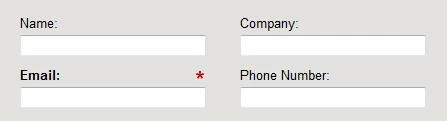
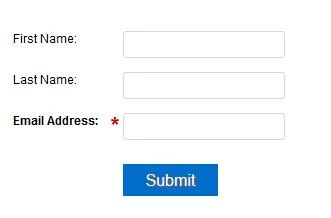
I'm using the Big Event v1 landing page template and would love to be able to change the style of the form so it's not rectangular, but rather vertical. I can't seem to figure out how. Anyone have any clue how to do that?

Rectangular Form (go from this):

Vertical Form (to this):

Would appreciate any sort of help!
This post is no longer active and is closed to new replies. Need help? Start a new post to ask your question.
Best answer by
Hey Kelly,

If you shrink the width of the are for the form in the LP editor, then the form will become vertical, but will run into the verbiage below. You may want to create your own 2.0 form to use there so that you can keep it vertical, keep the requirement of the field (First Name, Last Name, etc.) in line, and have more flexibility with the button to keep it within the template area.

Hopefully that made sense!

2 replies

Accepted solution
July 8, 2014
Hey Kelly,

If you shrink the width of the are for the form in the LP editor, then the form will become vertical, but will run into the verbiage below. You may want to create your own 2.0 form to use there so that you can keep it vertical, keep the requirement of the field (First Name, Last Name, etc.) in line, and have more flexibility with the button to keep it within the template area.

Hopefully that made sense!
July 9, 2014
Using forms 2.0 was the way to go! Thanks for the help!