Best Practices for Creating Interaction Buckets in Marketo | Community
Skip to main content
Level 4
March 11, 2026
Solved

Best Practices for Creating Interaction Buckets in Marketo

  • March 11, 2026
  • 1 reply
  • 51 views

Hi Team ,


Problem Statement :

I’m trying to create interaction buckets in Marketo based on the most recent engagement (email open or click) so we can segment audiences based on how recently they interacted with our emails. The buckets I’m aiming to build are:

0–30 days, 31–60, 61–90, 91–120, 121–150, 151–180, 181–210, 211–240, and 241–540 days.

The goal is to identify how long it has been since a contact last engaged with us and use these segments for follow-up or re-engagement email campaigns.


Current Approach :

I created filters using email open and click activities within specific date ranges. However, I’ve noticed some inconsistencies. For example, some records that opened or clicked within the last 30 days are appearing in the 121–150 day bucket.

This makes me think I might not be structuring the activity filters or AND/OR logic correctly, or that multiple open/click activities may be affecting the results.
 

What I’m Considering :

I have creating a custom field called “Interaction Bucket” and planning to run a daily Smart Campaign to update the bucket based on the number of days since the last open or click.


Where I Need Help :

I’d appreciate guidance on:

  • The best way to accurately identify the latest interaction (open or click) in Marketo and put them in their said buckets

  • Whether using activity filters with date ranges is the right approach and what filters should be used? If you share that ..it would be really helpful

My main goal is to ensure the interaction buckets are accurate, since they will drive our follow-up and re-engagement campaigns.


Do let me know in case of anything

Regards,

Akshat
Best answer by Michael_Florin-2

What Sanford was saying is that you need to use the API to populate the date fields we mentioned retroactively. Weekly recurring Smart Campaign will only populate these fields looking into the future.


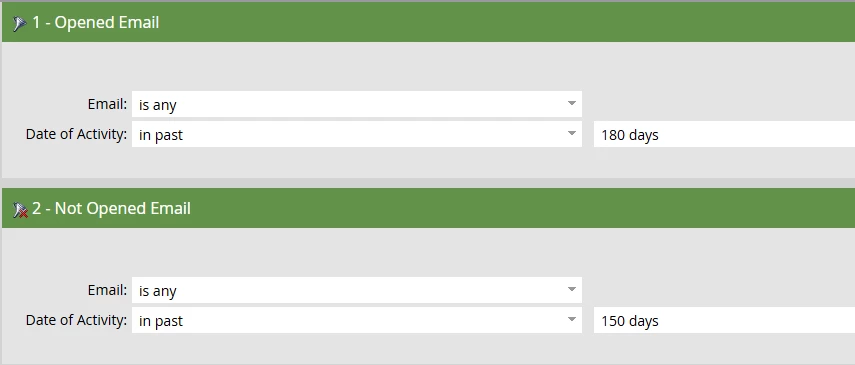
Regarding your filters: I can’t see the whole Smart List, so it’s difficult to assess what it actually does. Let me try to understand anyways. This filter:


will return all people who have opened an email between 150 and 180 days in the past. My current Smart List e.g. would return people with an open date of Oct 2nd 2025 and none after that.


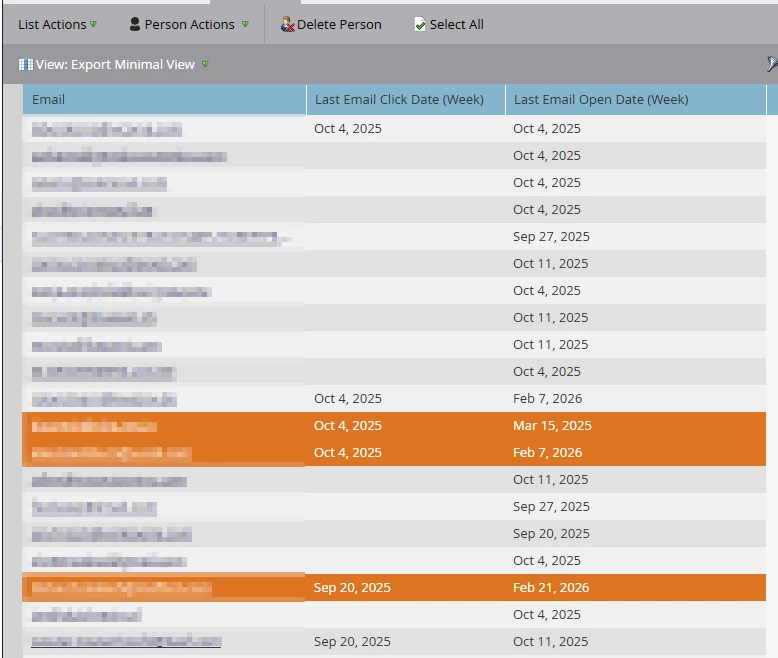
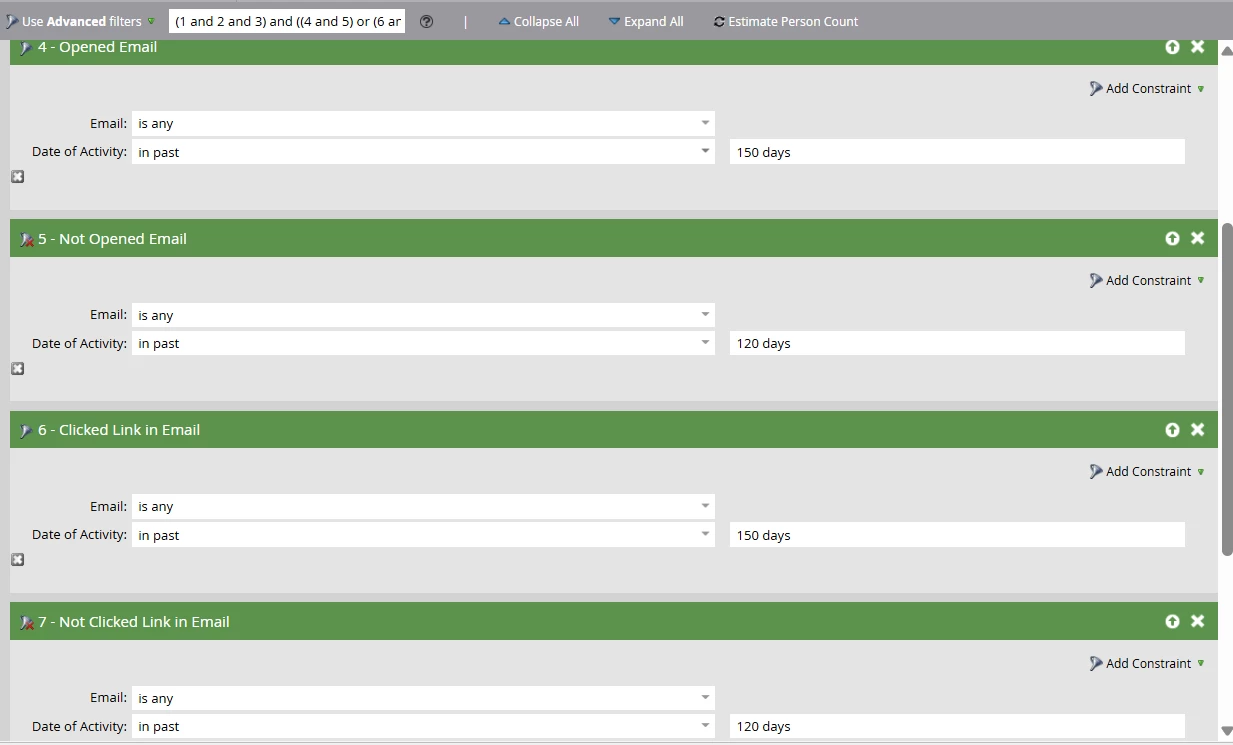
But if you add the clicked link condition to that Smart List, your results get distorted. You can see that here with the aforementioned date fields:


The highlighted people are true for the open condition (4 and 5) OR true for the click condition (6 and 7). But that’s not what you want. You want them to be true for both.


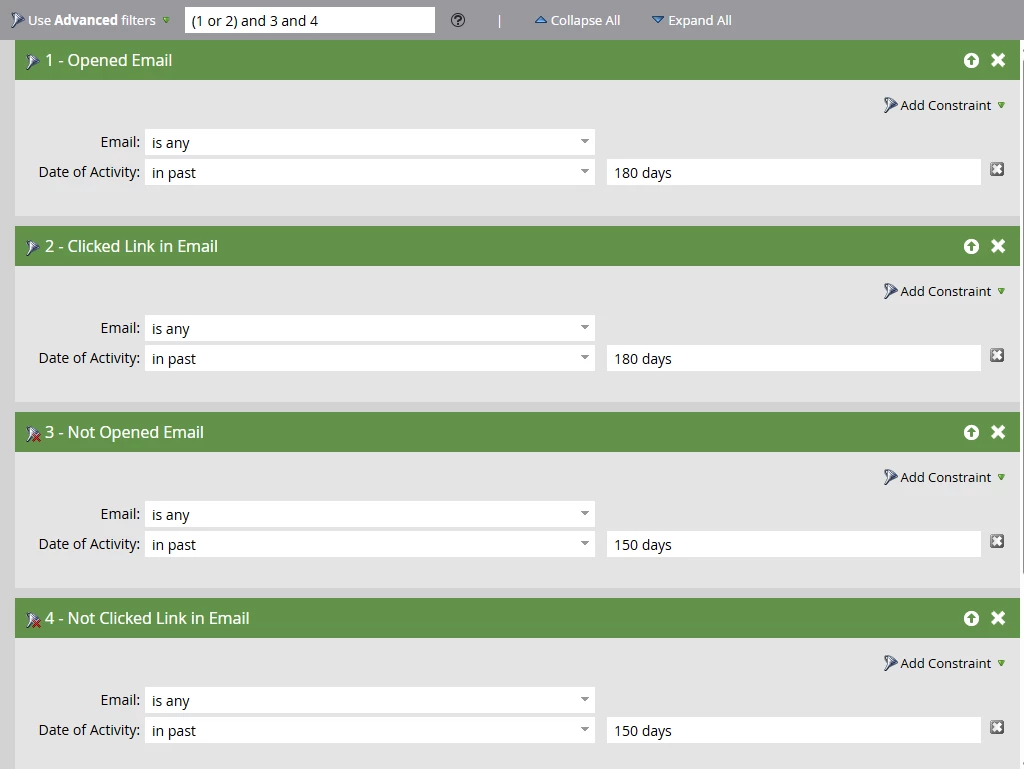
The correct version of your Smart List would be this:


Natural language: “Give me all people who opened or clicked in the past 180, but not opened AND not clicked in the past 150.”

1 reply

Michael_Florin-2
Level 10
March 11, 2026

Here’s what we like to do. We create a bunch of date fields like this:
 

And then run recurring weekly Smart Campaigns that write {{system.date}} to these fields when the respective events occur. By doing that, we make filtering on activities easier and we overcome Marketo’s retention limitations.

I admit, that this doesn’t help you right now, but it will in a few months.

SanfordWhiteman
Level 10
March 11, 2026

Yep, the way we do this (was about to blog about it actually) is run the campaigns on Sunday looking back the previous Sun-Sat and set Last <Activity Type> Week Ending {{system.date}} - 1.


ashah123Author
Level 4
March 11, 2026

@SanfordWhiteman  ​@Michael_Florin-2 

Thanks for the insights — this is helpful. However, I’m still a bit confused about one thing. If we start maintaining a new field from now on, we wouldn’t be able to populate it with previous interaction data, right?

We’re not too concerned about the retention rules. As I understand it, Marketo retains activity data for about 25 months, and our internal rule is that if someone hasn’t engaged for 18 months, we mark them as ineligible so they won’t receive emails. Because of that, retention itself isn’t the main concern.

My current challenge is around creating the interaction buckets (0–30 days, 31–60, 61–90, etc.). Without a date field, I’m not sure how we could build Smart Lists for those buckets. If we introduce a new field now, we wouldn’t be able to backtrack historical interactions, which limits its usefulness.

Could you suggest any other approaches we could leverage within the current setup to place people into their respective buckets?

Your thoughts would be greatly appreciated.

Also, the blog would definitely help —  @SanfordWhiteman  Those resources are always very useful.