
Batch email sends using Random Sample | Community
Skip to main content
Anna_Blanchet1
Level 3
July 7, 2015
Question

Batch email sends using Random Sample

  • July 7, 2015
  • 1 reply
  • 2090 views

Our sales team requested we send emails on their behalf to their leads. The requirements are to send a round of 8 emails over an 8 week period - one email per week to the lead. To not overwhelm the sales team, we want to send out emails in batches - 50 leads, per lead owner, per day. I'm pretty sure this can be achieved by using Random Sample and Request Campaign flow step in a reccuring smart campaign to add them to the email flow smart campaign.  
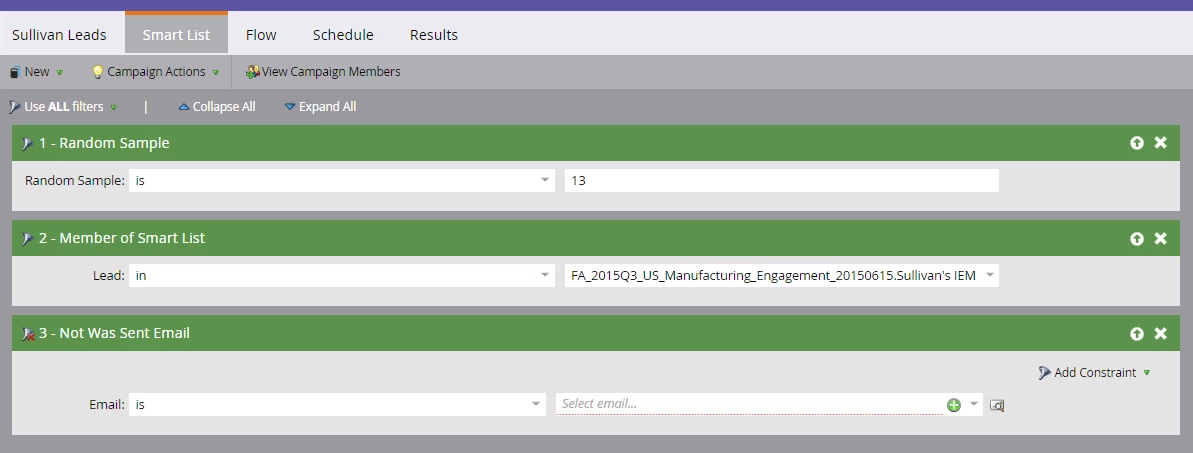
Has anyone tried this approach before and are there additional filters I should include?

This post is no longer active and is closed to new replies. Need help? Start a new post to ask your question.

1 reply

Josh_Hill13
Level 10
July 7, 2015

No, this will not work.

Look up Random Sample in the docs.marketo.com. You need to create a set of lists or use a Choice Step:

  • Smart List:
    • if Random Sample = 33 then add to List A
    • if Random Sample = 33 then add to List B
    • Default: List C (it will know to put 34% in C).
Anna_Blanchet1
Level 3
July 7, 2015

Thank you Josh. That makes sense. So then I would schedule separate smart campaigns with a Campaign Request flow to move each static list into the Send Email flow each day, correct?

Day 1

Smart List:Member of List A

Flow:

Request campaign: Email sends  (sends 1st week, wait 1 week, send 2 email, etc)

Day 2

Smart List:

Member of List B

Flow:

Request campaign: Email sends  (sends 1st week, wait 1 week, send 2 email, etc)

and so on..