Autofill with Cookie Value | Community
Skip to main content
Trevor_Parsell
Level 5
October 26, 2017
Solved

Autofill with Cookie Value

  • October 26, 2017
  • 4 replies
  • 17675 views

Hey All,

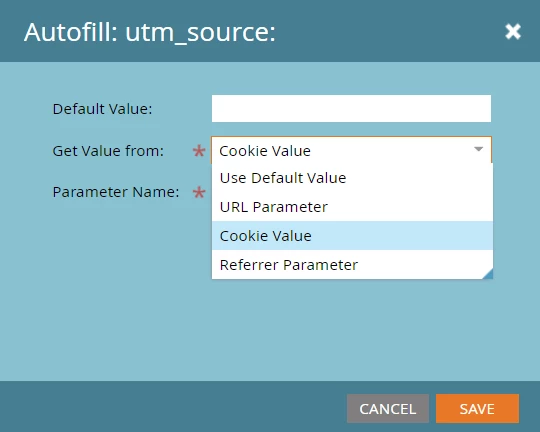
We have many scenarios where it makes sense to use URL Parameters and Referrer Parameters to fill hidden fields, but we are not using the Cookie Values option for anything.

What are the standard use-cases and best practices for using Cookie Values to auto-fill Marketo form fields? I am just looking to understand this at a high level to make sure we can make the most of this functionality.

Thanks!

This post is no longer active and is closed to new replies. Need help? Start a new post to ask your question.
Best answer by


I'm not Sanford, but maybe you'll find this JS useful. Just don't forget to update domain name.

This script saves UTM parameters in cookies whenever there are any UTM parameters in the URL. It also saves the initial referrer information in a cookie which is ever (365 days) overwritten.  The values in the cookies can be read and added to forms or stored in the backend database, etc.


var utmCookie = {

  cookieNamePrefix: "",

  utmParams: [

  "utm_source",

  "utm_medium",

  "utm_campaign",

  "utm_term",

  "utm_content"

  ],

  cookieExpiryDays: 365,

  // From quirksmode.org/js/cookies.html

  createCookie: function (name, value, days) {

  if (days) {

  var date = new Date();

  date.setTime(date.getTime() + (days * 24 * 60 * 60 * 1000));

  var expires = "; expires=" + date.toGMTString();

  } else

  var expires = "";

  document.cookie = this.cookieNamePrefix + name + "=" + value + expires + "; domain=.abilitynetwork.com; path=/";

  },

  readCookie: function (name) {

  var nameEQ = this.cookieNamePrefix + name + "=";

  var ca = document.cookie.split(';');

  for (var i = 0; i < ca.length; i++) {

  var c = ca[i];

  while (c.charAt(0) == ' ')

  c = c.substring(1, c.length);

  if (c.indexOf(nameEQ) == 0)

  return c.substring(nameEQ.length, c.length);

  }

  return null;

  },

  eraseCookie: function (name) {

  this.createCookie(name, "", -1);

  },

  getParameterByName: function (name) {

  name = name.replace(/[\[]/, "\\\[").replace(/[\]]/, "\\\]");

  console.log(name);

  var regexS = "[\\?&]" + name + "=([^&#]*)";

  var regex = new RegExp(regexS);

  var results = regex.exec(window.location.search);

  if (results == null) {

  return "";

  } else {

  return decodeURIComponent(results[1].replace(/\+/g, " "));

  }

  },

  utmPresentInUrl: function () {

  var present = false;

  for (var i = 0; i < this.utmParams.length; i++) {

  var param = this.utmParams[i];

  var value = this.getParameterByName(param);

  console.log(param + ' = ' + value);

  if (value != "" && value != undefined) {

  present = true;

  }

  }

  return present;

  },

  writeUtmCookieFromParams: function () {

  for (var i = 0; i < this.utmParams.length; i++) {

  var param = this.utmParams[i];

  var value = this.getParameterByName(param);

  this.writeCookieOnce(param, value)

  }

  },

  writeCookieOnce: function (name, value) {

  var existingValue = this.readCookie(name);

  if (!existingValue) {

  this.createCookie(name, value, this.cookieExpiryDays);

  }

  },

  writeReferrerOnce: function () {

  value = document.referrer;

  if (value === "" || value === undefined) {

  this.writeCookieOnce("referrer", "direct");

  } else {

  this.writeCookieOnce("referrer", value);

  }

  },

  referrer: function () {

  return this.readCookie("referrer");

  }

};

utmCookie.writeReferrerOnce();

if (utmCookie.utmPresentInUrl()) {

  utmCookie.writeUtmCookieFromParams();

}

4 replies

Josh_Hill13
Level 10
October 26, 2017

@Sanford Whiteman​ probably knows.

Sounds like you could force a cookie ID to pass over to a field.

SanfordWhiteman
Level 10
October 26, 2017

You use Cookie Value when you're purposely persisting values in cookies to pass them around your site -- by far the most common use is to save initial utm_* query params and then restore them into forms later.

October 27, 2017

Pretty much. We do that so that we can track initial utm all across the website rather than just the landing page, as well as prevent from having  it overwritten by consequent utms.

Erik_Gundersen
Level 2
April 23, 2018

Hi, Im trying to implement this in our system. I get the cookie to grab the UTM values and keep it when going to other sites. The problem is to get the cookie to write the info onto the hidden fields. Do I need to set two hidden fields one "orginal utm" and one"last utm"? Would be lovely if someone could do a more step to step guide, or if anyone have time to guide me over chat/pm - thanks

Trevor_Parsell
Level 5
April 23, 2018

Hey Erik,

Yes, I created "original UTM" fields and included both "original" and "last" utm as hidden fields on forms. You will autofill the "Last" utm fields with URL Parameters and autofill the Original utm fields with your stored Cookie values.

Erik_Gundersen
Level 2
April 23, 2018

Did you also succeeded to do cross domain tracking? Our mainsite is on .com meanwhile our marketo lp are on .eu

Re: Autofill with Cookie Value

reply from Trevor Parsell<https://nation.marketo.com/people/4ed5c3be285642baea928d908bbd728046252be1?et=watches.email.thread> in Products - View the full discussion<https://nation.marketo.com/message/187820-re-autofill-with-cookie-value?et=watches.email.thread#comment-187820>

SanfordWhiteman
Level 10
April 23, 2018

Did you also succeeded to do cross domain tracking? Our mainsite is on .com meanwhile our marketo lp are on .eu

This is a very, very different objective and requires a specialized JavaScript solution.

Also, since you're on .eu, are you setting your Munchkin domainLevel correctly?