Assistance Needed: Lead Partition Selection During List Import | Community
Skip to main content
Level 3
December 26, 2024
Solved

Assistance Needed: Lead Partition Selection During List Import

  • December 26, 2024
  • 1 reply
  • 591 views

Hello Nation,


We recently created a new lead partition within our default workspace and are in the process of uploading records to this partition. However, during the list import process, we noticed that the option to select the target lead partition is not visible.


For now, as a workaround, we are manually moving the leads to the correct partition using a Smart Campaign. While this works, we wanted to check if there is a specific setting we may have missed during the setup that would enable the partition selection during list import.


Alternatively, is there a more efficient way or workaround to handle this situation?
Best answer by uditmathur

Hi @nihal ,


Person partitions are designed in a way that Leads can exist in only 1 partition at a time. So you will not be able to assign them to any new partition just by list import.

You can assign Net New leads to partition based on a list import only if you are working in the Workspace which has access to only that person Partition.


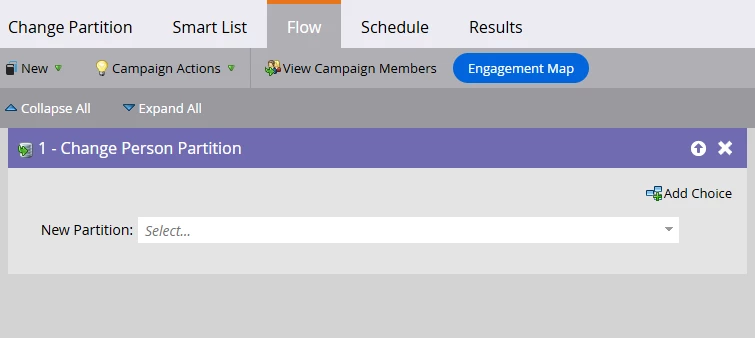
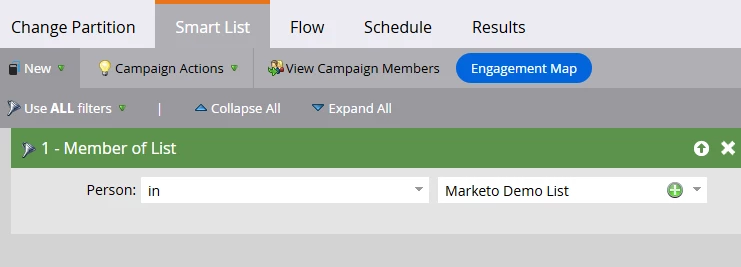
For leads already in your database you can surely do so by creating a Batch Smart Campaign (Default workspace having access to all partition) & using static list in the SC & Change Partition Flow step. This will be the one time process to assign leads to the new partition.


Hope this Helps 😊


1 reply

uditmathur
Community Advisor
uditmathurCommunity AdvisorAccepted solution
Community Advisor
December 27, 2024

Hi @nihal ,


Person partitions are designed in a way that Leads can exist in only 1 partition at a time. So you will not be able to assign them to any new partition just by list import.

You can assign Net New leads to partition based on a list import only if you are working in the Workspace which has access to only that person Partition.


For leads already in your database you can surely do so by creating a Batch Smart Campaign (Default workspace having access to all partition) & using static list in the SC & Change Partition Flow step. This will be the one time process to assign leads to the new partition.


Hope this Helps 😊