Ronda_Vye
Level 2
November 16, 2018
Question

Anyone know how to copy one date field from another?

  • November 16, 2018
  • 3 replies
  • 3447 views

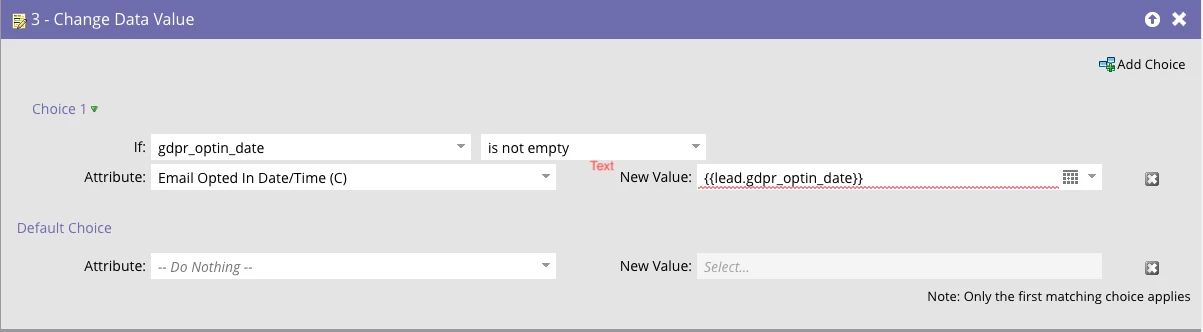
I have a date field that I need to populate into another date field but the when I create Data Value Change, it won't seem to update the field.

I have also tried adding {{system.time}} after the token but nothing seems to allow me to copy the field from one to another.

Any help would be appreciated.
This post is no longer active and is closed to new replies. Need help? Start a new post to ask your question.

3 replies

Devraj_Grewal
Level 10
November 16, 2018

Ronda,

"Email Opted In Date/Time (C)" seems like a datetime field whereas "gdpr_optin_date" may only be a date field. If so, this change data value may not work. Check both fields in Admin > Field Management and confirm they are the same field type.

If possible, you can change the field type.

Anne_Angele1
Level 3
November 16, 2018

Like Devraj said, it looks like you're copying the wrong data type into the field, so it won't accept it.

Jason_Keller3
Level 2
November 16, 2018

Given that the date formats are different, what is limiting you from timestamping the second value with a {{system.date}} token with a data-value change trigger?

Anne_Angele1
Level 3
November 16, 2018

The date/time field requires the format to be HH:MM:SS for the time portion, the system time field is formatted as HH:MM XM (Time Zone).

ETA: The system token for date/time DOES use the correct HH:MM:SS format to be put into the date/time field type, for the record.

Jason_Keller3
Level 2
November 16, 2018

I think you may have misread my question - I was offering an alternative trigger to populate the second value instead of attempting to make the value populated by referencing the original value.

It seems like she can trigger the second value to be timestamped when the first value was and then control that value with additional triggers/filters as needed.