All Marketo forms (still) blocked in Firefox even after trying "solutions" | Community
Skip to main content
July 21, 2016
Solved

All Marketo forms (still) blocked in Firefox even after trying "solutions"

  • July 21, 2016
  • 5 replies
  • 9586 views

EDIT: Looks like one actual solution here might be to get an SSL cert for our landing page domain (zozi.mktoweb.com CNAME'd as go.zozi.com) and use that URL in the loadForm call. Looks like that is possibly by contacting support: Add SSL to your Landing Pages - Marketo Docs - Product Docs ​ I will update this part of this post if that is the solution we go with / if it solves the issue.

As some of you are aware, Firefox now gives the option to enable tracking protection at all times (even outside of Private mode). Many users (like my self) choose this option while installing the browser, meaning it is on all the time. This means any request to marketo.com will be blocked by Firefox if the user has chosen that option during installation or is in Private Browsing mode. This results in Marketo forms not being loaded at all.

Firefox uses the Disconnect standard block list, which can be seen here: disconnect.me/trackerprotection/blocked


I have read all the threads here on getting around FF tracking protection and am still at a dead end.

When you call MktoForms2.loadForm('//app-sj16.marketo.com', ... it makes a request to the Marketo servers. This is blocked by tracking protection. Some users on here suggest using a CNAME and pointing that loadForm call at the aliased domain, like MktoForms2.loadForm('//mkto.zozi.com'... That does work, but only for an http connection (you cant use https on the CNAME unless the certificate on the Marketo end is signed for your aliased domain). If you use https, all modern browsers will stop the request via the aliased domain because it is insecure.

So, another thread suggests using your landing page domain (zozi.mktoweb.com in our case). This lets the form load in Chrome but just makes your HTTPS symbol in your URL red (bad!)

Firefox still blocks it completely
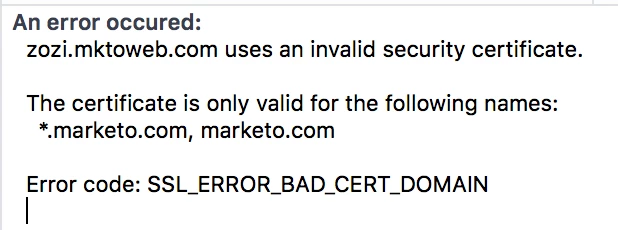
Hard to believe Marketo doesn't provide SSL for *.mktoweb.com...

So, here I am left with two options. A) don't use HTTPS on my website, or B) don't use Marketo forms. Which will it be? I think that is obvious if this doesn't get resolved fairly quickly...


How many people are effected by this?

This post is no longer active and is closed to new replies. Need help? Start a new post to ask your question.
Best answer by SanfordWhiteman

Damn you are right. See my edited comment. The XDFrame iframe still hits a marketo.com URL. I saw the form load and got ahead of myself. Shoot. Submits still fail even though form loads


Upload the file /marketo-xdframe-relative.html (you can get it from the demo link) to your Marketo instance.

Then reference the path in setOptions:

MktoForms2.setOptions({

  formXDPath:"/rs/AAA-BBB-CCC/images/marketo-xdframe-relative.html"

});

And create a behavior + origin for that path.

(You could put the file on S3 or any other host, but to avoid more moving parts I would use Marketo.)

5 replies

SanfordWhiteman
Level 10
July 21, 2016

You should be running HTTPS on your LP domains.  This has been true for awhile: without it, you lose referrer information.

(If Marketo ran SSL on *.mktoweb.com, that would be nice, but it wouldn't necessarily be a solution. mktoweb.com is a deeply Marketo-associated domain and thus can be expected to be blocked by anti-tracking plugins/features.)

July 21, 2016

Yes, that would be nice if they did. They don't probably because they charge thousands of dollars for SSL on landing pages as an upsell. Which is absolutely ridiculous considering one of their core products is fundamentally broken without it...

SanfordWhiteman
Level 10
July 21, 2016

There's another potential solution.Try using this endpoint:

     //marketo-app-ab12.figureone.com

Let me know if that works. Demo with your form here: http://codepen.io/figureone/pen/fb317fa5ad966ca08b0de57b27b39015

SanfordWhiteman
Level 10
July 21, 2016

Skylar Brown

gkrajeski
Level 10
July 21, 2016

Marketo Support is able to install an SSL cert of yours for a few.


My team is currently in the middle of this!


gkrajeski
Level 10
July 21, 2016

*fee 

SanfordWhiteman
Level 10
July 21, 2016

*fortune

July 21, 2016

A half solution is by spinning up a Cloudfront distribution and pointing the loadForm call to the dxxxxxxxxx.cloudfront.net URL.

This allows the loadForm call to succeed, but submit still fails as the iframe that forms2.js loads has a hardcoded marketo.com URL in the script that it runs, resulting in that call failing inside the iframe, and since the iframe handles submits, it still doesnt work.

July 21, 2016

@Geoffrey Krajeski​ @Sanford Whiteman​

Level 2
August 8, 2018

Hello,

Can you please let me know how do I get "

marketo-xdframe-relative.html

" File.

Thanks.

SanfordWhiteman
Level 10
August 8, 2018
Level 2
August 9, 2018

Thank you for your response Sanford.

I am sorry, I am not from development side and have experience in Marketo admin.

I shared your response with developer and still not able to identify how we get html file called "marketo-xdframe-relative.html"

Can you please explain, thanks for your support.